C:\4692676112\4692676112ILCE9UC2\01GB-ILCE9UC2\030BAS.indd
2017/03/15 14:08
ILCE-9
4-692-676-11 (2)
GB
131
Shooting
Face Detection
Detects the faces of your subjects and adjusts the focus, exposure, flash
settings and performs image processing automatically.
MENU (Camera Settings 1) [Face Detection] desired
setting.
Off: Does not use the [Face Detection] function.
On (Regist. Faces): Detects the registered face with higher priority using
[Face Registration] (page211).
On: Detects a face without giving higher priority to the registered face.
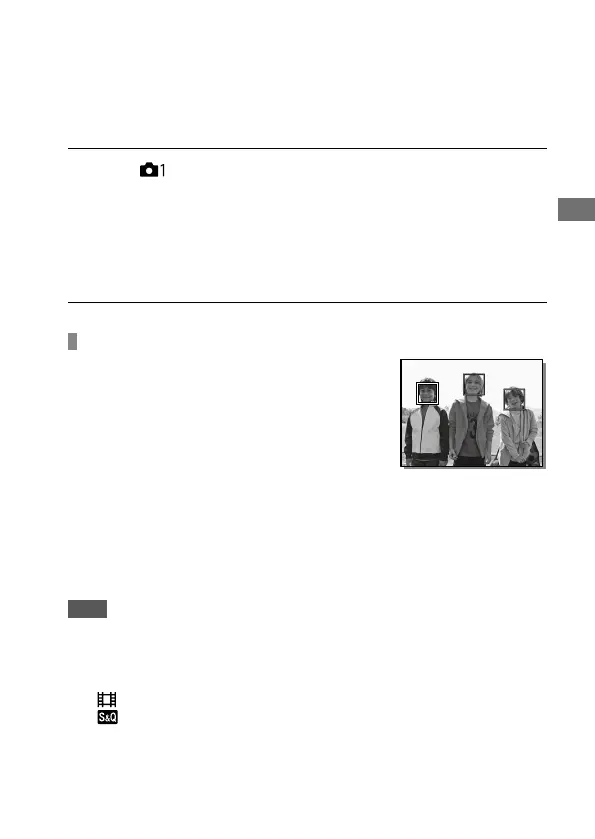
Face Detection frame
• When the product detects a face, the
gray face detection frame appears. When
the product determines that autofocus is
enabled, the face detection frame turns
white. When you press the shutter button
halfway down, the frame turns green.
• In case you have registered the priority
order for each face using [Face Registration],
the product automatically selects the first
prioritized face and the face detection frame
over that face turns white. The face detection
frames of other registered faces turn reddish-
purple.
Note
• You cannot use the Face Detection function with the following functions:
– Other zoom functions than the optical zoom
– [Picture Effect] is set to [Posterization].
– When using the [Focus Magnifier] function.
– [
Record Setting] is set to [120p]/[100p].
– [
Frame Rate] is set to [120fps]/[100fps].
• Up to 8 faces of your subjects can be detected.
• The product may not detect faces at all or may accidentally detect other
objects as faces in some conditions.



 To Next Page