C:\4692676112\4692676112ILCE9UC2\01GB-ILCE9UC2\040MOV.indd
2017/03/15 14:08
ILCE-9
4-692-676-11 (2)
GB
143
Shooting movies
AVCHD: Records HD movies in the AVCHD format. This file format is
suitable for high-definition TV.
Audio: Dolby Digital
MP4: Records MP4 (AVC) movies. This format is suitable for playback on
smartphones or tablets, web uploads, email attachments, etc.
Audio: AAC
Hint
• You can save images to a computer or copy them to a disc compatible with
your playback device using the PlayMemories Home software.
Note
• When [ File Format] is set to [AVCHD], the file size of movies is limited to
approx. 2GB. If the movie file size reaches approx. 2GB during recording, a
new movie file will be created automatically.
• When [
File Format] is set to [MP4], the file size of movies is limited to
approx. 4GB. If the movie file size reaches approx. 4GB during recording,
recording will stop automatically.
Record Setting
Selects the image size, frame rate, and image quality for movie recording.
The higher the bit-rate, the higher the image quality.
MENU (Camera Settings 2) [ Record Setting]
desired setting.
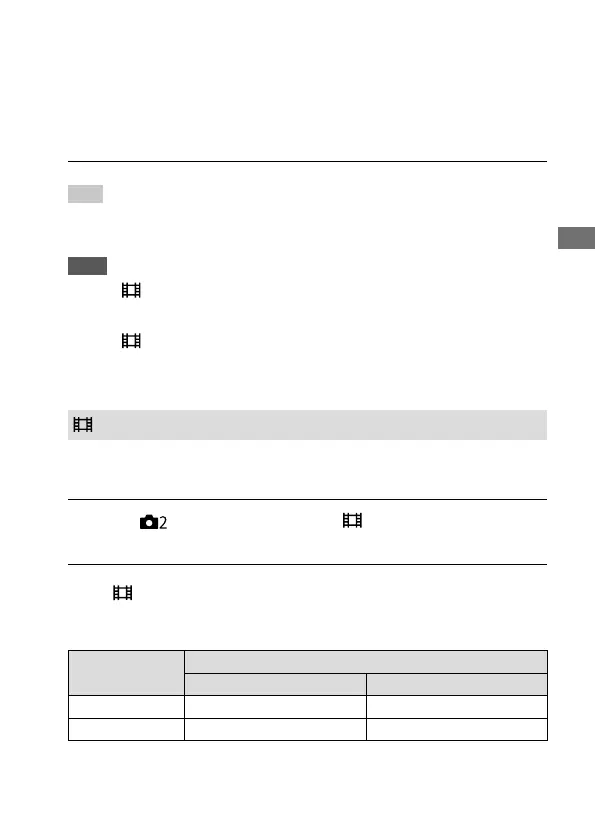
When [ File Format] is set to [XAVC S 4K]
Records high-definition movies by converting them into the MP4 file
format using the MPEG-4 AVC/H.264 codec.
Frame rate
Bit-rate
60Mbps 100Mbps
30p/25p
30p 60M/25p 60M 30p 100M/25p 100M
24p
24p 60M* 24p 100M*
* Only when [NTSC/PAL Selector] is set to NTSC



 To Next Page