ILCE-9
4-692-676-11 (2)
C:\4692676112\4692676112ILCE9UC2\01GB-ILCE9UC2\060SET.indd
2017/03/15 14:08
GB
170
Assigning selected functions to the button
Custom Key (Shoot.)/Custom Key (PB)
You can assign a desired function to a desired key.
Some functions are available only when they are assigned to a
custom key. For example, if you assign [Eye AF] to [Center Button] for
[Custom Key (Shoot.)], you can easily recall [Eye AF] simply by pressing the
center of the control wheel while shooting.
1
MENU (Camera Settings 2) [Custom Key (Shoot.)] or
[Custom Key (PB)].
2
Select the key to which you want to assign the function on the
selection screen, and then press the center of the control wheel.
• The keys that can be assigned functions are different for
[Custom Key (Shoot.)] and [Custom Key (PB)].
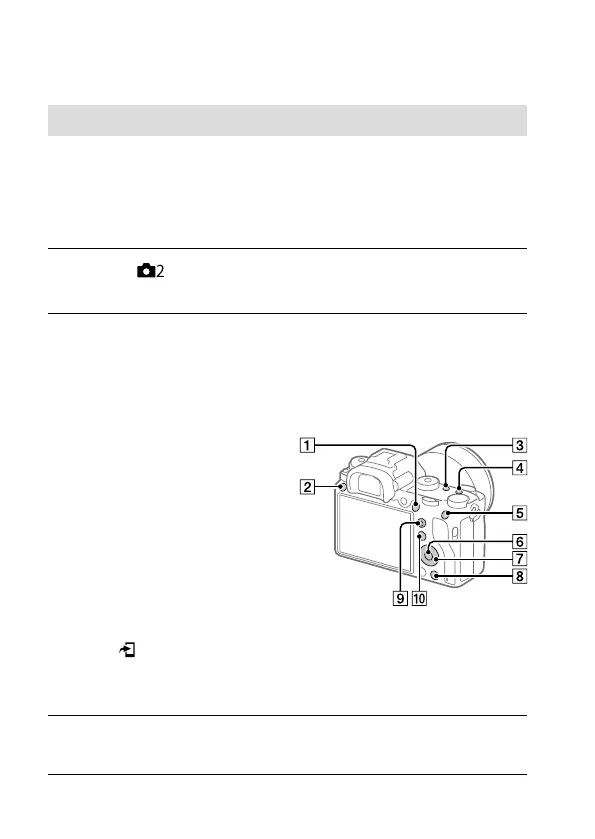
• You can assign the desired functions to the following keys.
AF-ON Button
Custom Button 3
Custom Button 2
Custom Button 1
AEL Button
Center Button
Control Wheel/
Down Button/ Left Button/
Right Button
Custom Button 4
Multi-Slc Center Btn
Fn/ Button
• You can also assign a shooting function to the focus hold button on
the lens. However, some lenses do not have a focus hold button.
3
Select the function to be assigned.
• The functions that can be assigned differ depending on the keys.



 To Next Page