C:\4692676112\4692676112ILCE9UC2\01GB-ILCE9UC2\100MEN.indd
2017/03/15 14:08
ILCE-9
4-692-676-11 (2)
GB
209
MENU items/List of icons
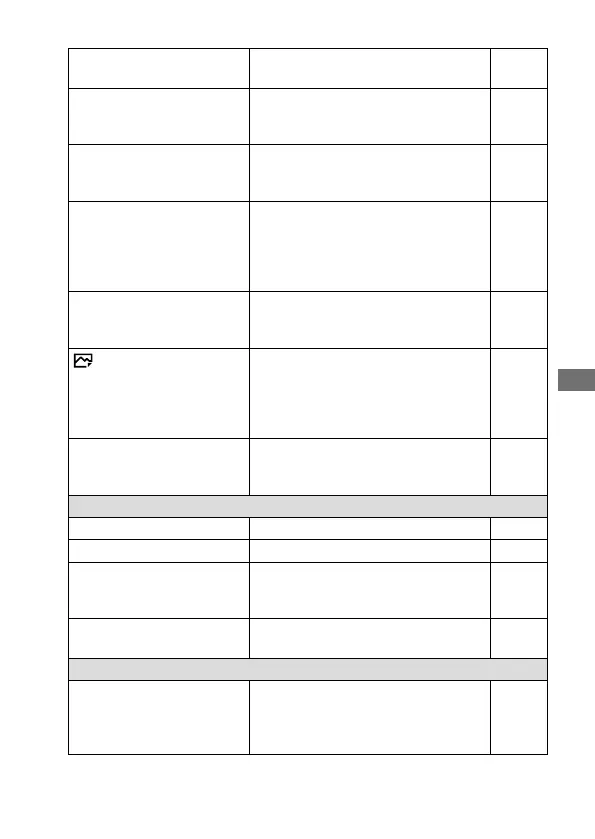
ISO
Sets the ISO sensitivity.
([ISO AUTO], etc.)
115
ISO AUTO Min. SS
Sets the slowest shutter speed at
which ISO sensitivity will start to
change in [ISO AUTO] mode.
116
Metering Mode
Selects the method for measuring
brightness.
([Multi]/ [Spot], etc.)
108
Spot Metering Point
Sets whether to coordinate the
spot metering point with the
focus area when [Focus Area]
is set to [Flexible Spot] or
[Expand Flexible Spot].
109
Exposure step
Selects the size of the increment
step for shutter speed, aperture, and
exposure compensation values.
Help
Guide
AEL w/ shutter
Sets whether to lock the exposure
when the shutter button is pressed
halfway down. This is useful when you
want to adjust the focus and exposure
separately.
Help
Guide
Exposure Std. Adjust
Adjusts the standard for the correct
exposure value for each metering
modes.
Help
Guide
Flash
Flash Mode
Sets the flash settings. 133
Flash Comp.
Adjusts the intensity of flash output. 134
Exp. comp. set
Sets whether to reflect exposure
compensation value to flash
compensation.
Help
Guide
Red Eye Reduction
Reduces the red-eye phenomenon
when using flash.
Help
Guide
Color/WB/Img. Processing
White Balance
Corrects the tone effect of the
ambient light to shoot whitish objects
in a white tone.
([Auto]/ [Daylight], etc.)
120



 To Next Page