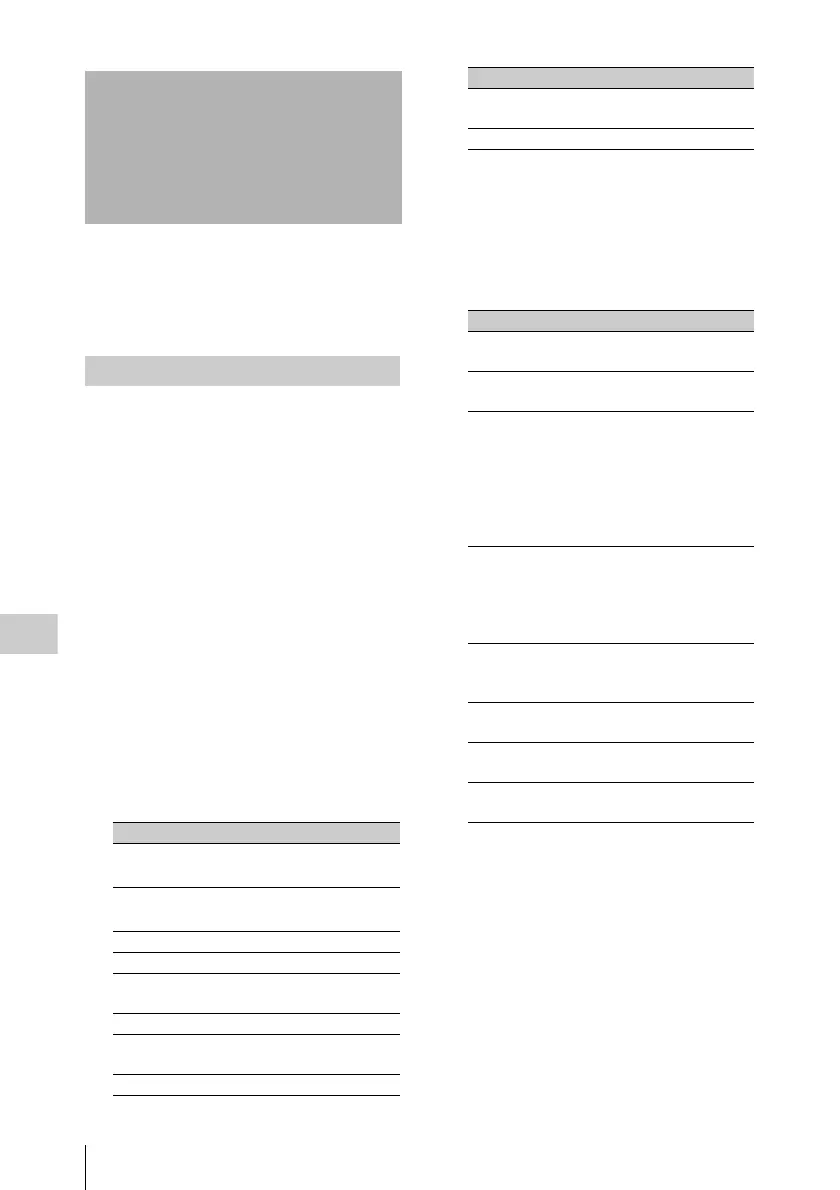
Setting the Status Display on the Viewfinder Screen and the LCD Monitor
148
Chapter 6 Menu Displays and Detailed Settings
This section explains the menu settings for the
display of the viewfinder screen. These settings
are also used for the display of the LCD monitor
in the same way.
To select the items to be displayed on the
viewfinder screen (with the viewfinder
DISPLAY of the DISPLAY/ASPECT switch set
to ON) and the LCD monitor, use the VF DISP 1
and VF DISP 2 pages of the OPERATION menu.
(How to select an item in the menu screen: Turn
the MENU knob to move b to the desired item.)
1 Display the VF DISP 1, VF DISP 2, or
VF DISP 3 page of the OPERATION
menu, and press the MENU knob.
For details on menu operations, see “Basic
menu operations” on page 140.
2 Select the desired setting item, and
press the MENU knob.
On the VF DISP 1, VF DISP 2, and VF DISP
3 pages, you can select any of the following
items to turn its display on or off.
VF DISP 1 page
a) The viewfinder display can be also turned on or
off by using the DISPLAY of the DISPLAY/
ASPECT switch on the viewfinder.
b) For detailed information on the display mode, see
“Change confirmation/adjustment progress
messages” (page 149).
VF DISP 2 page
a) When an Anton Bauer battery system or a BP-
GL65/GL95 battery pack is installed, the
remaining battery power is shown as a
percentage value (%) according to the setting of
this item.
INT: When one of the above batteries is
installed, the remaining power is shown as a
percentage value (%) when there is a change
in the value or when the power is low.
AUTO: The remaining power is shown as a
percentage value (%) when one of the above
batteries is installed. Otherwise the voltage
(VOLT) is displayed continuously.
VOLT: The voltage (VOLT) is displayed
continuously.
Setting the Status
Display on the
Viewfinder Screen and
the LCD Monitor
Selecting the display items
Item Description
VF DISP Turning on or off the
viewfinder display
a)
VF DISPLAY MODE Selecting the display
mode
b)
DISP EXTENDER Extender indicator
DISP FILTER Types of the ND filter
DISP WHITE White balance
memory indicator
DISP GAIN Gain indicator
DISP SHUTTER Shutter speed and
ECS mode indicator
DISP AUDIO Audio level indicator
DISP DISC Remaining disc
capacity indicator
DISP IRIS Iris opening indicator
Item Description
DISP ZOOM Zoom position
indicator
DISP COLOR TEMP Displays the color
temperature.
DISP BATT
REMAIN
a)
Displays the battery
voltage/remaining
capacity of an internal
battery pack or an
external battery
connected to the DC
IN connector.
DISP DC IN Displayed when the
power is supplied
from an external
battery connected to
the DC IN connector.
DISP WRR RF LVL Displays the reception
level of the wireless
microphone.
DISP REC FORMAT Displays the recording
format.
DISP CLIP NO(PB) Displays the clip
number.
DISP TIMECODE Displays the
timecode.
Item Description



 To Next Page