Overview
87
Chapter 5 Operations in GUI Screens
e Lock icon
This icon appears when the clip is locked
(protected) (see page 96). Clips cannot be deleted
and their clip information cannot be changed
when this mark is displayed.
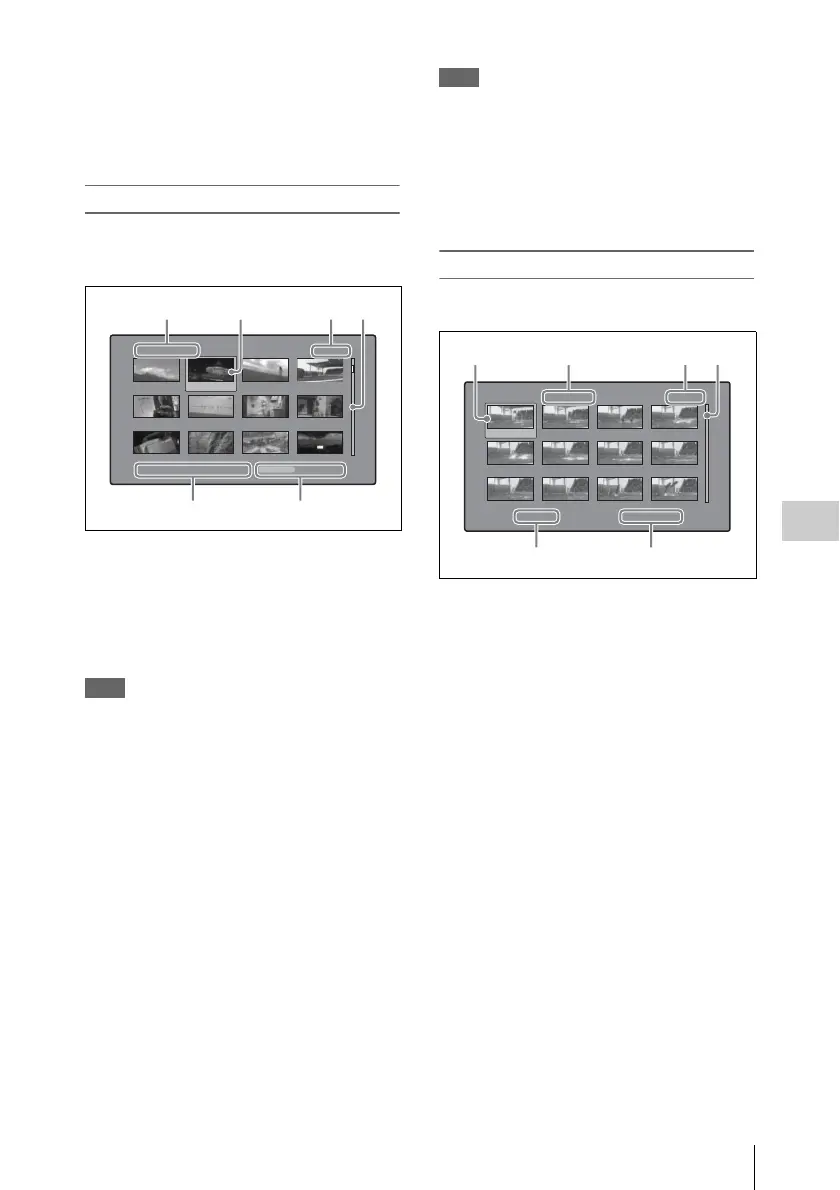
Clip list thumbnail screen
This screen displays thumbnails of the clips in the
current clip list. You can use this screen to create
and edit clips lists.
a Clip list name
Displays the name of the clip list. When the clip
list has a title, it is displayed as “TITLE00001”
(see page 78). Clip list names can be displayed in
Japanese when the area of use (see page 38) is set
to “NTSC (J) AREA”.
Note
To display the clip list title, Settings >Display Title in the
Disc Menu needs to be set to On.
b Selection frame
See the description in “Clip thumbnail screen” (page
85).
c Sub clip number/number of sub clips
Displays the total number of sub clips in the clip
list, and the number of the selected sub clip.
d Scrollbar
See the description in “Clip thumbnail screen” (page
85).
e Clip list date and time
Displays the date and time when the clip list was
created, or the date and time of its most recent
modification. An asterisk (*) appears after the
date and time of creation when the current clip list
has not been saved to the disc.
Note
“New File” appears when no clip list has been
loaded into the unit’s memory, and when a clip
list has been cleared from the unit’s memory.
f Total duration
Displays the total duration of all sub clips in the
clip list.
Expand thumbnail screen
This screen displays thumbnails of equally sized
divisions of the selected clip.
a Selection frame
See the description in “Clip thumbnail screen” (page
85).
b Clip number/total clips x number of
divisions
Displays the number of the selected clip, the total
number of clips on the disc, and the number of
times that the selected clip has been divided to
display the expansion thumbnails.
c Thumbnail number/total thumbnails
Displays the total number of expanded
thumbnails and the number of the selected
thumbnail.
d Scrollbar
See the description in “Clip thumbnail screen” (page
85).
e Clip name
Displays the name of the expanded clip. When the
clip has a title, it is displayed as “TITLE00001”
(see page 78). Clip names can be displayed in
Japanese when the area of use (see page 38) is set
to “NTSC (J) AREA”.
Clip List:E0001 002/013
TC 00:00:00:00
TC 00:00:28:08
TC 00:00:59:16
DATE&TIME
28 JUL 2006 19:55
TOTAL DUR
00:01:31:16
TC 00:00:04:14
TC 00:00:35:15
TC 00:01:06:18
TC 00:00:12:04
TC 00:00:46:08
TC 00:01:13:11
TC 00:00:20:13
TC 00:00:53:22
TC 00:01:17:27
5
1
Expand Clip 008/024 x 12 001/012
TC 00:01:35:17
TC 00:01:37:11
TC 00:01:39:06
TC 00:01:38:00
TC 00:01:37:24
TC 00:01:38:19
TC 00:01:36:14
TC 00:01:38:08
TC 00:01:40:02
TC 00:01:36:27
TC 00:01:38:22
TC 00:01:40:16
CLIP
Te ne DUR 0:00:00:13
1324



 To Next Page