Connecting the Remote Control Unit
50
Chapter 2 Preparations
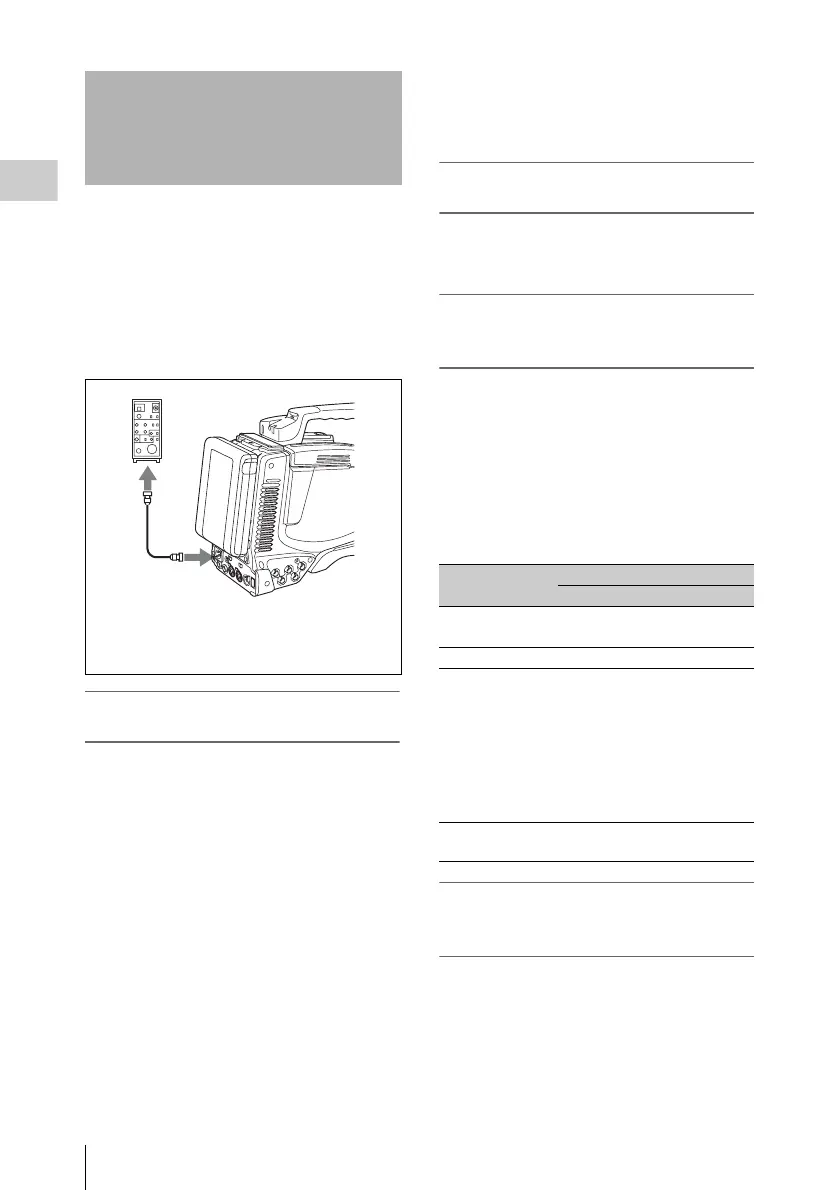
Connecting the RM-B150/B750 Remote Control
Unit enables remote control of the principal
camera functions.
Connecting the remote control unit to the
REMOTE connector (8-pin) automatically puts
the camcorder into remote control mode. If you
disconnect the remote control unit, the remote
control mode is cancelled.
Camcorder switch functions when the
remote control unit is connected
The following switches on the camcorder do not
function.
•GAIN selector
•OUTPUT/DCC switch
•WHITE BAL switch
•AUTO W/B BAL switch
• SHUTTER selector
• ASSIGN 1/3/4 switches, RET button on the
lens, and COLOR TEMP. button to which the
TURBO SWITCH function is assigned
• REC START button (and the recording start/
stop buttons on the lens, and the ASSIGN 1/3/4
switches, RET button on the lens, and COLOR
TEMP. button to which the recording start/stop
function is assigned) (when the RM REC
START item on the CAM CONFIG 2 page of
the MAINTENANCE menu is set to “RM”)
• ASSIGN 1/3/4 switches, RET button on the
lens, and COLOR TEMP. button to which the
electrical CC filter 3200K/4300K/5600K/
6300K function is assigned.
Paint adjustment when the remote
control unit is connected
The settings of the paint adjustment that were in
effect the last time the remote control unit was
used are recalled.
Function of the recording start/stop
buttons when the remote control unit is
connected
When the remote control unit is connected, you
can make a setting to determine which of the
recording start/stop buttons you will use. This
setting is made using the RM REC START item
on the CAM CONFIG 2 page of the
MAINTENANCE menu.
Relationship between the setting of the RM REC
START item and the function of recording start/
stop buttons
When the monitor is connected to the
MONITOR OUT connector of the remote
control unit
The MONITOR connector (BNC type) of the
RM-B150/B750 outputs the same signal as that
from the TEST OUT connector on the camcorder.
Use the black cable supplied with the RM-B150/
B750 to connect the monitor to the MONITOR
connector on the RM-B150/B750.
Connecting the Remote
Control Unit
1
2
3
1RM-B150/B750
2Remote control cable
3REMOTE connector
Recording start/
stop button
Settings of RM REC START
RM CAM PARA
Camcorder’s REC
START button
Disabled Enabled Enabled
Lens’ VTR button Disabled Enabled Enabled
Camcorder’s
ASSIGN 1/3/4
switches, COLOR
TEMP. button,
and lens’ RET
button assigned
the recording
start/stop function
Disabled Enabled Enabled
Remote control
unit’s VTR button
Enabled Disabled Enabled


 To Next Page