Overview
89
Chapter 5 Operations in GUI Screens
Note
The total number of essence marks is the total number of
essence marks that have been set in all clips on the disc.
d Scrollbar
See the description in “Clip thumbnail screen” (page
85).
e Clip date and time
Displays the date and time when the clip that
contains the selected thumbnail was recorded or
last modified.
f Clip name
Displays the name of the clip that contains the
selected frame. When the clip has a title, it is
displayed as “TITLE00001” (see page 78). Clip
names can be displayed in Japanese when the area
of use (see page 38) is set to “NTSC (J) AREA”.
To display the clip title, Settings >Display Title in
the Disc Menu needs to be set to On.
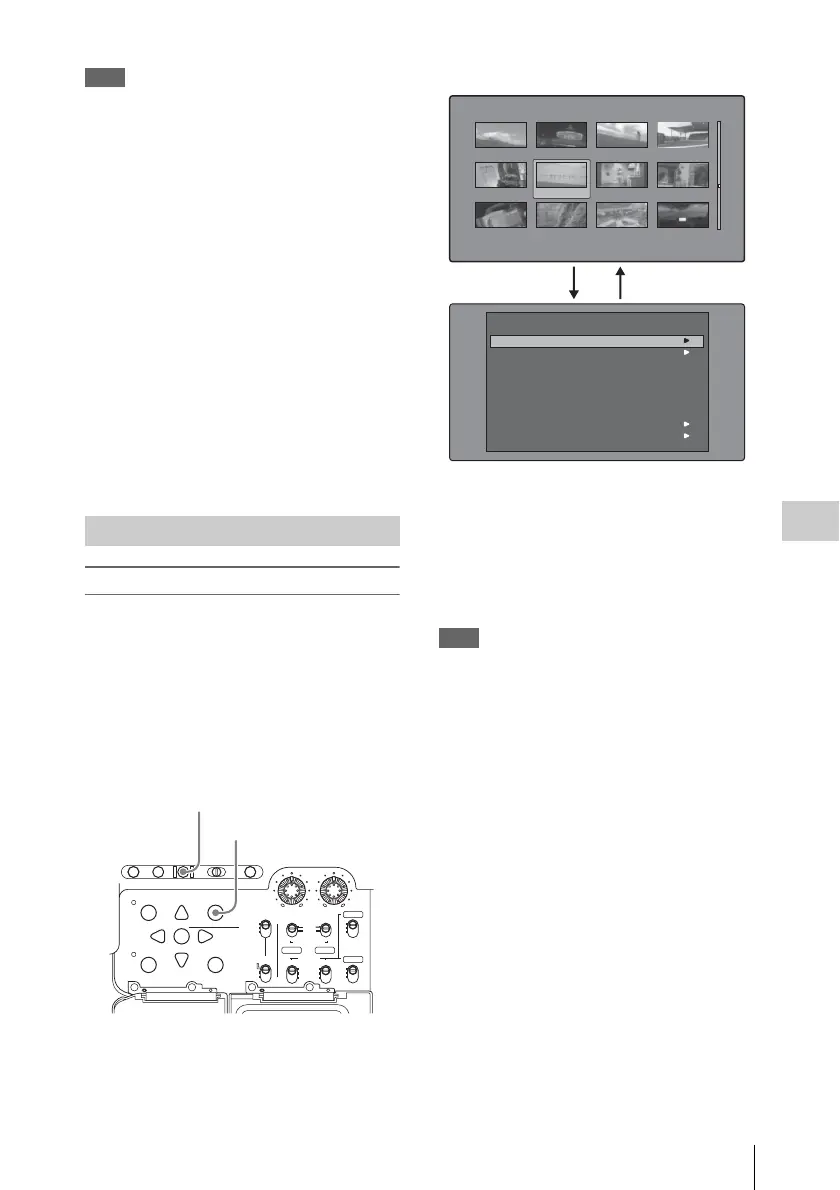
Thumbnail Menu
The Thumbnail Menu displays menu items that
are valid for the currently displayed thumbnail
screen.
To display the Thumbnail Menu
To display the Thumbnail Menu, press the
MENU button with a thumbnail screen displayed.
To return to the original screen, press the MENU
button again, or press the RESET/RETURN
button.
a) Clip thumbnail screen
b) Thumbnail Menu of the clip thumbnail screen
Shortcut operations
Shortcut button names are displayed next to the
menu items of commands that have shortcuts (see
page 107).
Note
Shortcuts displayed within parentheses should be used
with all menus closed.
Thumbnail Menu submenus
• The Thumbnail Search Menu contains the basic
commands for thumbnail searches.
• The Thumbnail View Menu contains the basic
commands for moving to other menus.
Displaying menus
AUTO
FRONT
WIRELESS
THUMBNAIL
SET
S.SEL
SHIFT
ESSENCE
MARK
SUB CLIP
REAR
CH-1
MANUAL
AUDIO SELECT
AUDIO IN
F
W
R
F
W
R
LEVEL
010010
CH-2
CH-3
CH-4
PRESET
F-RUN
REGEN
SET
CLOCK
R-RUN
BRIGHTDISPLAYRESETHOLDDISP SEL
COUNTER RC U-BITEXPAND CHAPTER
MENU
DISC MENU
RETURN
1 MENU button
2 RESET/RETURN button
Clip:"Navigeting sibiling relati..." 018/036
TC 00:29:19:23
TC 00:30:40:13
TC 00:24:34:27
DATE&TIME
30 NOV 2005 14:14 DUR 0:23:22:26
TC 00:29:38:25
TC 01:01:28:25
TC 00:24:46:22
TC 00:29:50:04
TC 00:09:43:14
TC 00:25:42:08
TC 00:30:25:11
TC 00:24:24:29
TC 00:25:49:07
Clip Information
Skip Scroll
Select Index Picture
Clip Properties
Add Sub Clips
Delete Clip
Lock/Unlock Clip
SHIFT+SET
SHIFT+RESET
SHIFT+STOP
Thumbnail Search
Thumbnail View
Thumbnail Menu
112
Thumbnail screen
a)
Thumbnail Menu
b)



 To Next Page