Locations and Functions of Parts and Controls
20
Chapter 1 Overview
For details about “Memory Stick”, see “Handling
the “Memory Stick”” on page 161.
n Cover
Right side (near the rear)
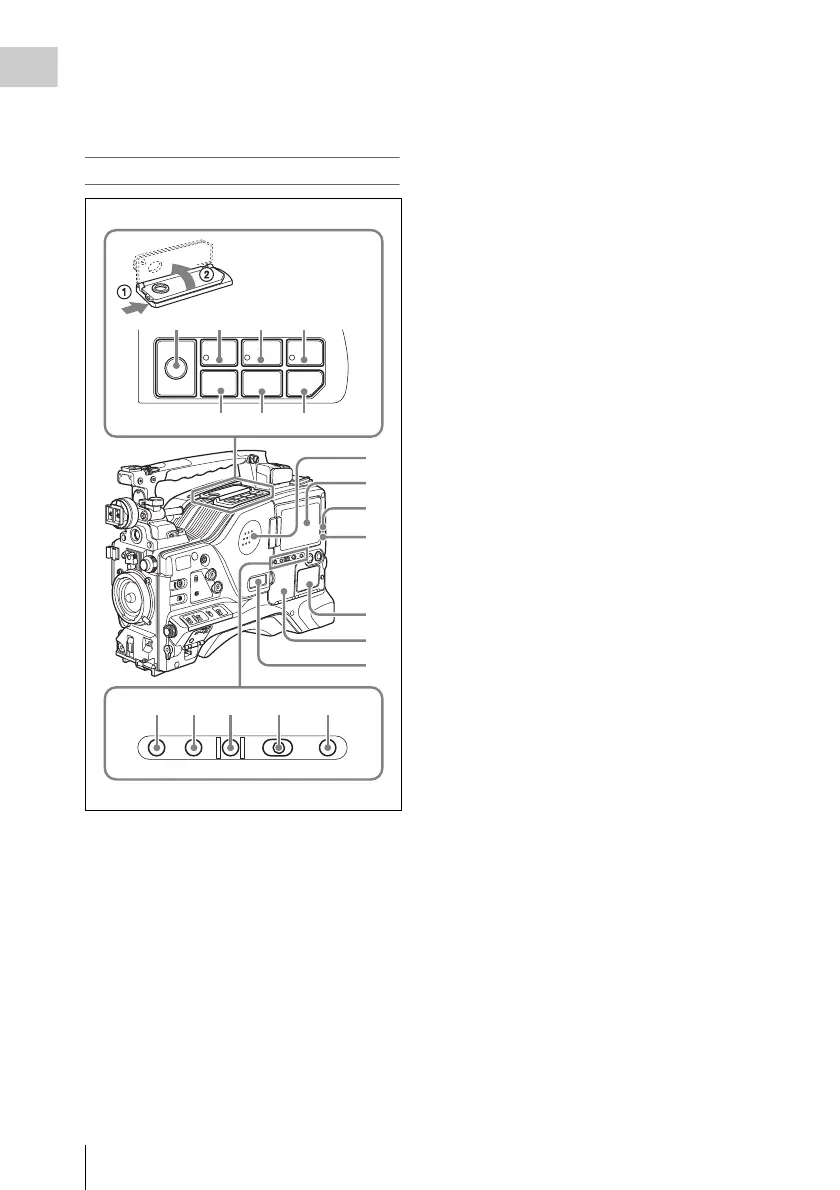
a Built-in speaker
The speaker can be used to monitor E-E sound
during recording, and playback sound during
playback. The speaker also sounds alarms to
reinforce visual warnings.
If you connect earphones to the EARPHONE
jack, the speaker output is suppressed
automatically.
For details about alarms, see “Operation Warnings”
on page 190.
b LCD monitor
Displays camera video, VDR-related warnings,
remaining battery capacity, remaining disc space,
audio levels, time data, and so on.
For details, see “Status Display on the LCD monitor
and monochrome LCD” on page 22.
c WARNING indicator
Lights up or flashes when an abnormality occurs
in the VDR section.
For details about the meaning of the states of the
WARNING indicator, see ““Operation Warnings”
on page 190.
d ACCESS indicator
This lights when data is written to or read from
the disc.
e Protection cover of the audio control
section
Open to access the audio control section (see page
25).
f Protection cover of the GUI screen
operations section
Open to access the GUI screen operations section
(see page 25).
g Monochrome LCD
This shows the remaining battery capacity,
remaining disc capacity, time data, and so on.
For details, see “Status Display on the LCD monitor
and monochrome LCD” on page 22.
h EJECT button and indicator
Press this button to insert a disc or eject the disc.
The indicator flashes while the disc is being
ejected.
i F REV (fast reverse) button and
indicator
This plays back at high speed in the reverse
direction. The indicator lights during high-speed
playback in the reverse direction.
j PLAY/PAUSE button and indicator
Press this button to view play back video images
using the viewfinder screen or the LCD monitor.
The indicator lights during playback.
Press this button again during playback to pause,
outputting a still image. At this time the indicator
flashes.
F REV
PREV
Z
PLAY/PAUSE
STOP NEXT
F FWD
m
.
NX
x>
M
EJECT
BRIGHTDISPLAYRESETHOLDDISP SEL
COUNTER TC U-BITEXPAND CHAPTER RETURN
2
3
4
5
6
7
1
qs qd qf
8 9 q; qa
qg qh qj qk ql



 To Next Page