Using a Wi-Fi Connection
17
Preparations
The recorder can connect to a computer,
smartphone, or tablet via Wi-Fi by attaching an
optional Wi-Fi adapter on the recorder. The
following Wi-Fi adapters are supported.
• CBK-WA100 Wireless Adapter
• IFU-WLM3 Wireless LAN USB Module
For details on the Wi-Fi connection method for the
CBK-WA100, refer to the operating instructions for
the CBK-WA100.
Making a Wi-Fi connection between a computer,
smartphone, or tablet and the recorder enables
you to do the following.
• Send planning metadata created on a computer to the
recorder, and set names of clips and shot marks.
• Display the Wi-Fi remote controller on a computer,
smartphone, or tablet to control the recorder remotely.
Notes
• Do not connect devices other than those specified to the
external device connector.
• Always turn off the power supply before attaching or
removing a CBK-WA100 or IFU-WLM3.
• When using the CBK-WA100, you cannot use the IFU-
WLM3.
• An i.LINK connection and USB wireless LAN module
cannot be used at the same time. When using a wireless
connection with an IFU-WLM3 inserted directly into the
external device connector, do not connect a device to the
i.LINK connector.
• The IFU-WLM3 USB Wireless LAN Module (sold
separately) may not be available in some countries/
regions.
• Using other wireless devices near the recorder may
result in improper operation of the recorder. Turn off
wireless devices near the recorder whenever possible.
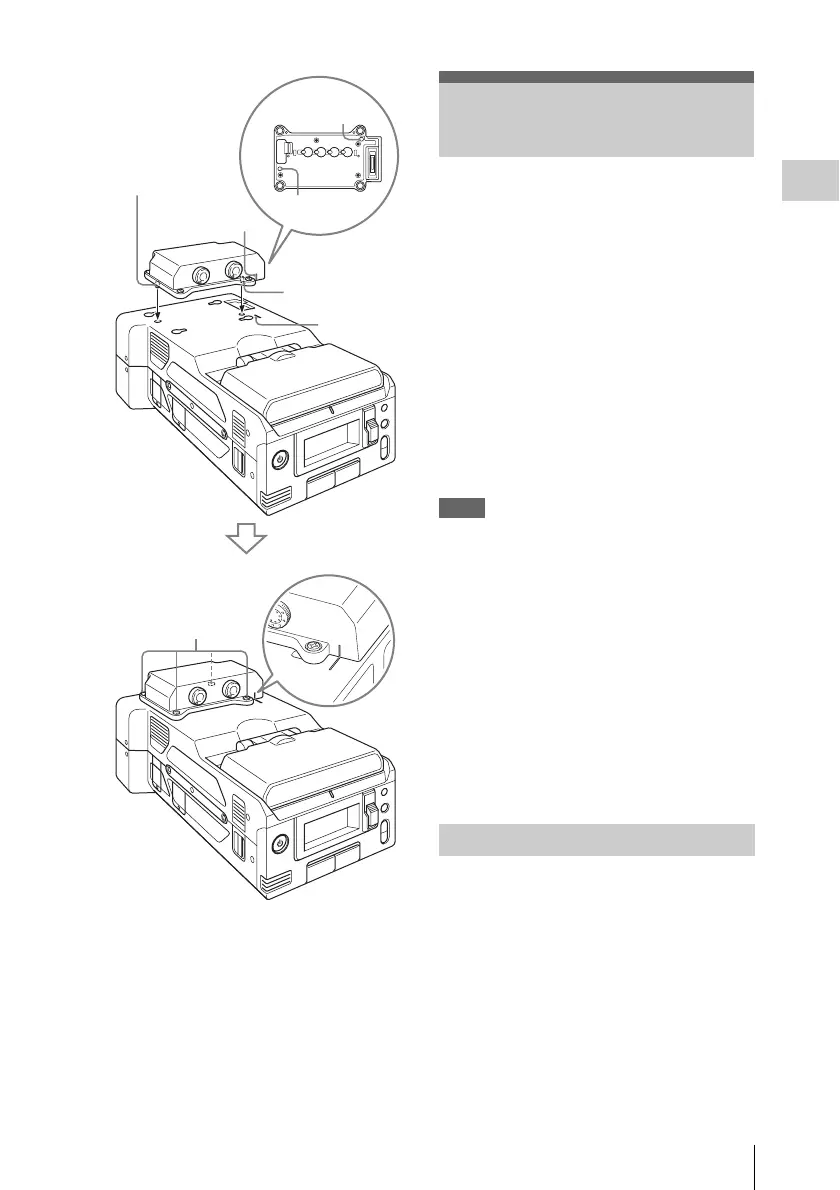
1 Remove the top part of the bracket, and
secure the main part of the bracket to
the CBK-WA100 using the three screws
(M2×5) supplied with the CBK-WA100.
Guide
Guide
Guide
Guide
Guide line
Guide line
Screws (M3)
Using a Wi-Fi
Connection
Attaching the CBK-WA100



 To Next Page