Clip Operations
41
Playback
1) Enabled in UDF, exFAT and FAT/HD mode.
You can display only those frames with shot
marks or recording start marks as thumbnail
images on the screen.
1 Select a clip on the thumbnail screen,
then press the SEL/SET button.
2 Select [ALL MARKS], [SHOT
MARK1], [SHOT MARK2], or [REC
START MARK] from the Clip
Operation menu.
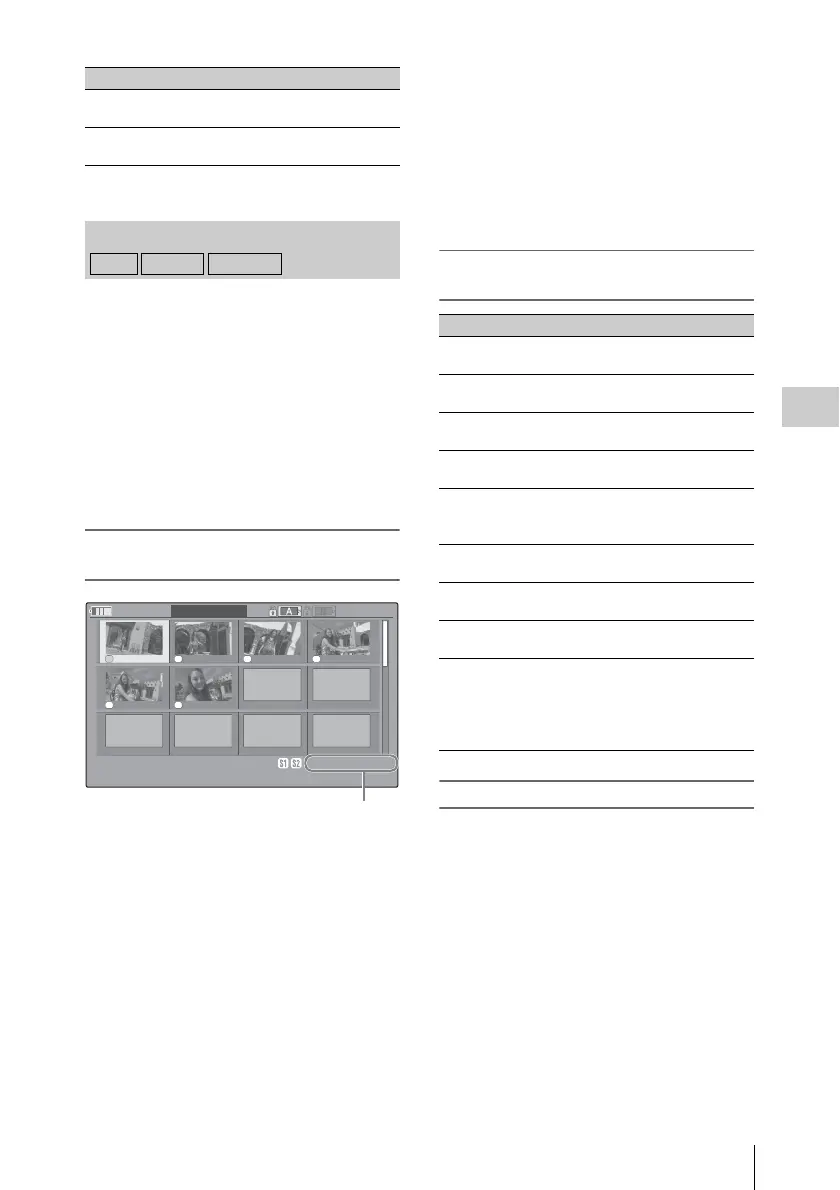
SHOT MARK screen example (when [ALL
MARKS] is selected)
The detailed information of the clip is displayed
at the bottom of the screen.
The items other than the following are the same as
those on the EXPAND CLIP screen (page 40) in
UDF, exFAT and FAT HD mode:
1. Timecode indication
The timecode of the frame at the cursor on the
SHOT MARK screen is displayed.
Move the cursor to the first/last frame
First frame: When the cursor is at a user-
designated position, press the F REV and PREV
buttons simultaneously.
Last frame: Press the F FWD and NEXT buttons
simultaneously.
Switch to the clip shot mark screen for a different
clip
Previous clip: When the cursor is at the first frame
for a clip, press the PREV or up button.
Next clip: When the cursor is at the last frame for
a clip, press the NEXT or down button.
Clip Operation menu on the SHOT MARK
screen
Adding/Deleting Shot Marks
Adding a shot mark in Pause mode
Select [SHOT MARK1 ADD] or [SHOT
MARK2 ADD] from the Clip Operation menu.
Adding a shot mark on the EXPAND CLIP screen
Select [SHOT MARK1 ADD] or [SHOT
MARK2 ADD] from the Clip Operation menu.
Deleting a shot mark
Select [SHOT MARK1 DEL] or [SHOT MARK2
DEL] from the Clip Operation menu on the
[EXPAND CLIP] screen (page 39) or on the
[SHOT MARK] screen (page 41).
DIVIDE CLIP
1)
To divide the clip into two clips at
the selected frame (page 42)
CLIP REPEAT
1)
Plays the selected clip repeatedly
(page 35).
SHOT MARK Screen
Item Function
UDF exFAT FAT/HD
S1 S2 S2 S1
S1 S
1
120
m
in
H
TSHOT MARK1
01:10:20:00 01:10:30:00 01:10:40:00 01:10:50:00
01:11:00:00 01:11:10:00
-
-
-
-
-
-
-
-
-
-
-
-
-
-
-
-
-
-
0031 / 0031
01 / JAN / 2009
10:53
S
&
Q
29 / 24
JPAN0011
(
1
)
HQ
1920 / 23. 9 P
TCR
01:12: 00 : 00
DUR
00:03 : 19:23
1
Item Function
PAUSE To set to Pause mode at the selected
frame
SET INDEX PIC To specify the selected frame for the
index frame of the clip (page 42)
SHOT MARK1
DEL
To delete the shot mark 1 from the
selected frame (page 41)
SHOT MARK2
DEL
To delete the shot mark 2 from the
selected frame (page 41)
DIVIDE CLIP To divide the clip into two clips at
the selected frame (page 42) (FAT
HD mode Only)
CLIP REPEAT Plays the selected clip repeatedly
(page 35).
TRIM SHOT
MARK1
Trims the set position of the
specified shot mark 1 (page 35).
TRIM SHOT
MARK2
Trims the set position of the
specified shot mark 2 (page 35).
EXPAND
(FINEST)
Displays the CLIP EXPAND
screen, showing the smallest
segment of the clip, and displays the
selected frame in the center of the
screen.



 To Next Page