Part Identification
9
Overview
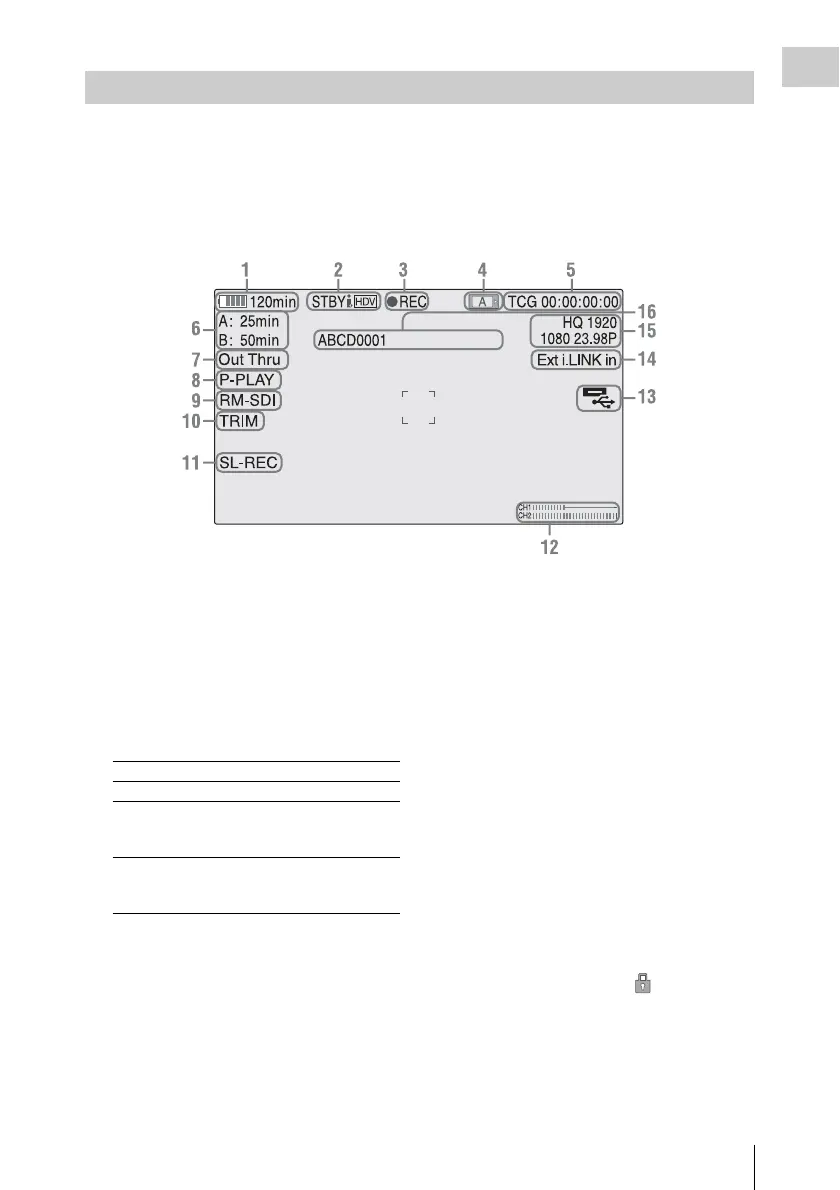
While recording or in standby mode, pressing the DISPLAY button displays the status and settings of this
unit on the LCD monitor.
Remarks
[M]: The indication of the items named with this suffix can be independently turned on/off with [Display
On/Off] in the [LCD SET] menu (page 52).
1. Battery remaining/DC IN voltage
indication [M] (page 11)
2. i.LINK status indication (page 68)
Only when an external device is connected to
the i.LINK connector, the status of the device is
displayed.
3. Special recording/operation status
indication
4. Media status indication
Displays the active memory card slots.
5. Time data indication [M] (page 23)
6. Media remaining indication [M] (page 14)
7. Output mode indication (page 23)
Displays “Out Thru” when the output mode is
set to [THROUGH], or [Out Auto] when the
output mode is set to [AUTO].
8. In-point to out-point partial playback
indication (page 34)
Displays “P-PLAY” when playing the interval
from the in-point to the out-point.
9. Synchronous recording indication [M]
Displays “RM-SDI” when [SDI Rec Control]
in the [VIDEO SET] menu is set to [On].
Displays “Rec2” when the REC trigger
signal is output when using the
CBK-WA100.
10. Trim indication (page 35)
11. Loop recording indication (page 27)
Displayed when loop recording.
12. Audio level meters [M]
13. USB media icon indication (page 70) or
wireless adapter status indication
Displays an icon when valid USB media (HDD,
flash drive, or other USB device) is connected.
If the media is protected, a lock mark
appears.
If a CBK-WA100 wireless adapter is connected,
it displays the wireless status, SD card
remaining capacity, and clip transfer status.
On-Screen Indications
zREC Recording in progress
STBY Standby for recording
CONT (lit) When using Clip Continuous
Recording, indicates that a
clip is being continued.
CONT
(flashing)
When using Clip Continuous
Recording, indicates there is
no continuing clip.



 To Next Page