Part Identification
8
Overview
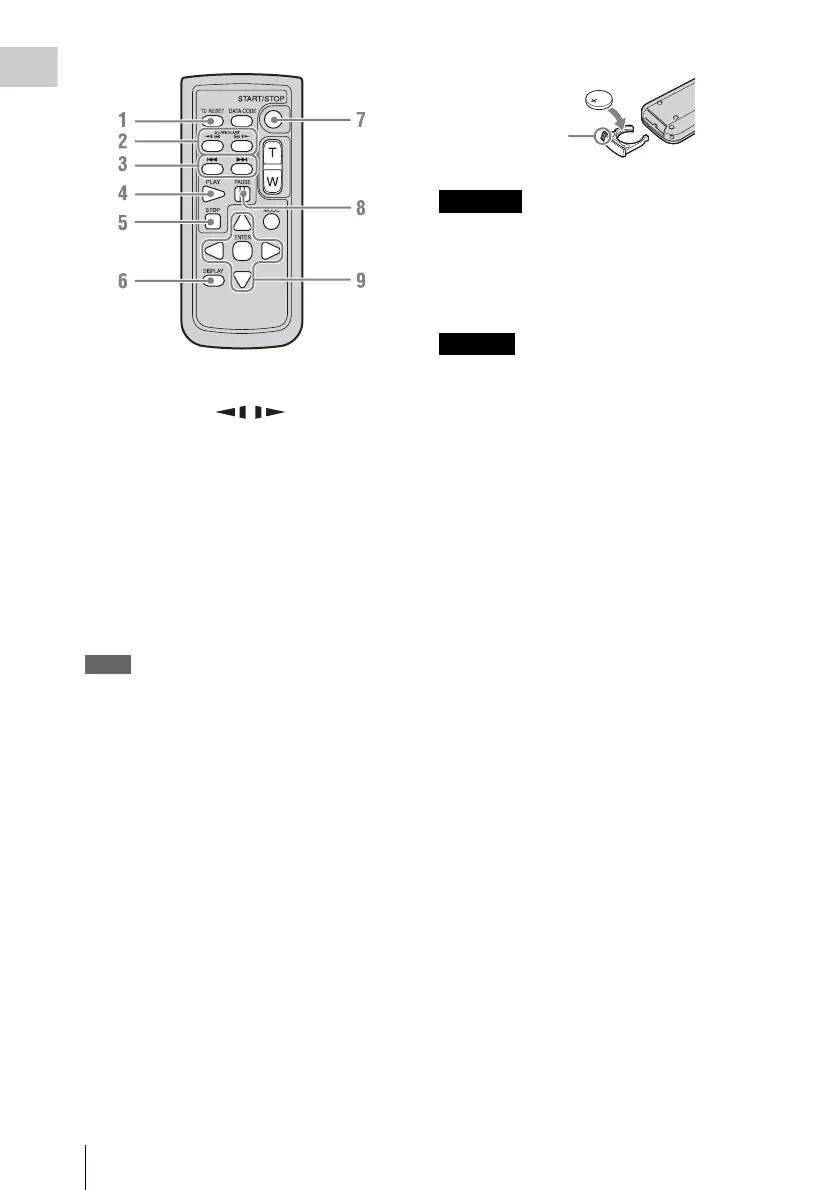
1. TC RESET (timecode reset) button
2. SCAN/SLOW (fast reverse
playback / fast playback) buttons
3. . > (previous/next clip) buttons
4. PLAY button
5. STOP button
6. DISPLAY (screen display) button
7. START/STOP (recording start/stop)
button
8. PAUSE button
9. b/B/v/V/ENTER buttons
Notes
• The DATA CODE, T/W (zoom), and MODE buttons
are not used with this recorder.
• To avoid malfunctions, the remote control function is
automatically deactivated when the recorder is turned
off. Activate the function each time when required
after you turn the recorder on.
Replacing the battery in the IR Remote
Commander
Use a commercially available CR2025 lithium
battery. Do not use any battery other than a
CR2025.
1 Press the tab inward and grasp it with
your fingernail to pull out the battery
case.
2 Insert the new battery with its + side
facing up.
3 Insert the battery case until it clicks into
place.
• Battery may explode if mistreated.
Do not recharge, disassemble, or dispose of in
fire.
• Batteries shall not be exposed to excessive heat
such as sunshine, fire or the like.
Danger of explosion if battery is incorrectly
replaced. Replace only with the same or
equivalent type recommended by the
manufacturer.
When you dispose of the battery, you must obey
the law in the relative area or country.
WARNING
CAUTION
Tab



 To Next Page