Clip Operations
38
Playback
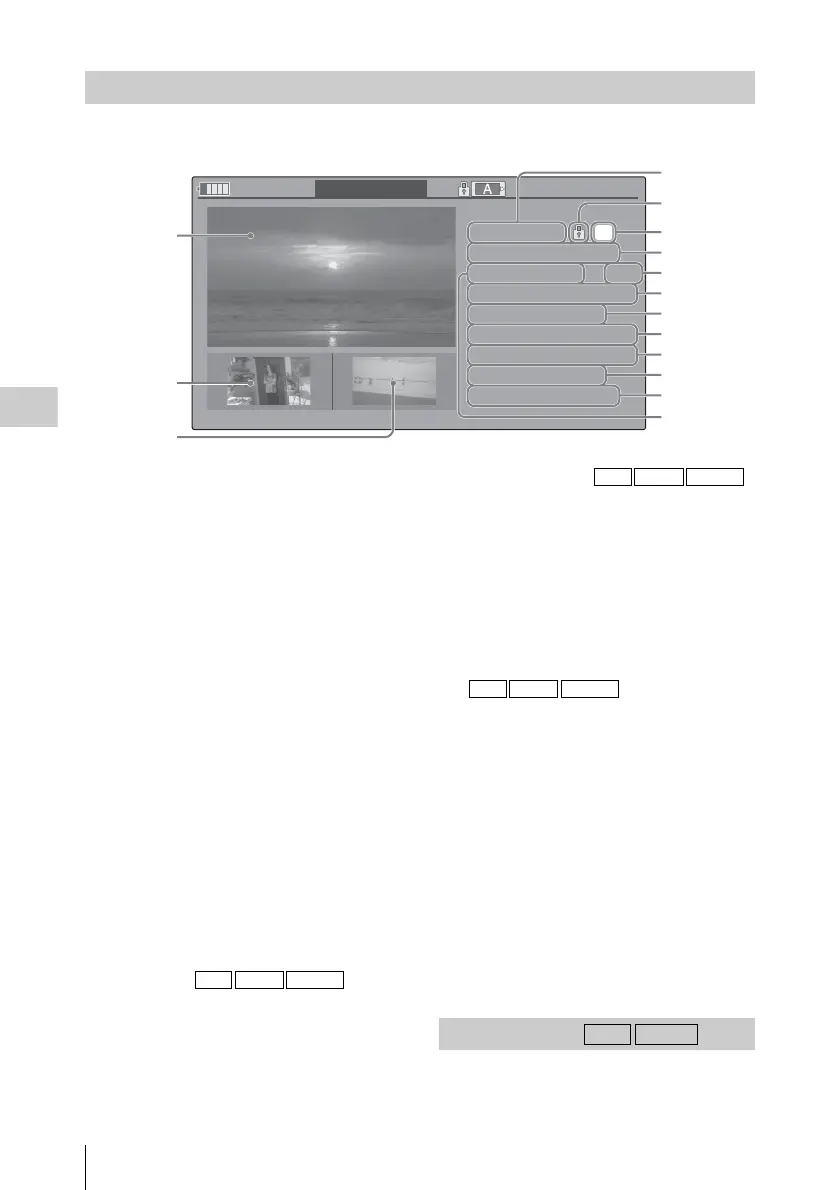
Select [DISP CLIP INFO] from a Clip Operation menu.
1. Image of the current clip
2. Image of the previous clip
Press the PREV button to switch to the clip info
screen of the previous clip.
In FAT SD Mode, the previous segment of a
segmented clip is displayed.
3. Image of the next clip
Press the NEXT button to switch to the clip info
screen of the next clip.
In FAT SD Mode, the next segment of a
segmented clip is displayed.
4. Clip name
For a clip name of 12 characters or longer, only
the first 5 and last 5 characters of the name are
displayed. To check the non-displayed block of
the name, press the SEL/SET button to display
the entire clip name (Long-Display mode). Press
the SEL/SET button again to cancel Long-
Display mode. Long-Display mode is also
canceled by switching to the previous or next
clip with the PREV or NEXT button.
In FAT SD Mode, if the file was split into
multiple parts because its file size exceeded 2
GB, the segment number is displayed after the
name, separated with a slash.
5. Lock mark
UDF and exFAT: A lock mark appears if the
selected clip is locked.
FAT HD Mode: A lock mark appears if the
selected clip has an OK mark.
6. OK/NG/KP mark
UDF and exFAT: The mark is displayed if the
selected clip has an OK/NG/KP flag.
FAT HD Mode: The OK mark is displayed if the
selected clip has an OK mark.
7. Date and starting time of recording
8. File format
The file format (MXF, MP4, AVI) of the
selected clip is displayed.
9. Special recording information
If the selected clip was recorded in a special
recording mode (Slow & Quick Motion, Interval
Recording, or Frame Recording), the mode is
displayed.
Clips recorded in Slow & Quick Motion display
the “Recording frame rate/playback frame rate
fps” to the right.
10. Timecode of the displayed frame
11. Timecode at the recording starting point
12. Timecode at the recording ending point
13. Duration of the clip
14. Recorded audio channels
15. Recorded video format
When adding a flag, you can select from [OK
FLAG ADD], [NG FLAG ADD], and [KEEP
Displaying the Detailed Information of a Clip
OK
120
m
in CLIP
I NFO
0011 / 0300
PREV
CLIP NEXT
CLIP
JPAN0011
(
1
)
01 / JAN / 2009
10:53
HQ
1920 / 23.9P MP4
S
&
Q
M
otion
29/24fps
TCR
00:05:00:02
TCR
00:05:00:00
STR
TCR
00:08:19:23
END
DUR
00:03:20:00
CH1/2/3/4/5/6/7/8
1
2
3
4
5
6
7
8
9
10
11
12
13
14
15
UDF exFAT FAT/HD
OK/NG/KP Flag
UDF exFAT FAT/HD
UDF exFAT FAT/HD
UDF exFAT



 To Next Page