Backup Battery Replacement
83
Appendices
This recorder uses a backup battery to retain
various setting data.
A lithium battery (CR2032) for backup is
mounted in the recorder at the factory.
The backup battery retains the date, time, and
timecode in Free Run mode even when no
operating power is being supplied.
Service life of the backup battery
When the backup battery’s voltage falls, the
backup battery low-voltage warning appears on
the LCD monitor.
If this warning appears, replace the battery as
soon as possible.
• Battery may explode if mistreated. Do not
recharge, disassemble, or dispose of in fire.
• Batteries shall not be exposed to excessive heat
such as sunshine, fire or the like.
Danger of explosion if battery is incorrectly
replaced. Replace only with the same or
equivalent type recommended by the
manufacturer.
When you dispose of the battery, you must obey
the law in the relative area or country.
Replacing the backup battery
Notes
• Be sure to turn the power to OFF when replacing the
backup battery.
• Be careful not to drop the removed screw into the
recorder.
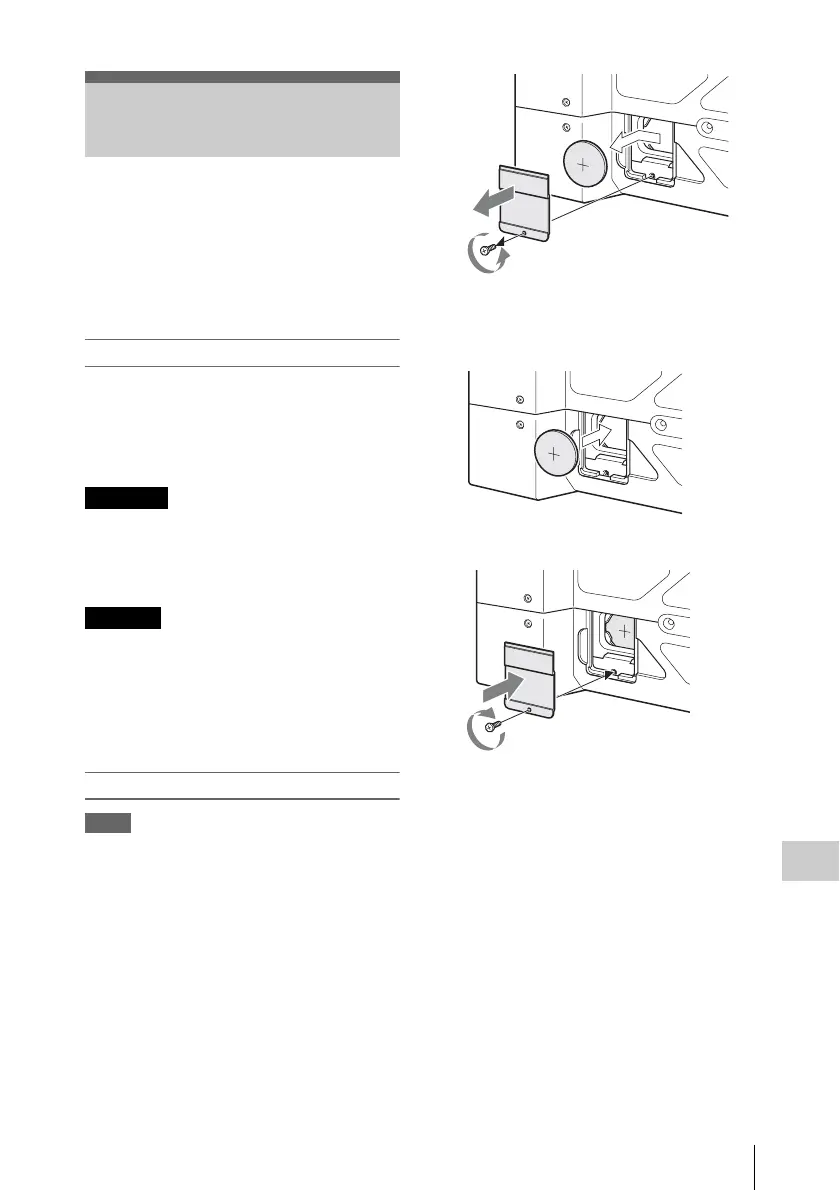
1 Remove the screw of the backup battery
holder, then remove the cover. Insert a
nonmetallic item, such as a plastic
toothpick, to the side of the battery and
lever the battery out of its
compartment.
2 Insert a new backup battery (CR2032)
with the + symbol on the battery facing
outside.
3 Attach the cover in the original position.
Backup Battery
Replacement
WARNING
CAUTION



 To Next Page