Playing Clips
34
Playback
For playback operations, use the playback control
buttons on the top panel (page 6). When the IR
Remote Commander is enabled, you can use its
playback control buttons instead (page 56).
1 Move the cursor to the thumbnail image
of the clip with which you wish to start
playback.
2 Press the PLAY/PAUSE button.
Playback starts from the beginning of the
selected clip.
Notes
• The playback picture may be momentarily distorted or
frozen between clips. The playback control buttons
and THUMBNAIL button do not function during this
condition.
• When you select a clip on the thumbnail screen and
start playback, the playback picture at the beginning of
the clip may be distorted. To start playback without
distortion, once pause playback after starting it, press
the PREV button to return to the top of the clip, then
restart playback.
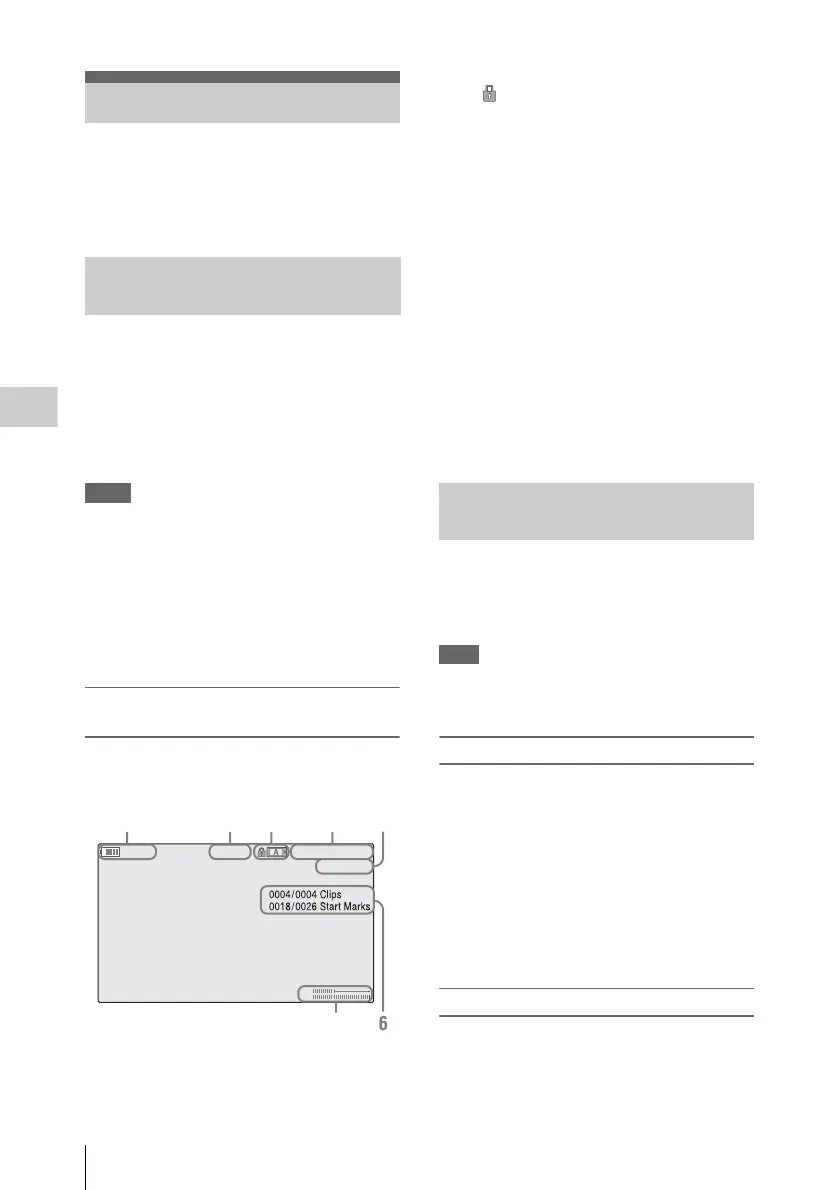
Information displayed on the playback
screen
The following information is superimposed on
the playback picture.
1. Battery remaining/DC IN voltage
2. Playback mode
3. SxS memory card
A mark appears to the left if the SxS memory
card is write-protected.
4. Time data
Each time you press the DURATION/TC/U-
BIT button, the indication is switched between
timecode (TCR) and user-bit (UB) data.
5. Clip no./total number of clips
This is displayed for FAT. It is also displayed
for UDF and exFAT, if [Find Mode] in [Clip]
(page 59) in the [OTHERS] menu is set to
[Clip].
6. Clip no./total number of clips, essence
mark no./total number of essence marks
This is displayed for UDF and exFAT, if [Find
Mode] in [Clip] (page 59) in the [OTHERS]
menu is set to [Rec Start].
7. Audio levels
The audio levels for the recording are displayed.
The recorder can play a section between start and
stop points specified in advance. The recorder
plays continuously between the in-point and out-
point for the clips after the selected clip.
Note
In FAT/SD mode, playback between in-point and out-
point is not supported because shot marks cannot be
inserted in clips.
Specifying the In-point and Out-point
Specifying shot mark 1 and shot mark 2 for a clip
allows the shot marks to be used as an in-point
and out-point, respectively.
When the recorder plays a clip with shot marks
recorded on another device, the recorder can play
the interval between shot marks 1 and 2 in the
same way as for clips recorded on this recorder.
When a clip with shot marks recorded on this
recorder is played on another device, the shot
marks are not treated as an in-point and out-point.
Selecting the Clip to Play
Only clips with an attached OK flag or OK mark
support partial playback between in-point and
out-point.
Playing Clips
Playing the Selected and
Subsequent Clips in Sequence
TCR 00:00 :00:00
0011/03 00
120min B PLAY
CH1
CH2
12345
7
Playing between In-point and Out-
point



 To Next Page