Using a Wi-Fi Connection
18
Preparations
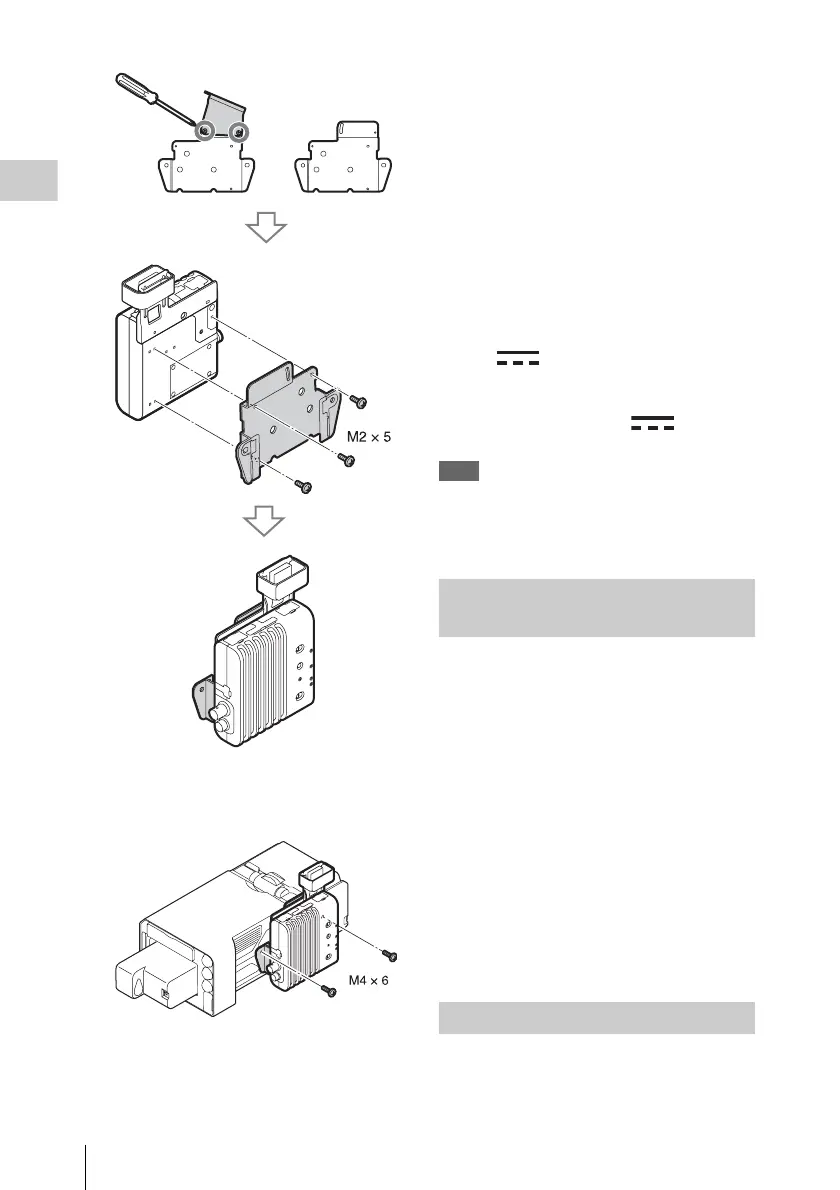
2 Secure the CBK-WA100 to the recorder
using the two screws (M4×6) supplied
with the CBK-WA100.
3 Use the USB cable supplied with the
CBK-WA100 to connect the external
device connector (page 6) on the
recorder to the Mini USB connector on
the CBK-WA100.
4 Use the BNC cable supplied with the
CBK-WA100 to connect the SDI OUT
1/2 connector (page 6) on the recorder
to the SDI IN connector on the CBK-
WA100.
5 When supplying power to the CBK-
WA100 from the recorder, use the DC
power supply cable supplied with the
CBK-WA100 to connect the DC OUT
connector (page 6) on the recorder to
the (DC IN) connector on the
CBK-WA100.
When using a separately supplied AC
adapter, connect it to the (DC IN)
connector on the CBK-WA100.
Note
Power can only be supplied to an external device from
either the DC OUT connector or the external device
connector. They cannot both be used to supply power at
the same time.
1 Turn on the recorder.
2 When supplying power to the CBK-
WA100 from the recorder, set
[OTHERS] >[Power Enable] in the
setup menu to [Sony Wireless Adapter].
The recorder will restart after you change the
setting.
3 Set the output signal from the SDI OUT
connector that is connected to the CBK-
WA100 to [SD] or [HD] in the [VIDEO
SET] >[SDI/HDMI/i.LINK I/O Select]
setup menu.
4 Turn on the CBK-WA100.
You can operate the Web menu built in the
recorder from a computer when it is connected to
the recorder via a Wi-Fi connection.
Connecting to Wi-Fi with the CBK-
WA100
Using the Web Menu



 To Next Page