❍ Log in as root. That means in YDL's login menu your Username should be ?root? and your
password is the root password you typed during installation.
❍ Launch Gnome Terminal. (Just like you did with VLC.)
❍ This time type: "yum install mplayer" hit Enter. (type "y" when prompted and hit Enter)
❍ After the previous step finishes, Type "yum install mplayer-gui" hit Enter.
❍ After process is complete, mplayer should be installed on your PS3.
11. Configuring, Launching and Using Mplayer:
❍ Mplayer doesn't seem to pick the right drivers for the PS3 by default, so we are going to have
to configure it.
■ NOTE: These configuration might not apply to everyone, I'm using a component cable,
not HDMI.
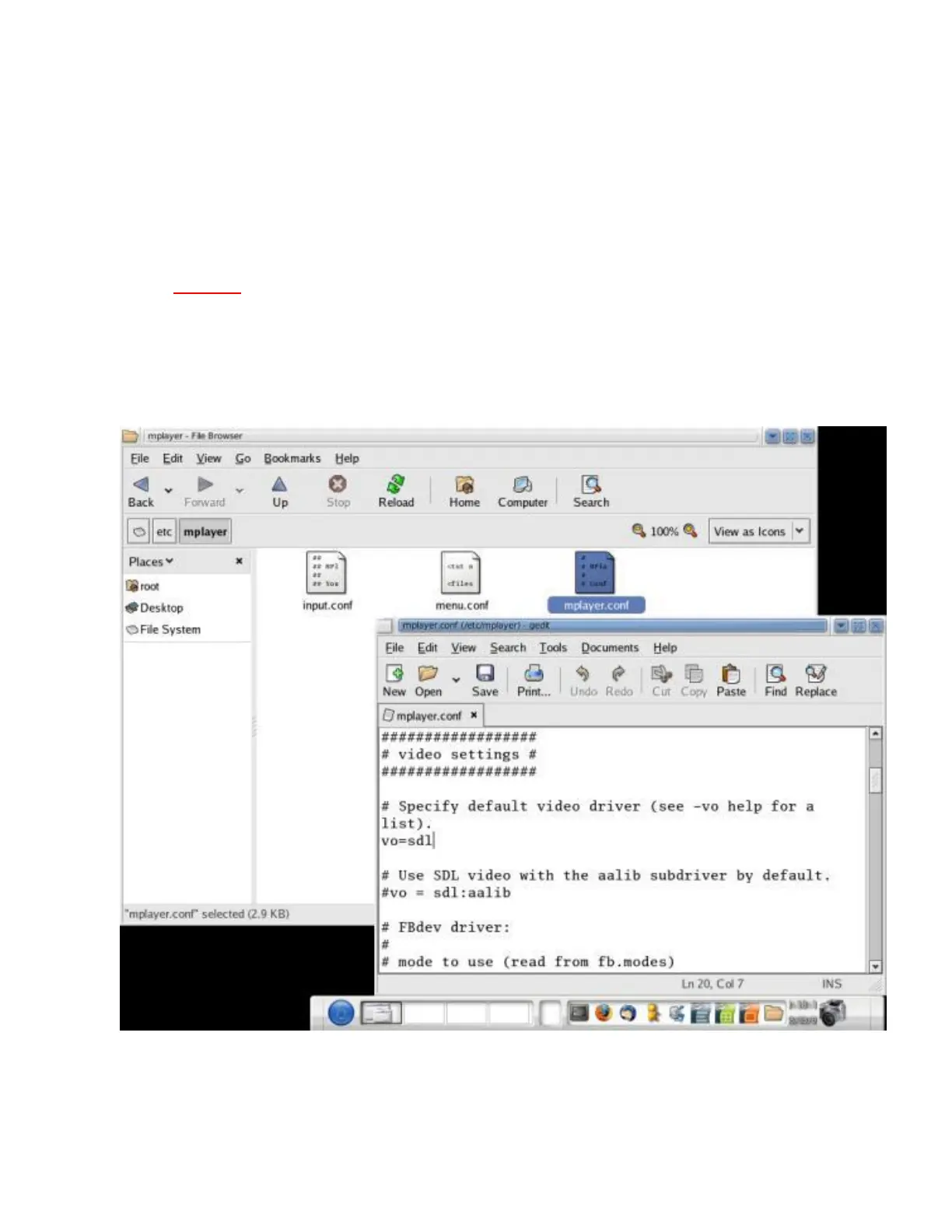
❍ Log in as root. Browse to /etc/mplayer and double click mplayer.conf. Make the changes
shown in the pictures:
In video settings, vo=sdl
In audio settings, ao=sdl (Scroll down)
❍ Once in GNOME (not as root), to launch Mplayer go to:
Applications ---> Sound & Video ---> Mplayer
❍ Using Mplayer now should be easy, right click and check out the options.
❍ If you pick a video and mplayer still fails to initialize, Open up a Terminal (we're still in
Gnome)



 To Next Page