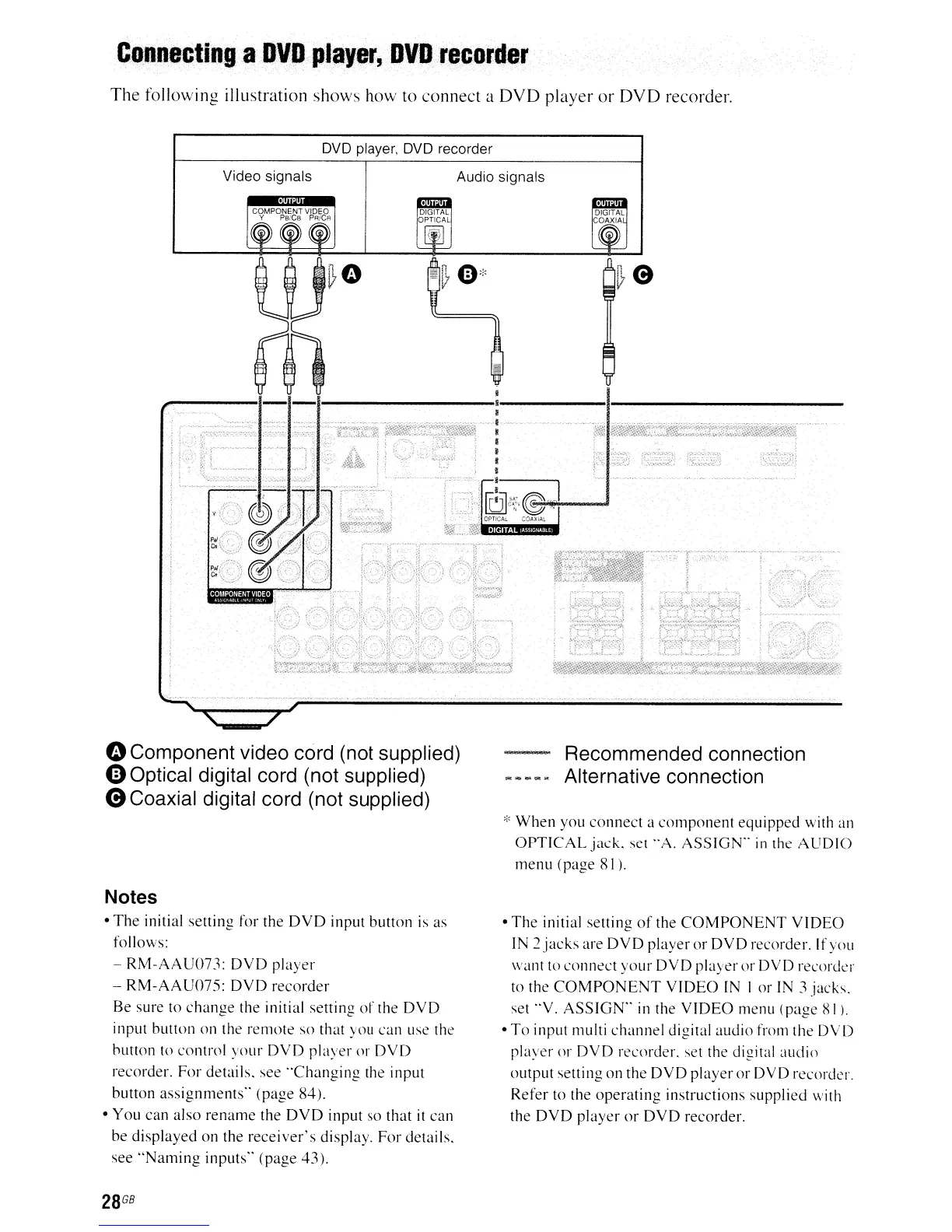
Connecting
a
OVO
plilyer,OVDrecorder
The
following illustration
shows
how
to
connect
a
DVD
player
or
DVD
recorder.
DVD
player. DVD recorder
Video signals
Audio signals
oComponent video cord (not supplied)
oOptical digital cord (not supplied)
eCoaxial digital cord (not supplied)
Notes
• The initial setting for the
DVD
input button
is
as
follows:
- RM-AAU073: DVD player
- RM-AAU075: DVD recorder
Be
sure
to
change the initial setting
of
the DVD
input button on the
remote?
so that you can
use?
the
button
to
control your DVD player or DVD
recorder. For details. see "Changing the input
button assignments" (page 84).
• You can also rename the DVD input so that
it
can
be displayed on the receiver's display. For details.
see "Naming inputs" (page 43).
28
GB
Recommended connection
Alternative connection
* When you connect a component equipped with
an
OPTICAL jack. set "A. ASSIGN"
in
the AUDIO
menu (page
81
).
• The initial setting
of
the COMPONENT VIDEO
IN
2jacks
are DVD player or DVD recorder. If you
want
to
conne?ct
your DVD player or DVD
re?corder
to
the COMPONENT VIDEO
IN
I or
IN
3 jacks.
set ··V. ASSlGN"
in
the VIDEO menu (page
81
).
• To input multi channel digital audio from the DVD
player or DVD recorder. set the digital audio
output setting on the DVD player or DVD recorder.
Refer
to
the operating instructions supplied \vith
the DVD player or DVD recorder.



 To Next Page