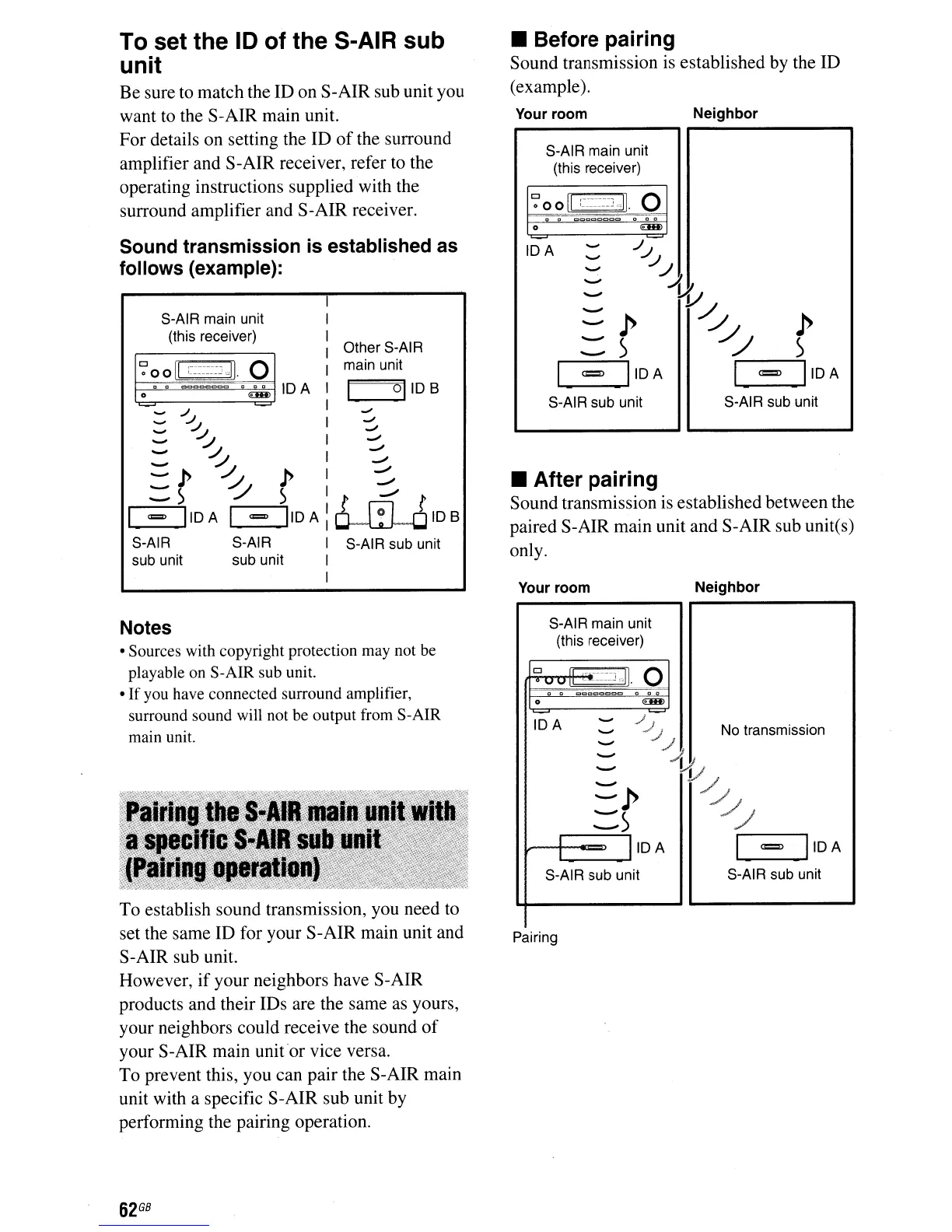
Sound transmission
is
established as
follows (example):
To set the
10
of
the S-AIR
sub
unit
Be sure to match the ID
on
S-AIR sub unit you
want to the S-AIR main unit.
For details on setting the ID
of
the surround
amplifier and S-AIR receiver, refer to the
operating instructions supplied with the
surround amplifier and S-AIR receiver.
• Before pairing
Sound transmission is established by the ID
(example).
Neighbor
Your room
S-AIR main unit
(this receiver)
~
00
II
:~~n~~~J
",II.
e
.
="~C:"::::"::>C=c
...
0
€III)
-
../-
IDA
-
......"
../..J
......"
./..4
'-'"
...-
I{;
........
~
-
p p
.........
)
/./
)
--
I
=
IIOA
I
=
IIOA
S-AIR sub unit S-AIR sub unit
• After pairing
Sound transmission is established between the
paired S-AIR main unit and S-AIR sub unites)
only.
Other S-AIR
main unit
____
°1
108
oJ
oJ
oJ
-
-
,./
....",
-'"
-'"
~108
S-AIR sub unit
IDA
S-AIR main unit
(this receiver)
.......
,.1.1
.......
~
-
~
-
/J
-
p"
p
:::~
~
~
=
IIOA
I =
IIOA
S-AIR S-AIR
sub unit sub unit
Your room Neighbor
Notes
• Sources with copyright protection may not be
playable on S-AIR sub unit.
•
If
you have connected surround amplifier,
surround sound will not be output from S-AIR
main unit.
To
establish sound transmission, you need to
set the same ID for your S-AIR main unit and
S-AIR sub unit.
However,
if
your neighbors have S-AIR
products and their IDs are the same as yours,
your neighbors could receive the sound
of
your S-AIR main unit
or
vice versa.
To prevent this, you can pair the S-AIR main
unit with a specific S-AIR sub unit by
performing the pairing operation.
S-AIR main unit
(this receiver)
Cl
~~~
::.UI.
0
v
.
ClC==ClCcCl
.
..
0
€III)
IDA
-
../}
......"
./...J
J
No transmission
.......
'-'"
...
~
...-
/1{;
........
./..,/
-p
::::)
/../
IIOA
I
=
IIOA
S-AIR sub unit
S-AIR sub unit
Pairing
62
GB



 To Next Page