al
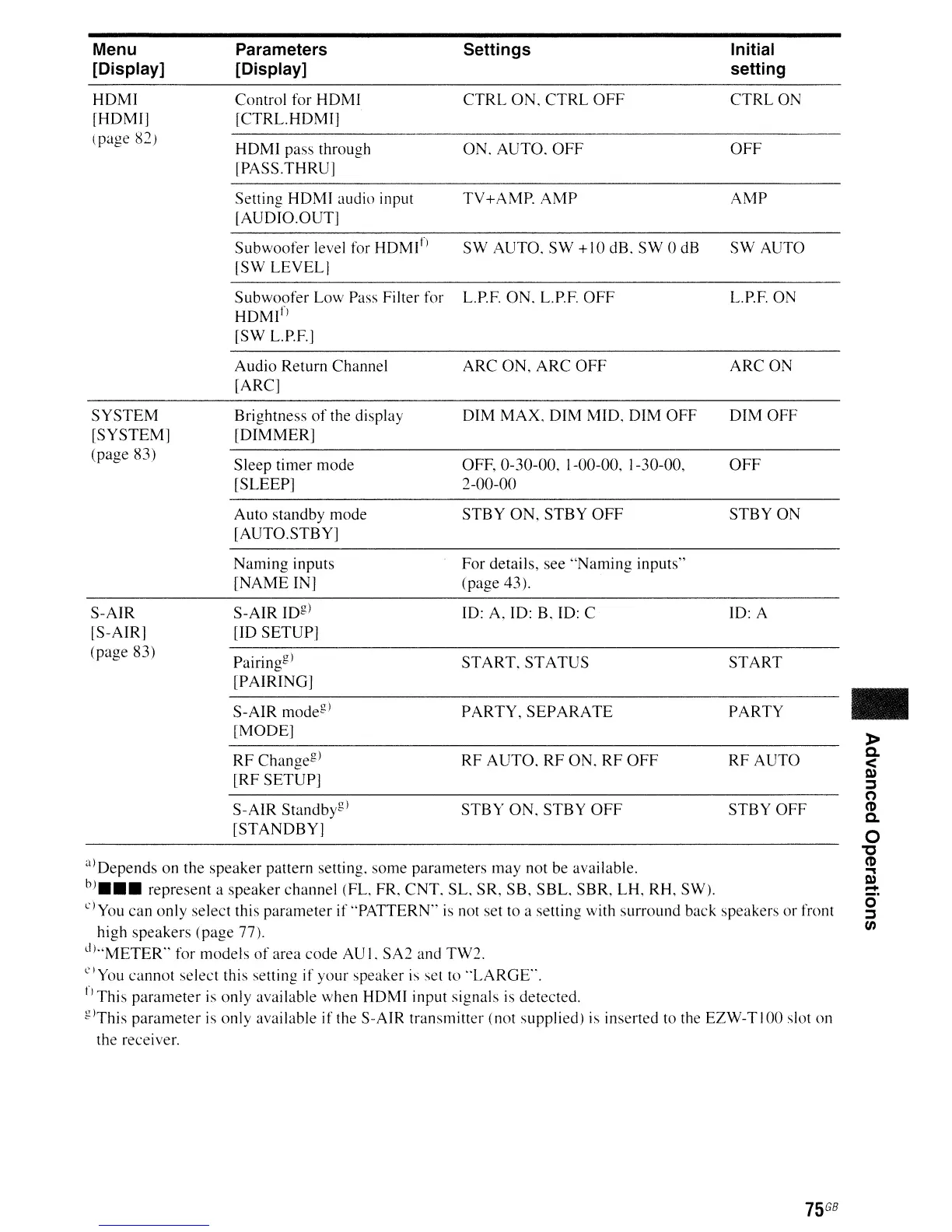
Depends
on the speaker pattern setting. some parameters
may
not be available.
bJ
•••
represent a speaker channel (FL, FR,
CNT.
SL, SR, SB,
SBL.
SBR, LH, RH, SW).
L')You
can
only
select this
parameter
if
"PATTERN"
is
not set to a setting with surround back speakers or front
high
speakers
(page 77).
d)"METER"
for
models
of
area code AU I. SA2 and
TW2.
C)You
cannot
select this setting if your speaker
is
set to
"LARGE".
fJ
This
parameter
is only available when
HDMI
input signals is detected.
glThis
parameter
is only available if the S-AIR transmitter (not supplied) is inserted to the EZW-TIOO slot
on
the receiver.
Menu
[Display]
HDMI
[HDMl]
(page 82)
SYSTEM
[SYSTEM]
(page 83)
S-AIR
[S-AIR]
(page 83)
Parameters Settings Initial
[Display] setting
Control for
HDMI
CTRL
ON,
CTRL
OFF
CTRLON
[CTRL.HDMI]
HDMI
pass through ON.
AUTO.
OFF
OFF
lPASS.THRU]
Setting
HDMI
audio input
TV+AMP.
AMP
AMP
[AUDIO.OUT]
Subwoofer
level for HDMI!)
SW
AUTO,
SW
+10
dB.
SW
0 dB
SW
AUTO
[SW
LEVELl
Subwoofer
Low Pass Filter for
L.P.F. ON. L.P.F.
OFF
L.P.F. ON
HDMl
fJ
[SW L.P.F.]
Audio
Return Channel
ARC
ON,
ARC
OFF
ARC
ON
[ARC]
Brightness
of
the display
DIM
MAX.
DIM
MIO.
DIM
OFF
DIM
OFF
[DIMMER]
Sleep
timer
mode
OFF,
0-30-00.
1-00-00, 1-30-00,
OFF
[SLEEP]
2-00-00
Auto
standby mode
STBY
ON,
STBY
OFF
STBY
ON
[AUTO.STBY]
Naming
inputs
For
details, see
"Naming
inputs"
[NAME
IN] (page 43).
S-AIR
109)
10:
A,
10:
B, ID: C
10:
A
[10
SETUP]
Pairin
og
)
START.
STATUS
START
b
[PAIRING]
S-AIR
mode
g
)
PARTY,
SEPARATE
PARTY
[MODE]
RF
Chanoe
g
)
RF
AUTO.
RF
ON.
RF
OFF
RF
AUTO
b
[RF
SETUP]
S-AIR
Standby&)
STBY
ON,
STBY
OFF
STBY
OFF
[STANDBY]
-
»
a.
<
l»
::J
(')
(1)
a.
o
"C
(1)
..,
l»
=:
o
::J
en
75
GB



 To Next Page