Jm Operating Video Equipment
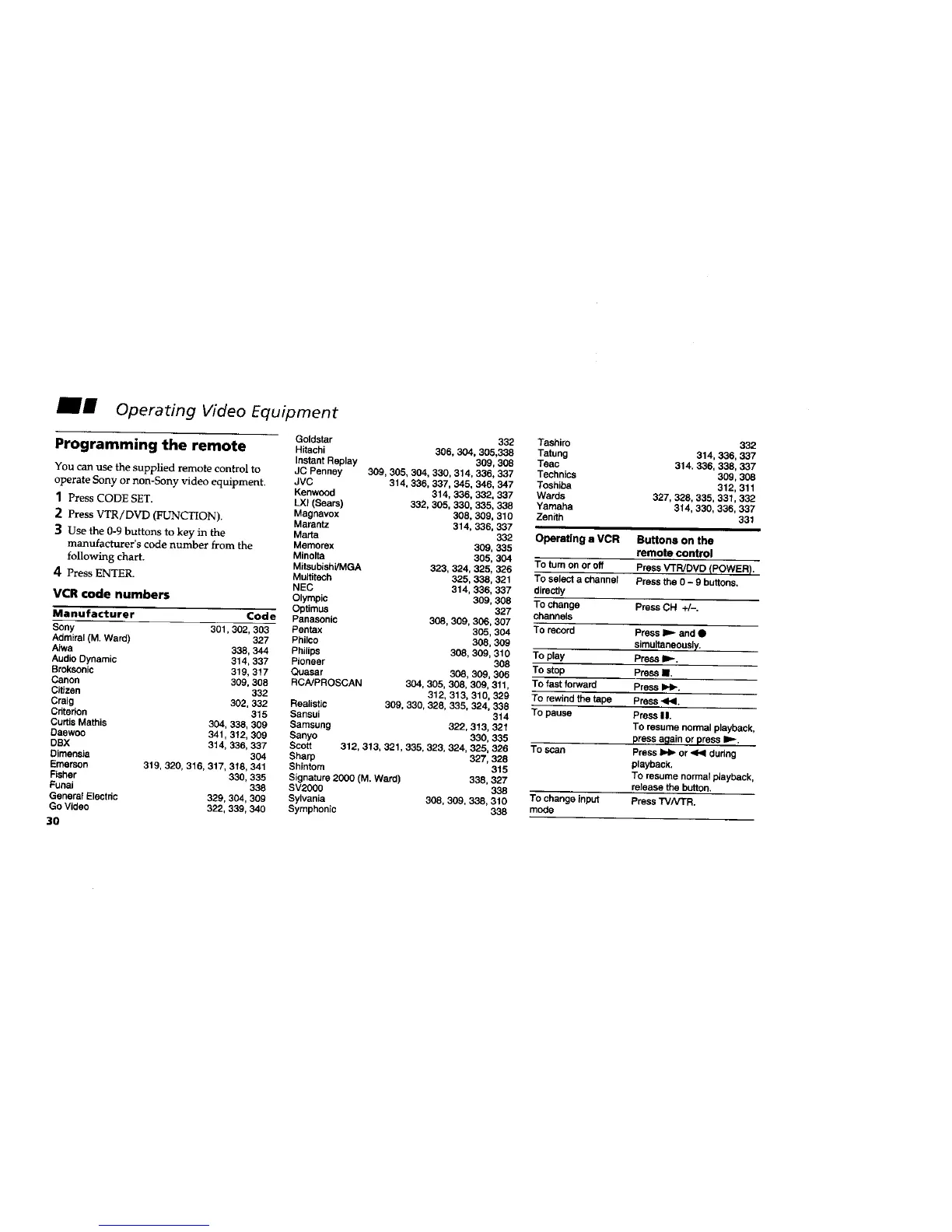
Programming the remote
You can use the supplied remote control to
operate Sony or non-Sony video equipment.
] Press CODE SET.
2 Press VTR/DVD (FUNCTION),
3 Use the 0-9 buttons to key in the
manufacturer's code number from the
following chart.
4 Press ENTER.
VCR code numbers
Manufacturer Code
Sony 301,302, 303
Admiral (M. Ward) 327
Aiwe 338, 344
Audio Dynamic 314, 337
Broksonic 319, 317
Canon 309, 308
Citizen 332
Craig 302, 332
Cdtedon 315
Curtis Mathis 304, 338, 309
Daewoo 341,312, 309
DSX 314, 336, 337
Dimensia 304
Emerson 319, 320, 316, 317, 318, 341
Fisher 330, 335
Fonai 338
General Electdc 329, 304, 309
Go Video 322, 339, 340
3O
Goldstar 332
Hitachi 306. 304, 305.338
tnstant Replay 309,308
JC Penney 309, 305, 304, 330, 314, 336, 337
JVC 314, 336, 337, 345, 346, 347
Kenwood 314, 336, 332, 337
LXI (Sears) 332, 305, 330, 335, 338
Magnavox 308, 309, 310
Marentz 314, 336, 337
Matte 332
Memorex 309, 335
Minolta 305. 304
Mitaubishi/MGA 323, 324, 325, 326
Multitech 325, 338, 321
NEC 314, 336, 337
Olympic 309, 308
Optimus 327
Panasonic 308, 309, 306, 307
Pentax 305, 304
Phi_,o 308, 309
Philips 308, 308, 310
Pioneer 308
Quasar 308, 309, 306
RCNPROSCAN 304, 305, 308, 309, 311,
312, 313, 310, 329
Realistic 309, 330, 328, 335, 324, 338
Sansui 314
Samsung 322,313. 321
Sanyo 330, 335
Scott 312,313. 321,335, 323, 324, 325, 326
Sharp 327, 328
Shintom 315
Signature 2000 (M. Ward) 338, 327
SV2000 338
Sylvania 308, 309, 338, 310
Symphonic 338
Tashiro
Tatung
Teec
Technics
Toshiba
Wards
Yamaha
Zenith
Operatinga VCR
To tum on or off
To select a channel
directly
To change
channels
To record
TO play
To stop
To fast forward
To rewind the tape
To pause
To scan
TO change input
mode
332
314, 336, 337
314. 336, 338,337
309,308
312, 311
327,328, 335, 331,332
314, 330, 336, 337
331
Buttons on the
remote control
PressVTR/DVD (POWER).
Pressthe0 - 9 buttons.
PressCH +/-.
Press_ and •
simultaneously.
Pressle_.
PressII,
PressIH_.
Press-_1.
PressII.
To resumenormalplayback,
pressagainorpressI=,,-.
Press_ or,4<1during
playback.
To resume normalplayback,
release the button.
PressTVNTR.






 To Next Page