Scorpio User Guide
16
12. GAIN Use ** toggle to select and adjust selected bus gain in 1
dB increments. [Off-16 dB]
13. MUTE COMS Selects muting of Coms 1, 2 sends and returns.
14. MUTE ALL Indicates mute status of bus. Blue icon = muted.
Toggle Mute All On/Off with the “Fav” toggle.
Outputs
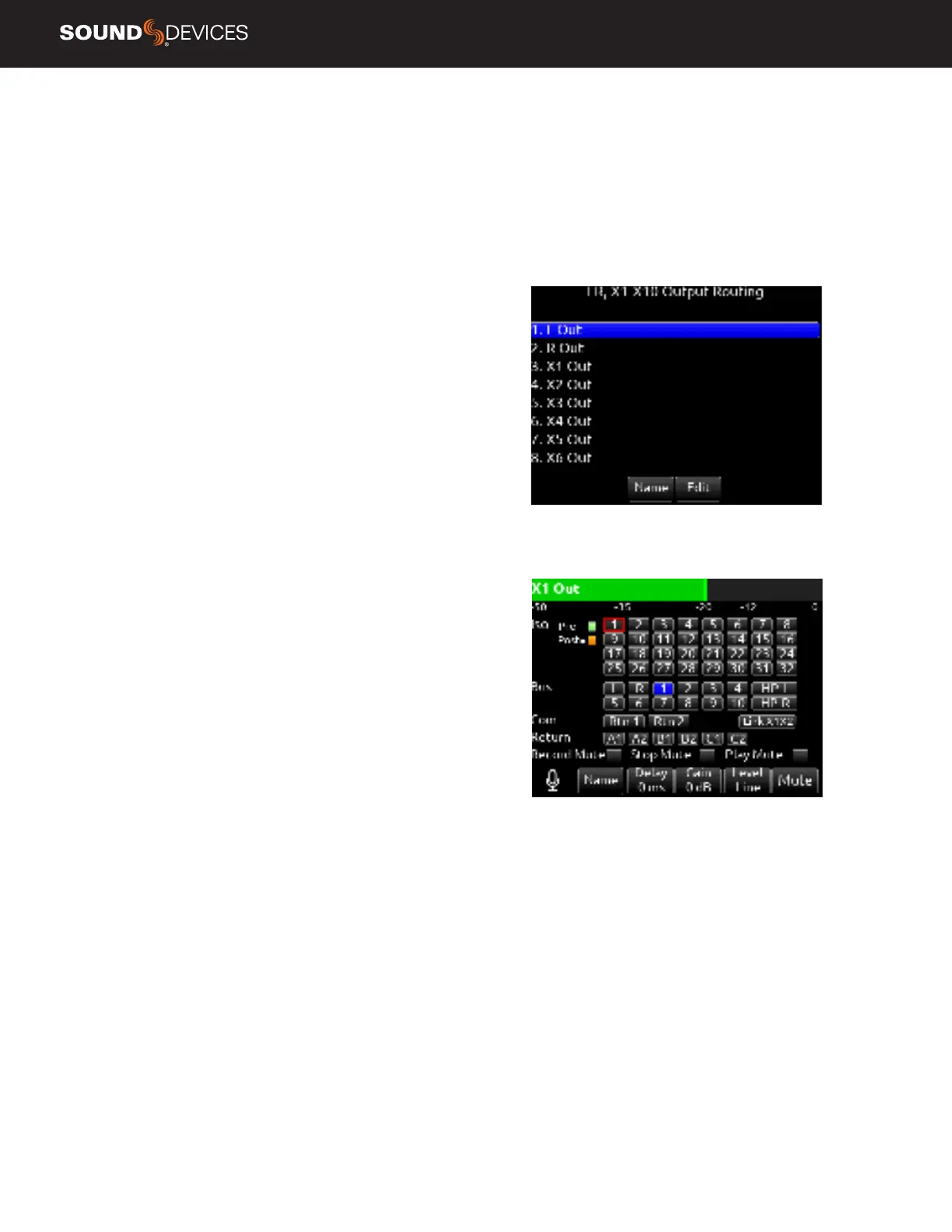
1. LR, X1-X10 OUTPUT ROUTING
Selects routing for L,R and X1-X10 outputs [L Out, R Out, X1, X2, X3,
X4, X5, X6, X7, X8, X9 and X10 Out]
Note:
Only a single source can be routed to an Output. If multiple
sources need to be routed, use a Bus.
NAME Opens a keyboard for naming the selected Output. Output
names appear in output meter views when a meter view preset has
Track Names enabled.
EDIT Enters the Output screen. The bus can also be entered by press-
ing the Sel or HP encoder.
A. ISO Selected source will contribute to the Output. (Green = Pre-
fade, orange = Post-fade [1-32])
B. BUS [L,R, 1-10, HP-L, HP-R]
C. COM [Rtn 1, Rtn 2]
D. RETURN [A1, A2, B1, B2, C1, C2]
E. RECORD MUTE Selects automatic muting of the output when in
Record mode. [Off*, On]
F. STOP MUTE Selects automatic muting of the output when in Stop
mode. [Off*, On]
G. PLAY MUTE Selects automatic muting of the output when in Play
mode. [Off*, On]
H. DELAY The output delay is continuously-variable in milliseconds
from 0-500 ms.
I. GAIN Selects amount of attenuation applied to the output. Toggle
the ** to select [0 dB to -50 dB and -inf]
J. LEVEL Selects output level type. [Line, -10, Mic, AES]
AES is available for L and R Outputs, AES is not available on X1-X10.
See AES Output for more information.
K. MUTE Indicates mute status of output (Orange = muted) Toggle
Mute On/Off with the “Fav” toggle.
L. LINK *-* Selects linking for two even-to-odd numbered adjacent
outputs. Links gain, mutes, and delays.
2. 10-PIN A OUT ROUTING
Selects routing for 10-Pin A outputs.
A. A1 Selects mix bus for A1 output [L,R, 1-10].
B. A2 Selects mix bus for A2 output [L,R, 1-10].
C. RECORD MUTE Selects automatic muting of the output when in
Record mode. [Off*, On]
D. STOP MUTE Selects automatic muting of the output when in Stop
mode. [Off*, On]
E. PLAY MUTE Selects automatic muting of the output when in Play
mode. [Off*, On]
F. DELAY The output delay is continuously-variable in milliseconds
from 0-500 ms.



 To Next Page
 Loading...