Page. 29 of 87
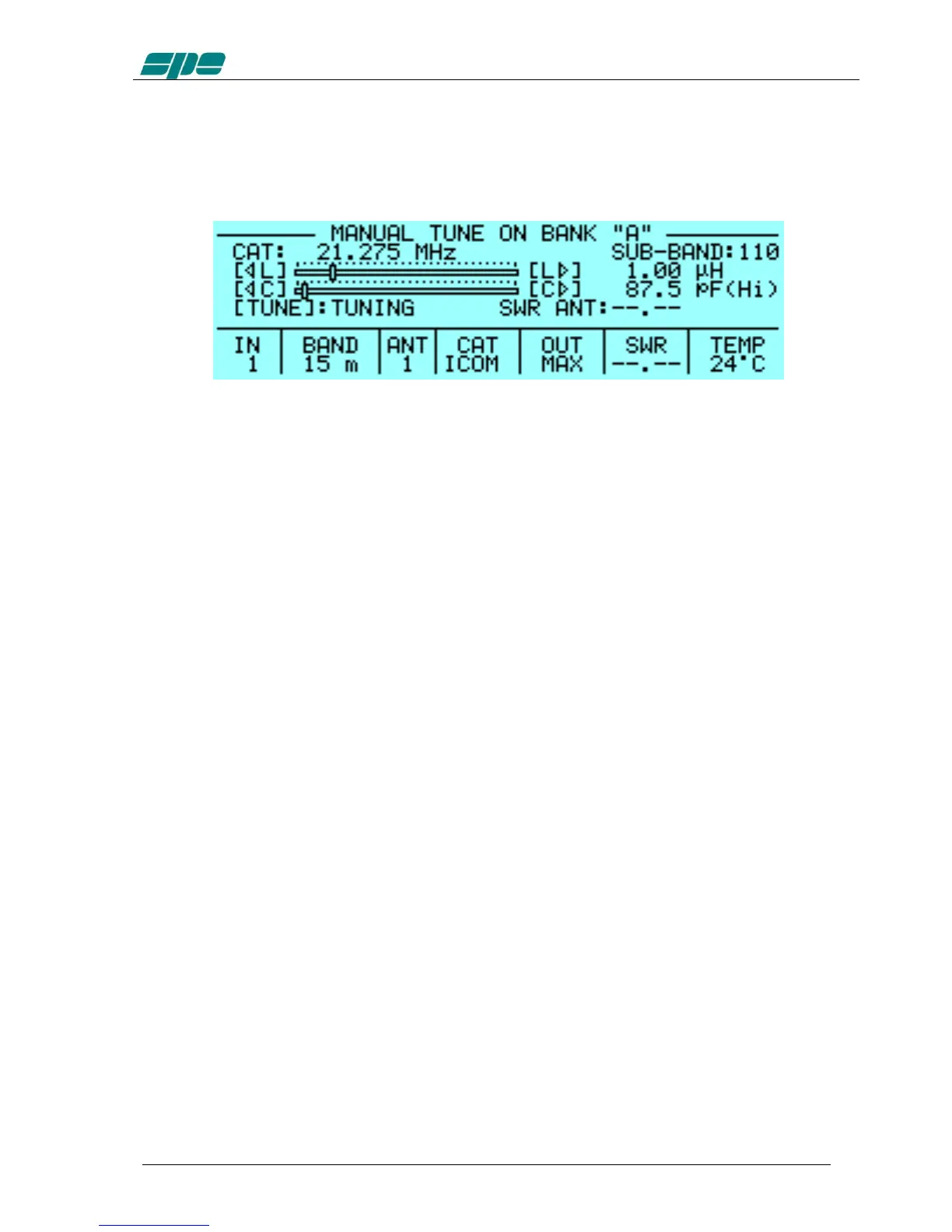
c) MANUAL TUNE: Allows you to tune the amplifier manually.
However achieving a better setting than that obtained by automatic
tuning is very unlikely.
Set your exciter to transmit a continuous RTTY or CW signal.
Then press the [◄ L], [L ►], [◄ C], [C ►] keys until you obtain the
minimum SWR.
The operating frequency and the sub-band are also shown on the
Display.
d) DISPLAY: Adjusts the backlight and the contrast of the display.
e) BEEP: On : All acoustic warning alarms operate and a beep confirms a
keystroke.
Off : In this condition, when you press a key there is no beep
feedback. But for all worning conditions and alarms, the
acoustic warnings are still functional.
f) START: Stby: Sets STANDBY mode at startup.
Oprt: Sets OPERATE mode at startup.
g) TEMP: °C: Displays temperature readout expressed in Celsius degrees.
°F: Displays temperature readout expressed in °Fahrenheit
degrees.
h) ALARMS LOG: Shows only the ten most recent "SERIOUS" alarms.
i) TUN ANT: Allows you to associate a tunable antenna to one of four ANT
connectors.
A "t" highlights the selected antenna.
j) RX ANT: Allows you to set a single receiving antenna.
An "r" highlights the selected antenna.
k) CONFIG: Select “BANK A” or “BANK B” (see item 4.6).


 To Next Page