Page. 77 of 87
Remote ON/OFF using RS-232.
With this new software release, the [ON] and [OFF] keys are fully enabled and work the
same way as they work on the USB version of the application.
However, there is a small technical detail to take into account about the [ON] key's
behaviour.
It acts on the DTR output line of the PC RS-232 serial COM port by generating a timed
positive pulse about every second or so across the link.
Since the “PORT” socket on the rear panel of the 1.3K-FA isn't equipped with any DSR
input line to handle this “switch-on” signal coming from the remote control application,
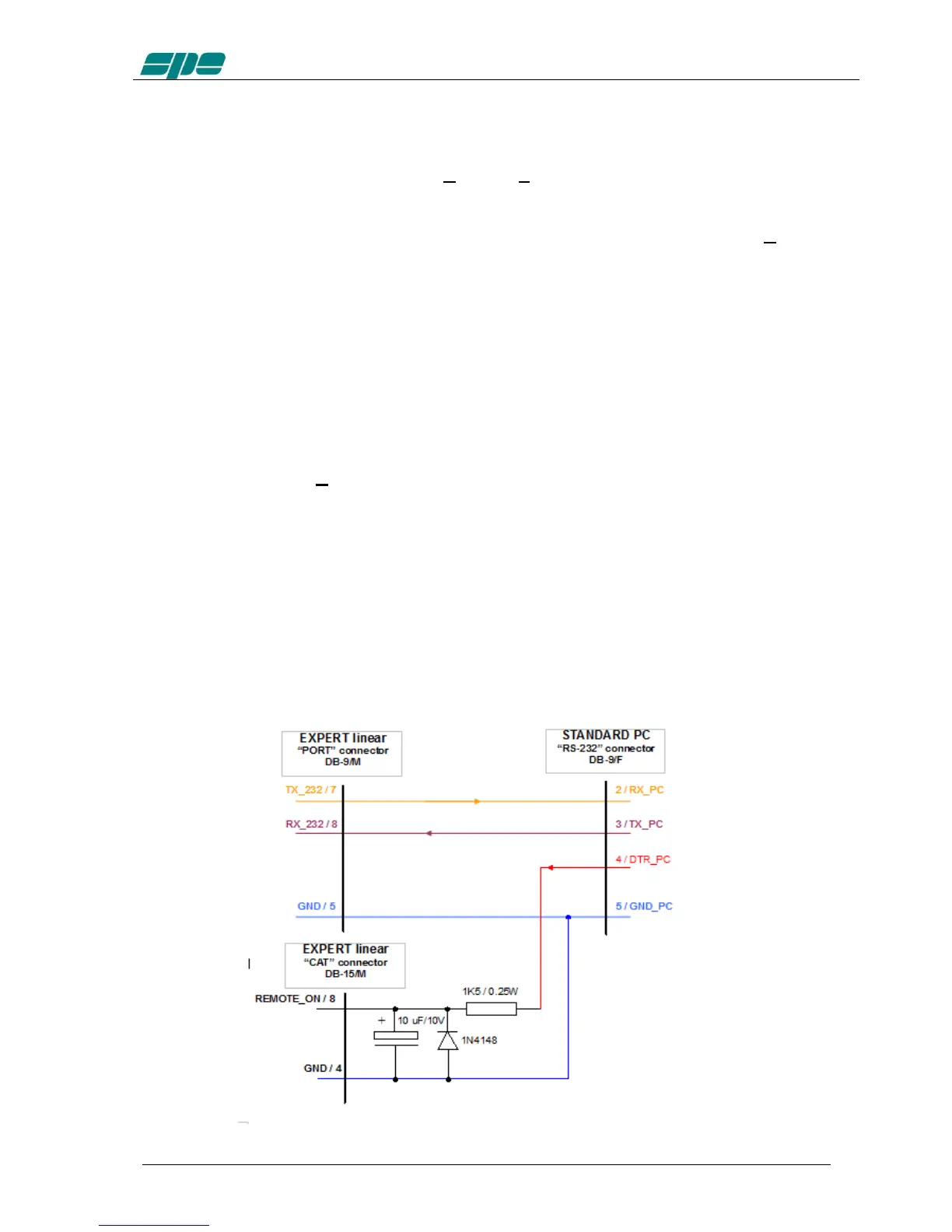
the most suitable solution is to wire a “cable branch” according to the schematics in the
following diagram.
This solution uses an already-existing feature of 1.3K-FA which involves the
“REMOTE_ON” input line, placed on both “CAT” sockets, which behaves the same way
as the front panel's [ON] key does.
Actually, it triggers a switch-on of the linear amplifier whenever a positive voltage level
greater than +5Vdc is applied to it.
A typical application for this “remote switch-on line”, is to wire it to the +13.8Vdc power-
supply which powers the transceiver. And a similar result can also be achieved by
wiring it to DTR output line coming from a PC, or from a remote device controlled by a
PC running Term_2K_232.exe using the suggested external R-C network drawn in the
schematic diagram below.
A typical RS-232 serial port like this ensures output voltage levels spanning from +/-
6.5Vdc (USB to serial adapters) and up to +/- 11Vdc (standard RS-232 ports whose
circuit is based upon the popular MAX232 line-driver).



 To Next Page