EasyManua.ls Logo

Speechi SuperGlass+ - Page 17

Speechi SuperGlass+
37 pages
Print Icon
To Next Page IconTo Next Page
To Previous Page IconTo Previous Page
Loading...
© Speechi (08/29/2023)
User Manual l SpeechiTouch SuperGlass+ Interactive Display | HP-006(-C)
17
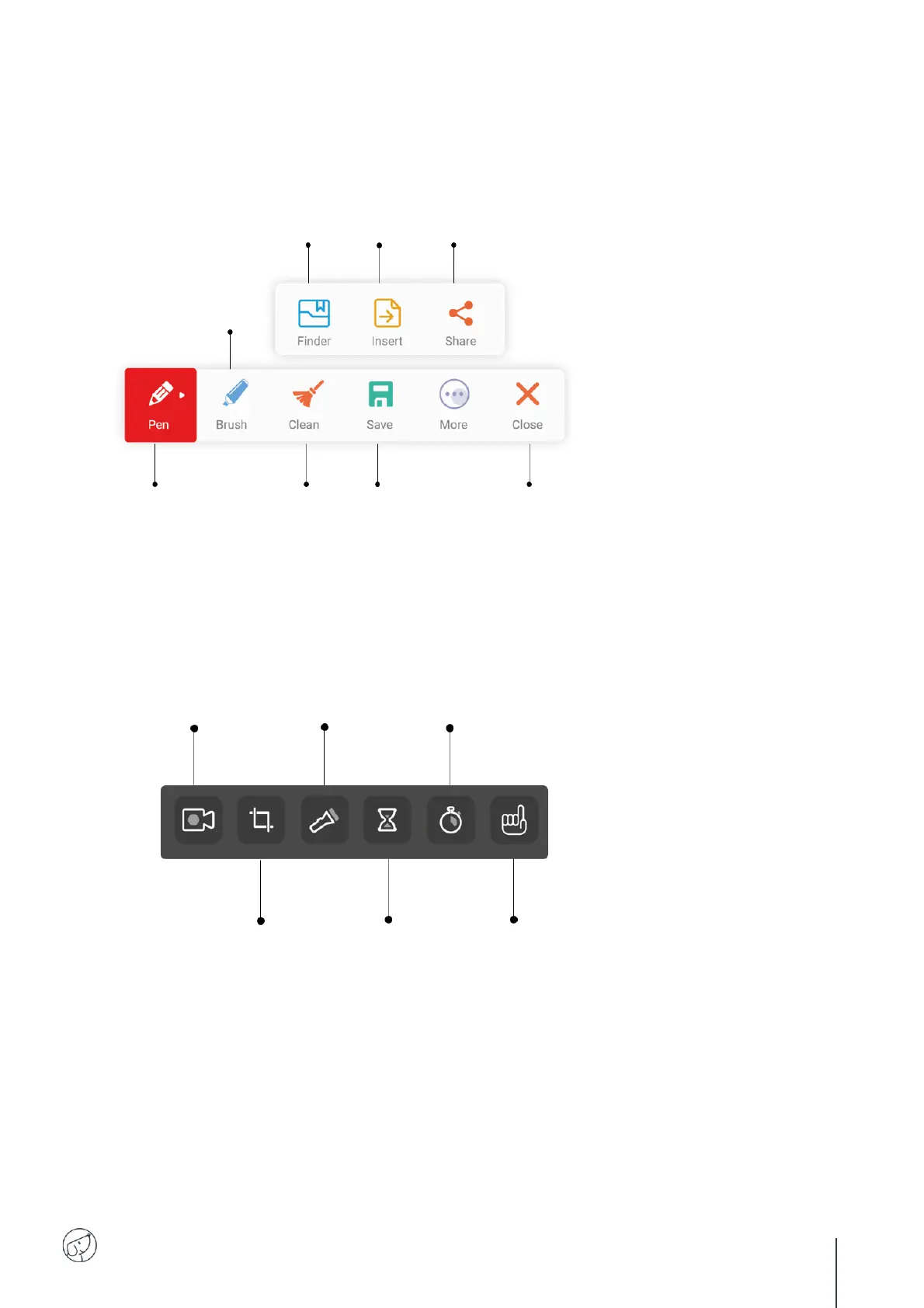
Annotation Bar
Tools Bar
Annotation pen
Short press to
change color.
Delete
all annotations.
Highlighter
Short press to
change color.
Save
all annotations.
Close
Clore the tools bar.
Share
your annotations.
Insert
your annotations
on Note.
Finder
Find your capture
in the Finder.
Video recording
of what’s happening on the screen
and audio if a camera is
connected to the screen.
Spot
Spotlight part of
the screen.
Stopwatch
Start a stopwatch.
Screen photo capture
full or partial. Can be
inserted directly into a
Note presentation.
Hourglass
Start a countdown.
Je Lève La Main
Access the software to
create quizzes and surveys.

Related product manuals