4. Connecting the display
Power supply connection
Connect the display to the mains using the power socket. (see Connecting the power supply)
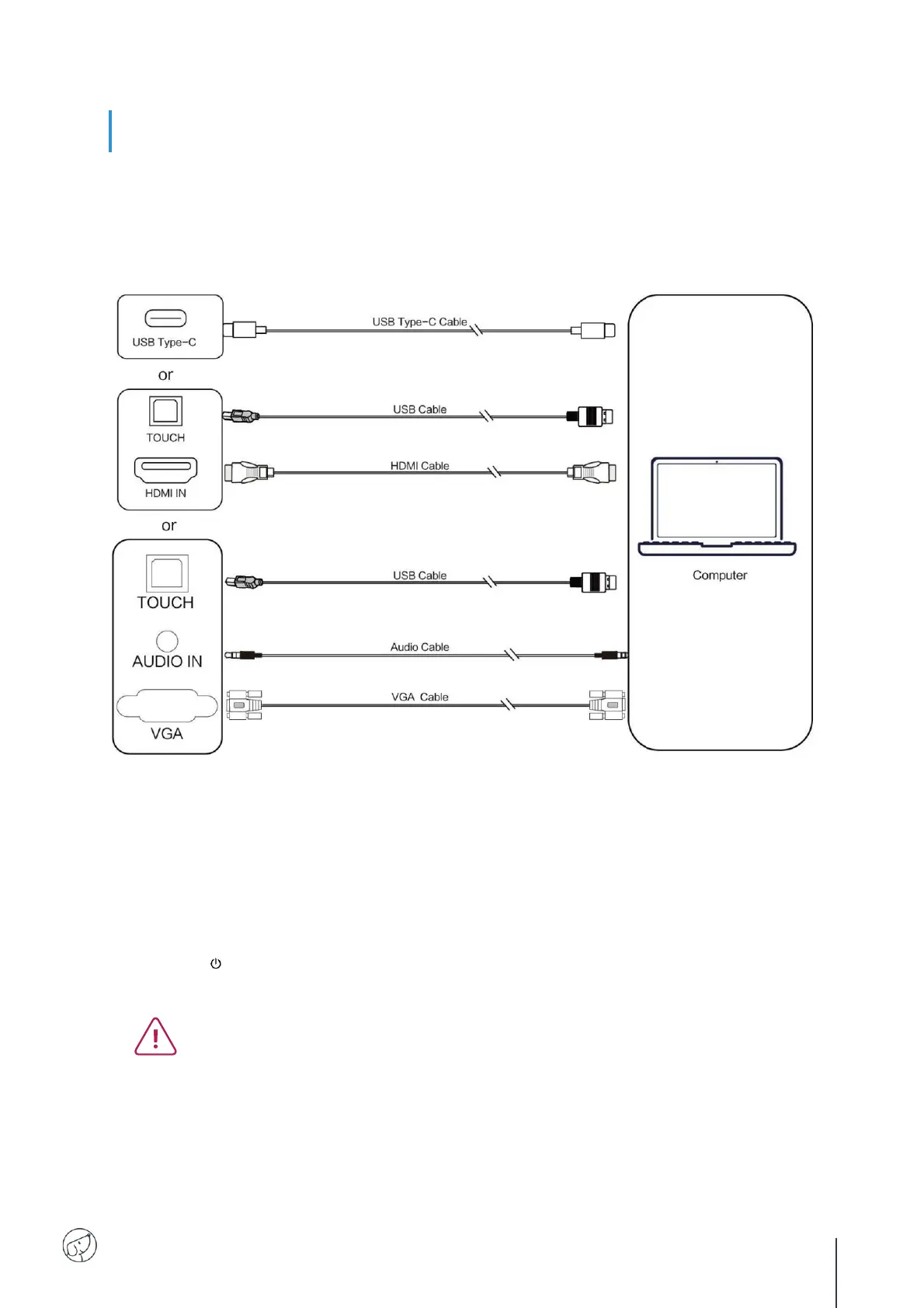
(1) Connection to an external computer
To connect an external computer to the display, follow these operating instructions, preferably with the
hardware switched off.
1. Use USB Type-C cable to connect the computer (or use VGA cable to connect to VGA output
port of external computer, and meanwhile use headphone audio cable to connect to external
computer audio output interface and use USB cable to connect to external computer USB
port. Or use HDMI cable to connect to HDMI output port of external computer and use USB
cable to connect to external computer USB port).
2. After cable connection, plug in power cord, and switch power on.
3. Start external computer.
4. Press key, and the equipment is power on.
5. Switch the input source to the USB Type-C/HDMI/VGA channel in the main menu.
(1) External computer input, equipment's best resolution is 3840*2160.
(2) You can also connect your computer with the HDMI cable if it has an HDMI port.
Remember to disconnect the display and peripheral before connecting.
(3) By connecting your interactive display to your computer via USB type C, only 1 cable
will be required, if your computer's USB-C port is compatible (the video stream and
touch will pass through the same cable).



 To Next Page