User Manual l SpeechiTouch SuperGlass+ Interactive Display | HP-006(-C)
3. Controls and connectivity
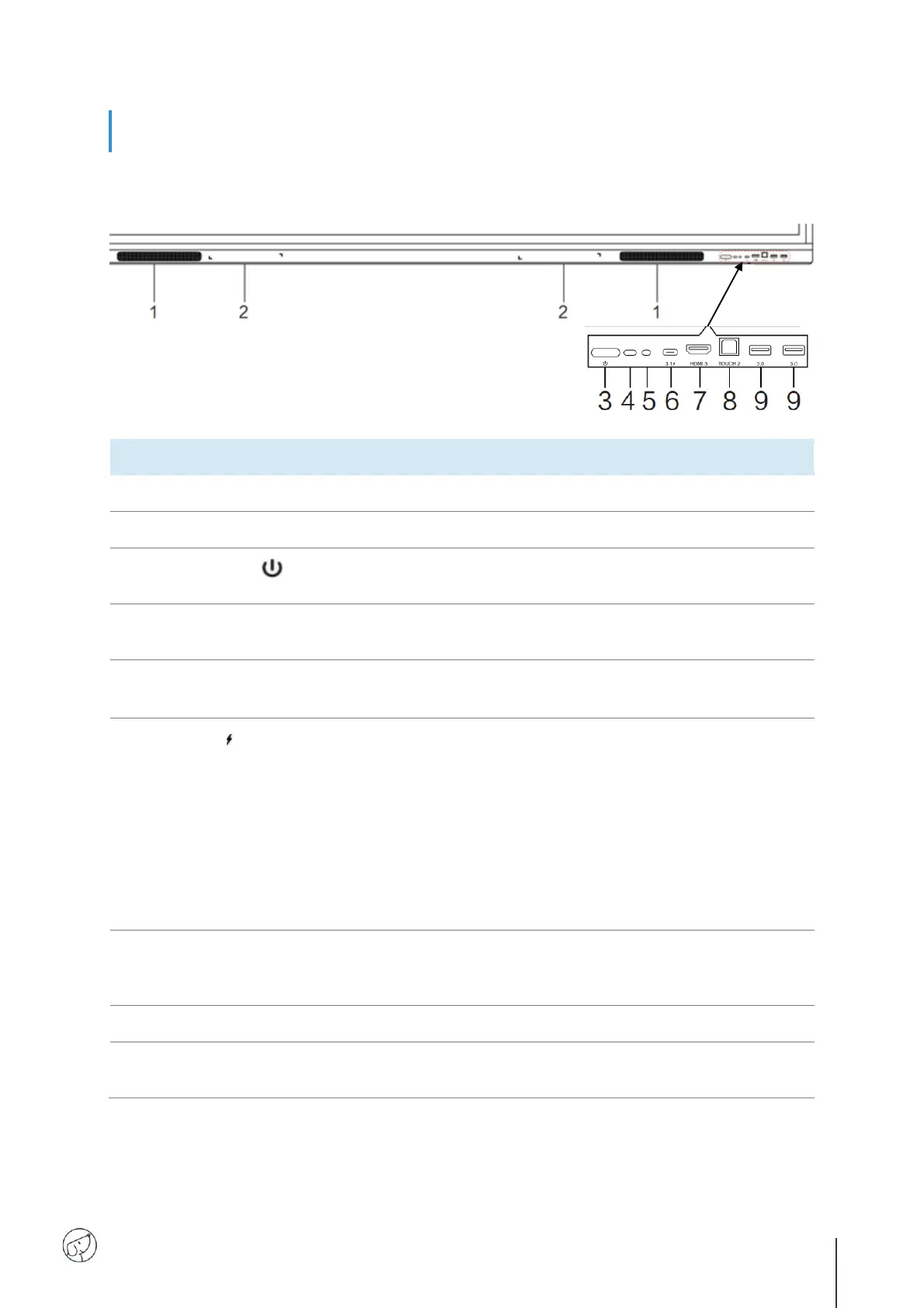
3.1. Front of display
Area for placing the absorptive magnetic pen.
Tap to enter energy saving function press at least 2 seconds to
enter standby mode.
Remote control signal
receiver
Receive remote control signal, don't put anything in between.
Sense ambient light to adjust backlight for appropriate
brightness,it can be switched in the menu.
Support charging, data transmission, extension for audio and
video output interface, etc.
Note:The maximum rated power of the USB Type-C port of
this product is 65W. When using this port to charge electronic
devices, the charging power of the electronic device cannot
exceed the rated power of this port. If the charging power of
the electronic device exceeds the rated charging power of this
port, please Do not directly use this port for charging.
High-definition multimedia interface signal input, connect to
devices with HDMI output 7 interface (personal computer with
HDMI output, set-top box, or another video device).
Touch signal output to the external computer.
Connect USB devices such as mobile hard disk, USB keyboard,
mouse, USB drives, etc.



 To Next Page