58
9.0 Interfaced EFTPOS
The following section describes interfacing with the i5100 EFTPOS terminal.
Interface Connection
If you are using an interfaced terminal
the instructions in the diagram below
illustrate how to connect the terminal to
the cash register.
Instructions on configuring cash register
to interface with the terminal will be
provided by your cash register supplier.
INTERFACED EFTPOS
Interfaced EFTPOS from St.George is
an i5100 EFTPOS terminal receiving
transaction information from a computer
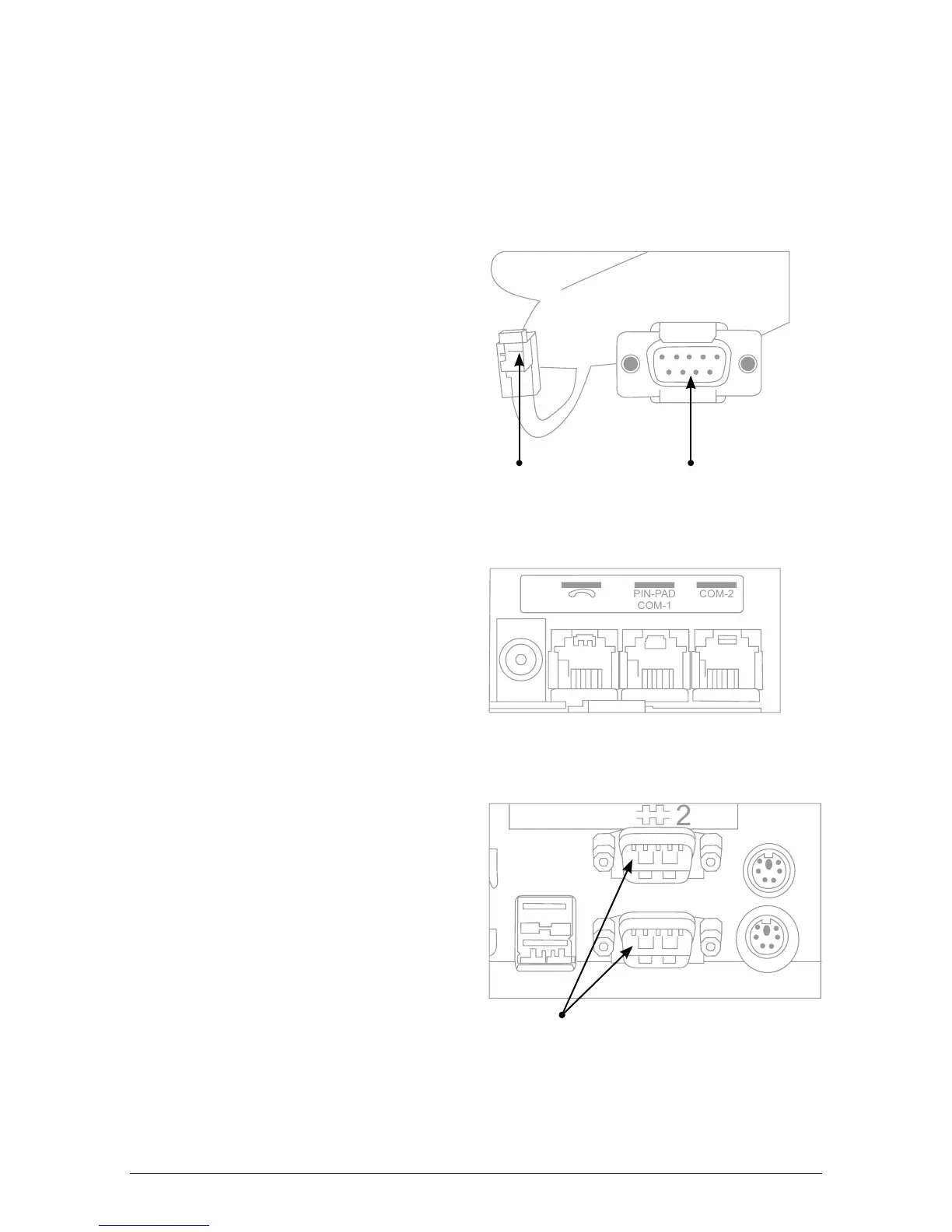
based cash register. The cable provided
(see Figure 1) is required to connect the
cash register.
The cable has a “6 Flat connector” on
one end that is inserted into the “Pinpad
COM 1 port” on the i5100 EFTPOS
terminal (see Figure 2).
The other end of the cable has a “9-pin”
connection that is inserted into an
available COM port on the cash register
(see Figure 3). Generally these ports
are at the back of the register.
Note: The interface cable uses a “9-pin
COM port. If a “25-pin” COM port is to
be used then a suitable adaptor must be
purchased. St.George does not supply
this adaptor.
DIAL-UP EFTPOS MERCHANT OPERATING GUIDE INTERFACED EFTPOS
Figure 2 – Base of Terminal



 To Next Page