5DIAL-UP EFTPOS MERCHANT OPERATING GUIDE GETTING STARTED
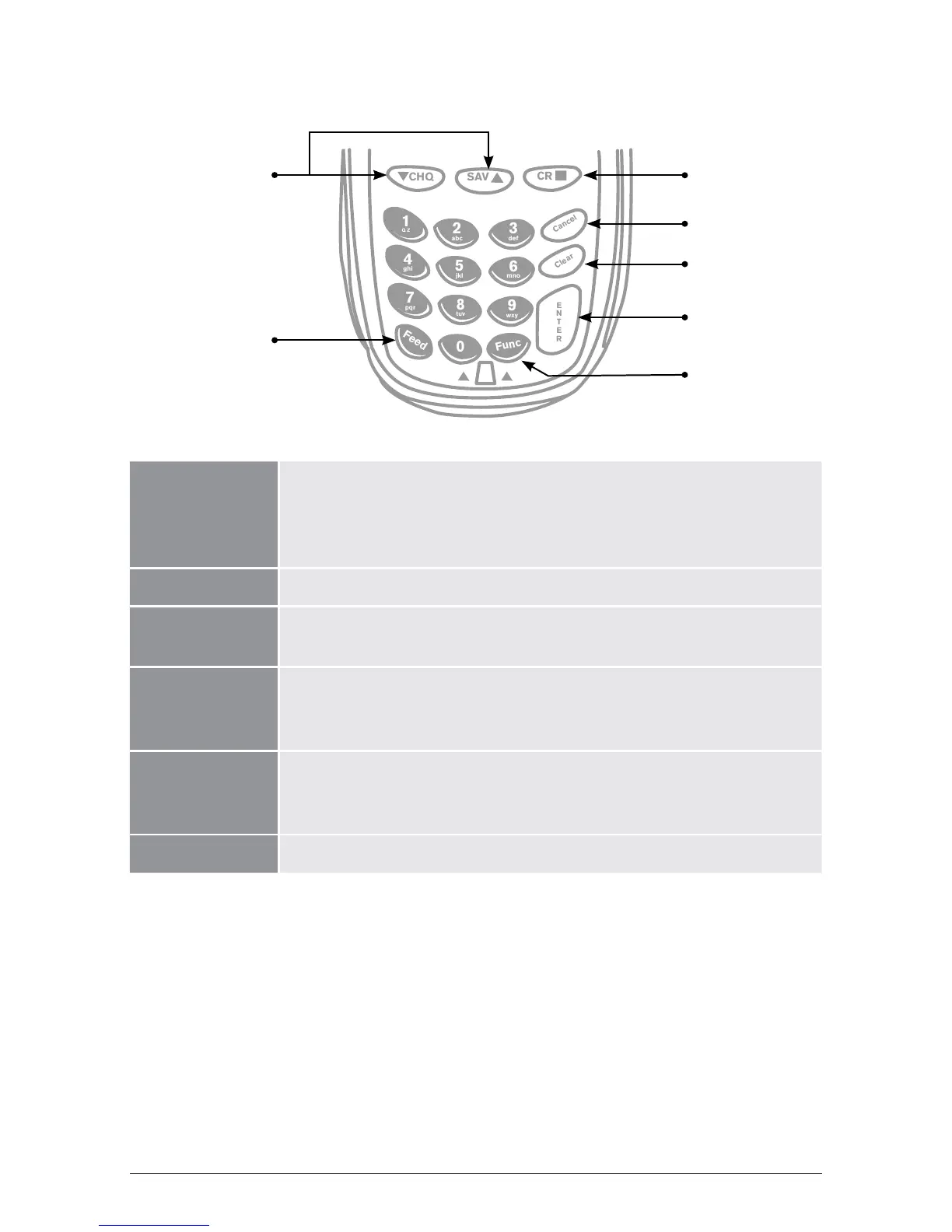
2.2 Keypad Layout
Account Keys: The CHQ (Cheque), SAV (Savings) and CR (Credit) keys (also
referred to as Soft Function Keys) allow the user to access the
particular account type required when prompted. These keys are
also used to access the terminal function menus.
Paper Feed: The FEED key performs a 20mm paper feed.
Cancel Key: The CANCEL key is used to cancel the current function and
return the terminal to the idle state.
Clear Key: The CLEAR key is used to correct any invalid data entered. It is
also used to cycle backwards through the transaction steps if an
error is made.
Enter Key: The ENTER key is used to confirm data entered or displayed, and
to cycle forwards through the menus. It is also used to Power on
the terminal.
Function Key: The FUNCTION key is used to access the terminal functions.



 To Next Page