Hot:
The Hot message is used to indicate that the counting unit is outside of its rated
temperature range. After the counting unit cools down, it will automatically begin
normal operation.
WATERPROOF DISPLAY OPERATION
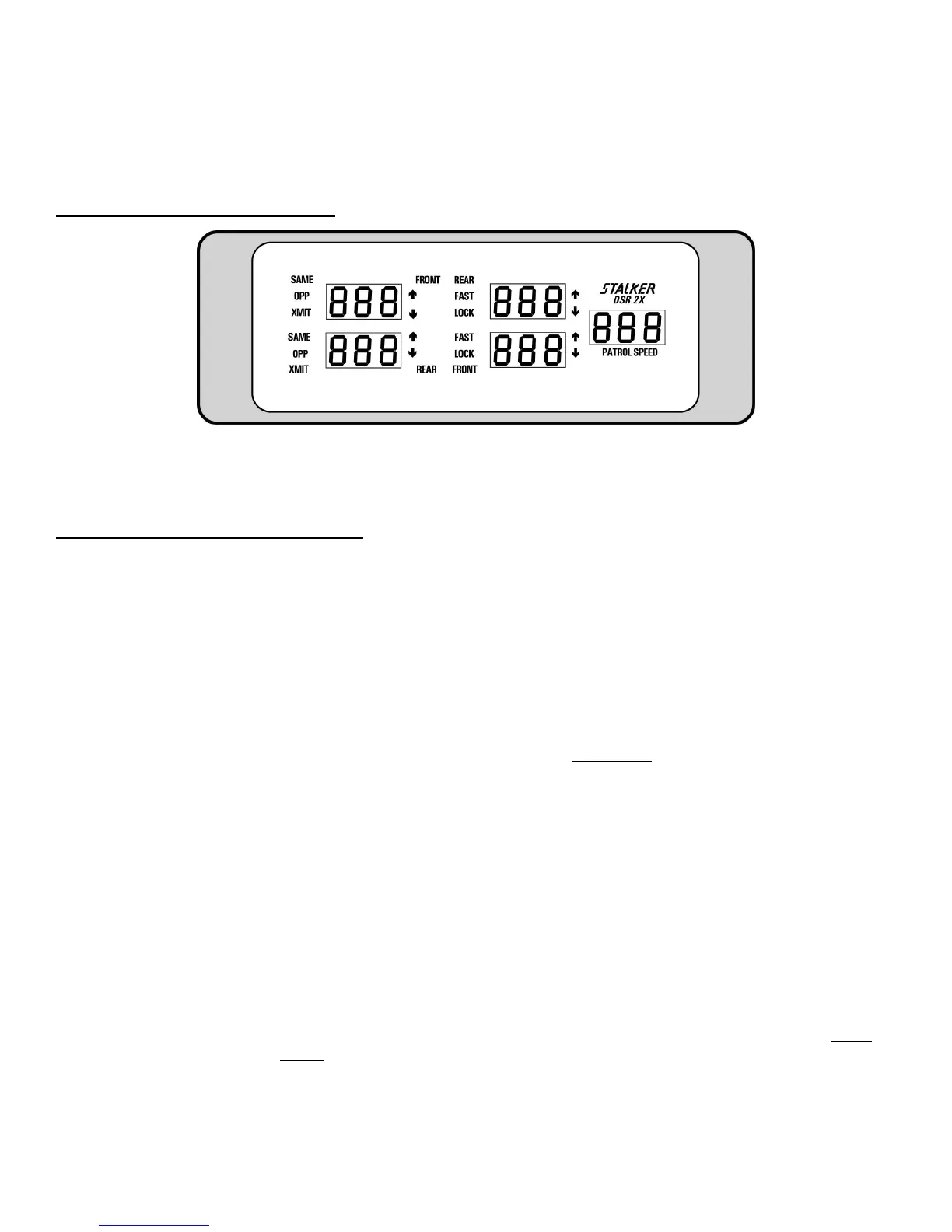
Waterproof Display Front Panel
The S
DSR 2X waterproof display unit presents the radar operator with a clear and logically organized picture of how the unit
is operating and the targets that it is tracking. The operator knows in a glance the speed of the target, its direction of travel, and its
position relative to the patrol car. Display brightness can be manually adjusted to compensate for ambient conditions. Other features
include:
Waterproof Display Unit Functions
POWER: The POWER button, the main On/Off power switch, is located on the Waterproof Remote
Control.
TARGET WINDOWS: The two left, three-digit LED windows are the target windows. The top window displays the
speed of the strongest target entering the front radar beam, while the bottom window displays the
speed of the strongest target entering the rear radar beam. While in stationary mode, both same
lane and opposite lane targets can be monitored simultaneously for both front and rear antennas.
The four target areas are known as Target Zones. When a strong target is displayed in either target
window, an arrow icon located to the right of the window indicates the target’s direction of travel
relative to the patrol vehicle. In moving mode, two Target Zones can be monitored, one front and
one rear.
MIDDLE WINDOWS: The two middle, three-digit LED windows are dual purpose
windows. First, they are used for
locking the strongest target shown in the corresponding left window. While not containing a
“locked” speed, the middle windows are used to display the faster target in the radar beams. The
LOCK and FAST icons are used to indicate the current status of the window.
The middle windows are used to store target speeds that the operator chooses to "lock" using the
appropriate front or rear LOCK key. The presence of the LOCK icon indicates that the middle
window contains a "locked" target speed. Every speed lock will be followed immediately by a 3-
word voice enunciator that indicates antenna/radar mode/direction.
Examples: FRONT/STATIONARY/CLOSING, FRONT/STATIONARY/AWAY,
REAR/STATIONARY/CLOSING, REAR/STATIONARY/AWAY,
FRONT/OPPOSITE/CLOSING, REAR/OPPOSITE/AWAY, FRONT/SAME/CLOSING,
FRONT/SAME/AWAY, REAR/SAME/CLOSING, OR REAR/SAME/AWAY.
Only one target speed can be locked.
PATROL WINDOW: The right, three-digit LED window is the patrol window. In moving mode, the operator should
always verify that the patrol window is tracking the patrol vehicle’s speedometer. After locking a
target speed, the patrol window may be "blanked" by pressing the PS BLANK key. Restore the
patrol speed by pressing the PS BLANK key a second time.
9



 To Next Page