HOW FASTER SPEED TRACKING HELPS THE PATROL OFFICER
Faster Speed Tracking can be enabled or disabled through the Operator Menu (see page 6) or through the Options Menu (see page 46).
The following examples are Faster targets under various conditions. In addition to the speeds displayed in each window, carefully
note the icons illuminated.
Faster mode allows S
DSR 2X to track a smaller high-speed target that was previously undetectable because a stronger target
shielded the weaker (smaller) target from normal (strongest target) speed measurement. The classic example is where a speeding
sports car passes a slower moving eighteen wheeler. The Faster sports car, although clearly speeding, could not be measured because
the strongest truck target captured the target display window. S
DSR 2X with Faster capability, however, will display the
speed of the strongest target (the truck) in the target window, while the speed of the Faster target (the sports car) will appear in the
middle Faster window.
S
DSR 2X simultaneously tracks both targets: however, the target window is always reserved for the strongest target and the
Faster window is reserved for the Faster
target. When the Faster target becomes the strongest target, the Faster target’s speed will
transfer to the strongest target window. Either the strong target or the Faster target’s speed can be locked. See the examples below:
Moving Mode Example:
L
O
P
E
T
A
T
S
S
A
X
E
T
E
C
I
P
O
L
I
C
E
← 60 mph
← 72 mph
→ 55 mph
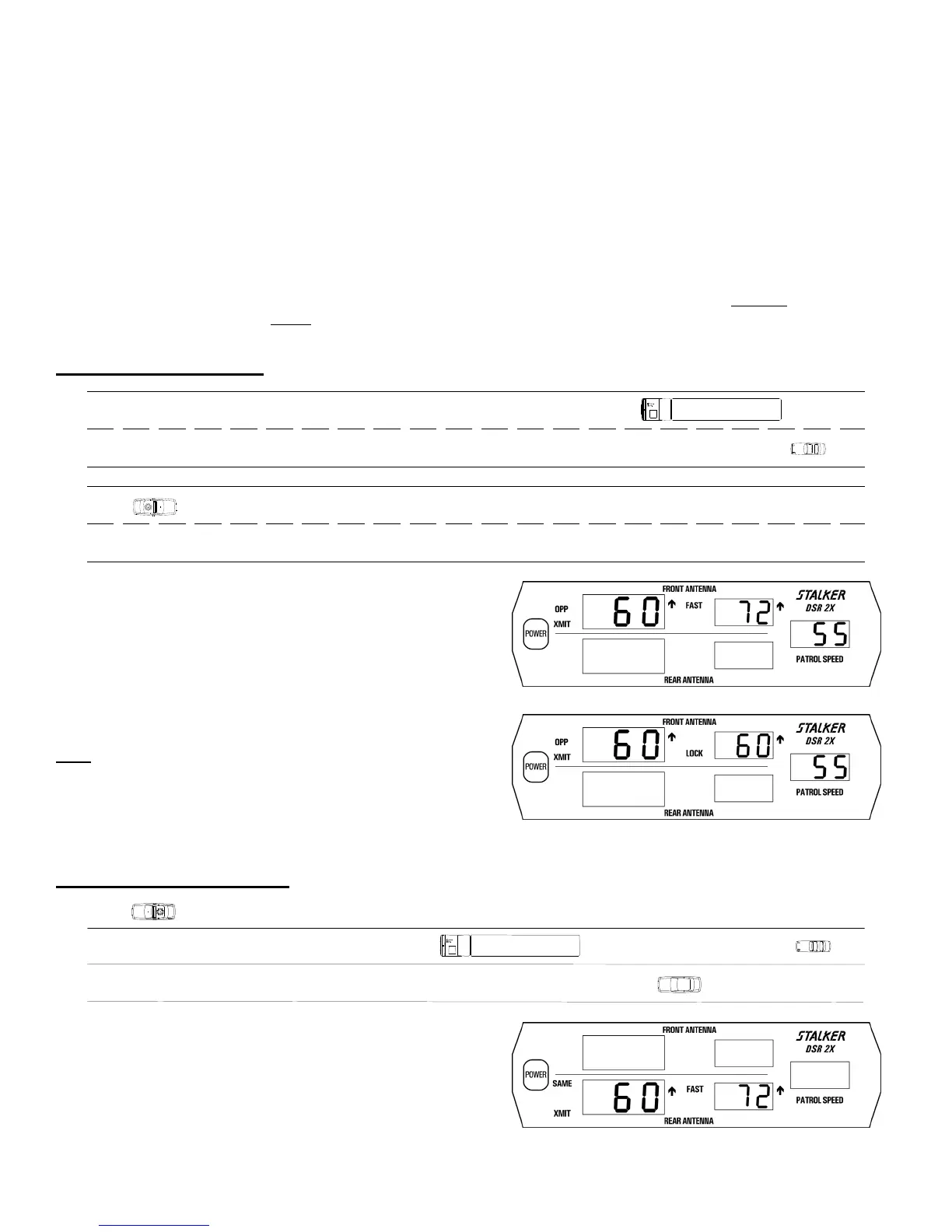
A Patrol vehicle is cruising at 55 mph. Two opposite lane targets are
approaching from the front - a 60 mph truck and a 72 mph sports car
behind the truck. The 60 mph strongest out-front target (the truck)
appears in the target window and the 72 mph Faster target (the sports
car) appears in the middle window (Fig. 53). Either the strong target
or the Faster target (with Fast Lock Remote only) can be locked.
Fig. 35
The 60 mph strongest target can be locked, by pressing the
Hold
│Strg Lk/Rel key on the Fast Lock remote or the OPP
LK/REL key on the Instant On remote and the voice enunciator will
announce Front/Opposite/Closing. Note how the middle window
changes from a Faster window to a Lock window (Fig. 36). The
FAST icon has been replaced by the LOCK icon. The middle
window is therefore defined by the icon that is associated with it.
Fig. 36
Stationary Mode Example:
A
T
S
E
C
I
P
O
L
I
C
E
← 72 mph
← 60 mph
← 65 mph
A Patrol vehicle is parked at the top of a hill monitoring approaching
traffic with his rear antenna. The first target, a 60 mph truck, is the
strongest out-front target and appears in the target window (Fig. 37).
The third target, the 72 mph Faster sports car, is tracked in the middle
Faster window. Either the strong target or the Faster target (with Fast
Lock Remote only) can be locked by pressing the appropriate LOCK
key. After lock, the voice enunciator will announce
Rear/Stationary/Closing.
Fig. 37
30



 To Next Page