REAR TRAFFIC ALERT
Rear Traffic Alert, a proprietary new feature of the S DSR 2X, is designed to warn the patrol officer of rapidly overtaking rear
same-lane traffic. Rear Traffic Alert is active when the patrol vehicle is most vulnerable to rear-end collisions - pulling into traffic
from a standing start. If the S
DSR 2X senses a rear approaching vehicle closing at a speed in excess of the user adjustable
approach speed, it prompts the officer with a distinctive “English Horn” audio sound and flashes ALE rt in the rear antenna speed
windows.
Rear Traffic Alert can be disabled in the OPTIONS MENU (See page 46). Please contact Applied Concepts, Inc. at 1-800-S
or your Factory Sales Representative. Rear Traffic Alert can also be disabled by setting the closing speed to a high speed such as 200.
Rear Traffic Alert is always active (unless disabled in the OPTIONS MENU – see page 46). Rear Traffic Alert is independent of the
rear target zone selection – either the Rear Opposite or Rear Same target zone can be selected. In a traffic alert condition, the 2X will
sound the alert tone and flash the alert display as long as the threat persists. Once the threat is gone, the 2X will automatically resume
tracking the rear targets. Rear Traffic Alert will be disabled if the rear antenna is placed in HLd (hold).
With Rear Traffic Alert enabled, go to the OPERATOR MENU (See page 6) to select the Rear Traffic Alert closing speed. In the
OPERATOR MENU, repeatedly press the MENU key until ALE rt is displayed. Set the desired Rear Traffic Alert speed by using the
Ï and Ð keys (the factory default speed is 30 mph). Pressing the Ï key or the Ð key will initially change the number count slowly,
but after about 1 second, the counting will speed up. Exit the OPERATOR MENU mode and return to radar mode by pressing any of
the four zone keys.
Rear Traffic Alert Requirements:
1. The radar must have VSS cabling installed in the vehicle and must be operating in VSS mode.
2. The rear antenna must be transmitting with either the Rear Opposite target zone or the Rear Same target zone selected.
3. Direction sensing will be used to ensure that the rear traffic is closing on the patrol vehicle.
4. The radar sensitivity is reduced to less than SEn 1 (to ensure close proximity) for measurement of approaching rear traffic.
All rear targets that are “outside” of the Rear Traffic Alert requirements will have normal sensitivity.
5. To reduce Rear Traffic Alert warnings while traveling at a steady speed, slowing down to turn, or slowing down to a stop, the
radar only enables Rear Traffic Alert when it senses vehicle acceleration.
ABOUT TARGET ZONES
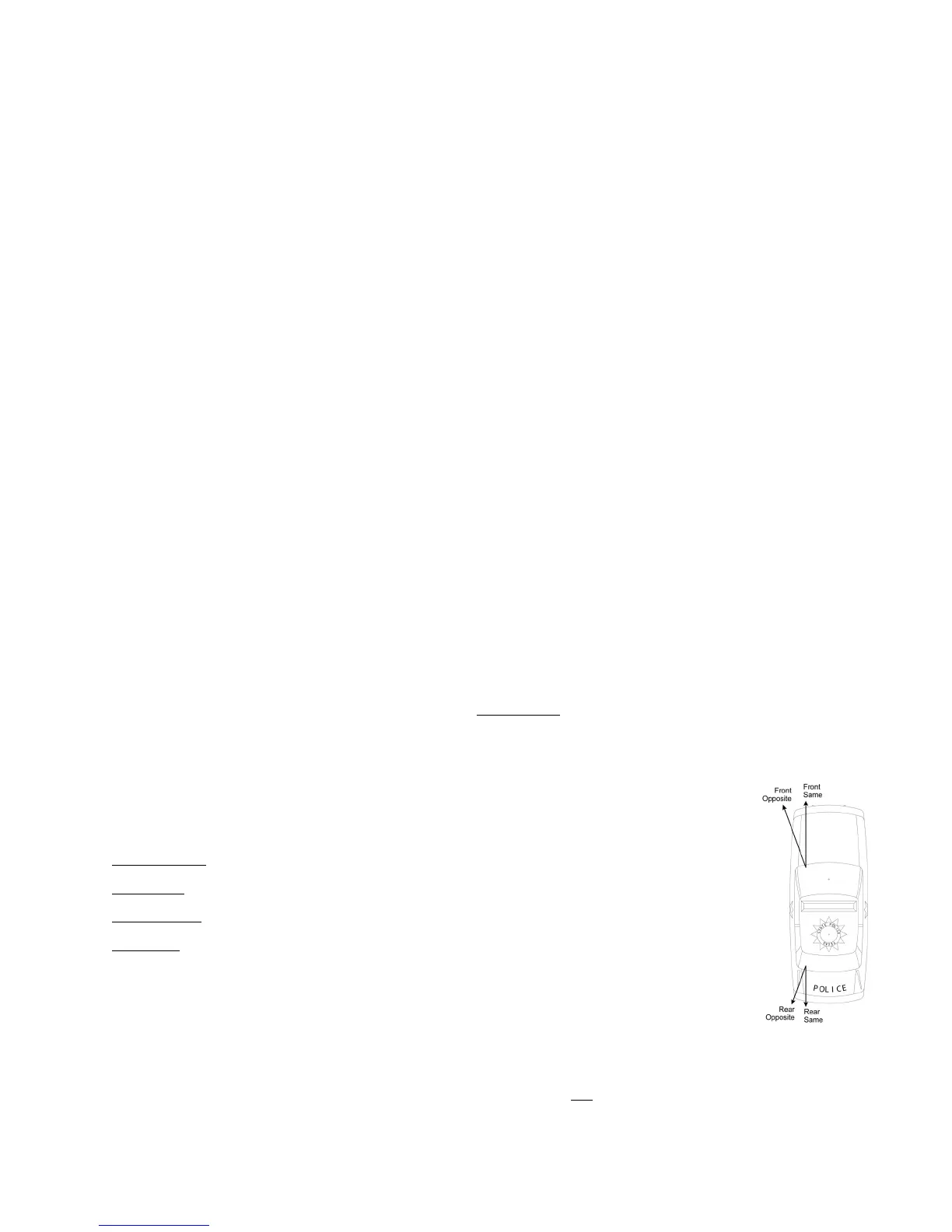
This manual refers to the four areas that a traffic radar monitors as: Target Zones
Conventional moving radar can monitor traffic in only one Target Zone. Now, with the introduction of the S
DSR 2X, two
moving target zones and all four stationary target zones can be monitored simultaneously. S
DSR 2X is actually two
independent radar units operating on a single display unit.
Those Target Zones are:
• Front Opposite
• Front Same
• Rear Opposite
• Rear Same
In moving mode, two Target Zones can be simultaneously monitored – one front Target Zone and one rear
Target Zone.
In stationary mode, all four Target Zones can be simultaneously monitored. The direction arrows indicate
target direction for both the front and the rear display windows. Or, if desired, only one front Target Zone and one rear Target Zone
can be simultaneously monitored.
S’s superior Direction Sensing Radar technology monitors both the speed and
direction of vehicles traveling in each Target
Zone. Voice enunciators confirm a locked target vehicle’s position and direction relative to the patrol car for quick confirmation.
5



 To Next Page