62
742.221 | 12.04
EN
8.7.2 Operation
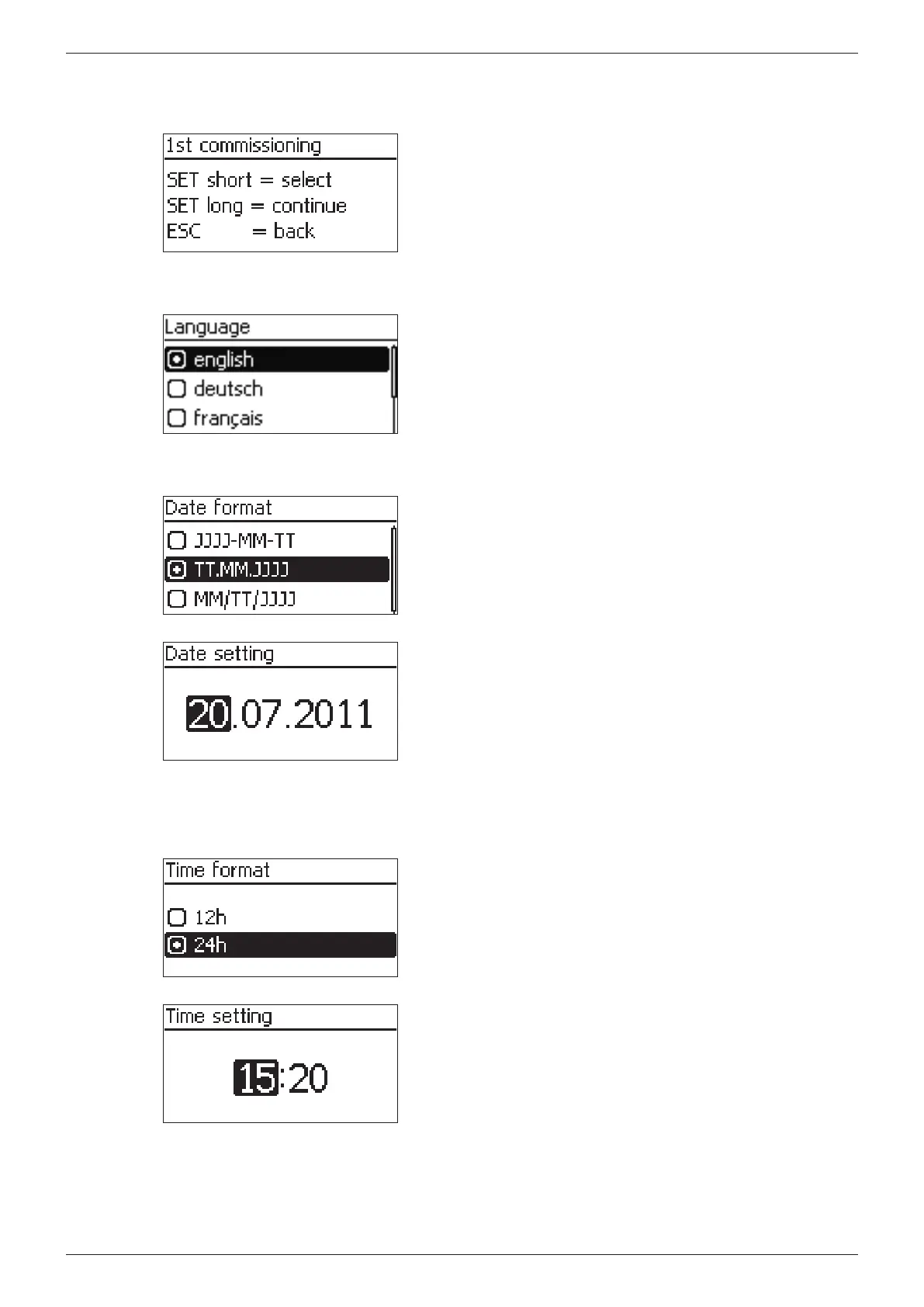
Starting initial commissioning
√ The start page for initial commissioning is shown on the
display.
Press SET for a longer time. The next page is displayed.
Selecting a language
1. Press to select a language.
2. Press SET briefly. The language is adopted.
3. Press SET for a longer time.
Setting the date
1. Press to select a date format.
2. Press SET briefly. The date format is adopted.
3. Press SET for a longer time.
4. Press SET briefly. The day flashes.
5. Press to change the day.
6. Press SET briefly. The change is adopted.
7. Press . The month is selected.
8. Repeat steps 4 to 6 for the month.
9. Press . The year is selected.
10. Repeat steps 4 to 6 for the year.
11. Press SET for a longer time.
Setting the time
1. Press to select a time format.
2. Press SET briefly. The time format is adopted.
3. Press SET for a longer time.
4. Press SET briefly. The hour flashes.
5. Press to change the hour.
6. Press SET briefly. The change is adopted.
7. Press . The minutes are selected.
8. Repeat steps 4 to 6 for the minutes.
9. Press SET for a longer time.








 To Next Page