XT6600/6800
19
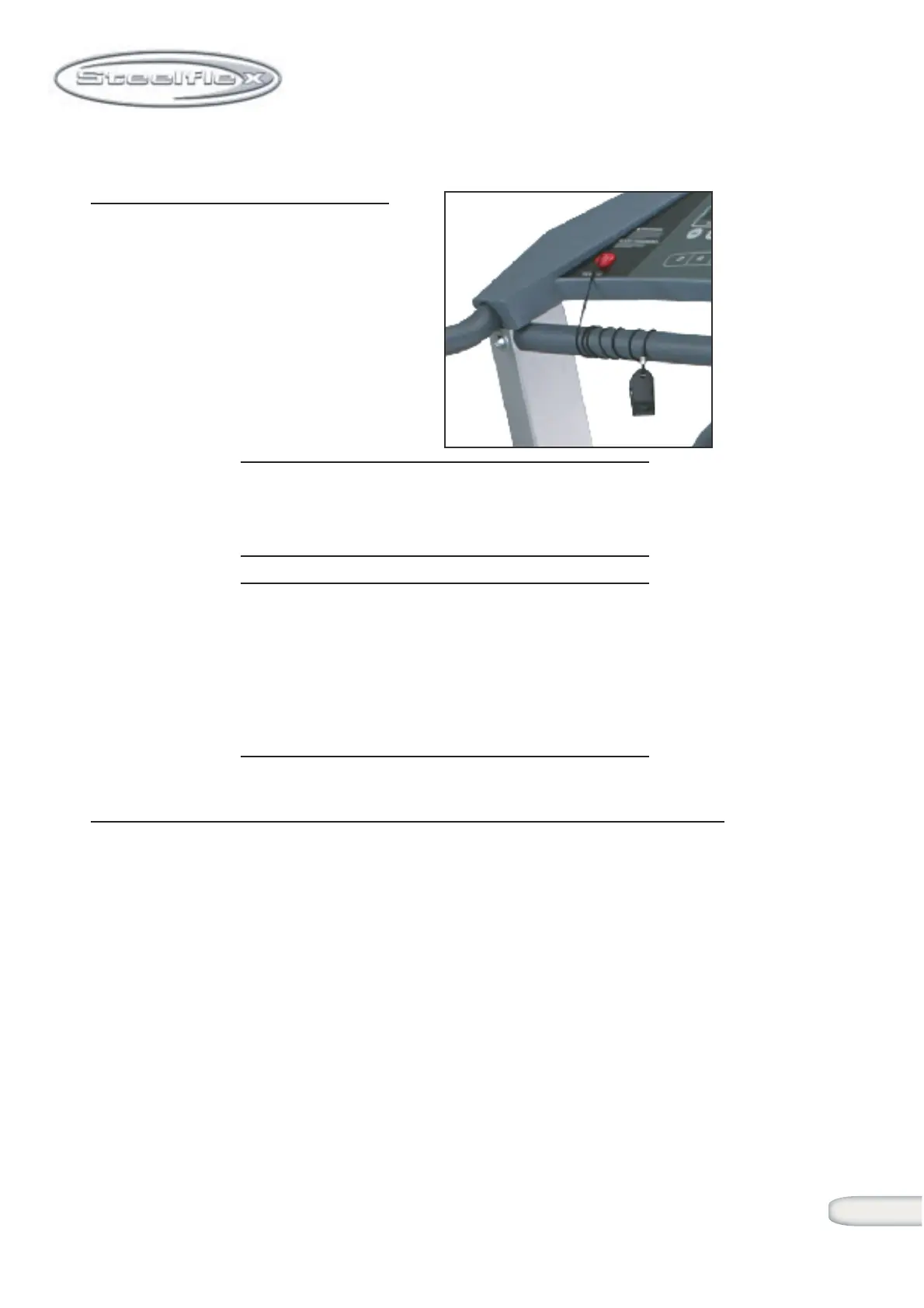
THE SAFETY KEY
The Safety key is designed to
stop the treadmill immediately.
The Safety key, when used cor-
rectly, will pull out of the Display
Console and stop the treadmill
quickly if the user has fallen or
is out of the safe operating
area.
Proper Use: Attach the clip at the end of the lanyard to
the waistband and insert the Safety key into
the Display Console
NOTE: The Safety key is also used to reset the
treadmill if an "EI" or programming error
should occur (if "EI" should appear in your
LED Matrix window). Simply pull the Safety
key out momentarily and re-insert it into the
Display Console.
BELT & RUNNING SURFACE
Belt Condition
Inspect the Running belt monthly to check it's condition. Look for
loose pieces, tears or extremely worn areas. If these conditions
occur, replace the running belt immediately.
Please call SteelFlex Customer Support to purchase a replacement
running belt.


 To Next Page