ISP Immersive Sound Processor
15
Click Select to choose your desired speaker
layout.
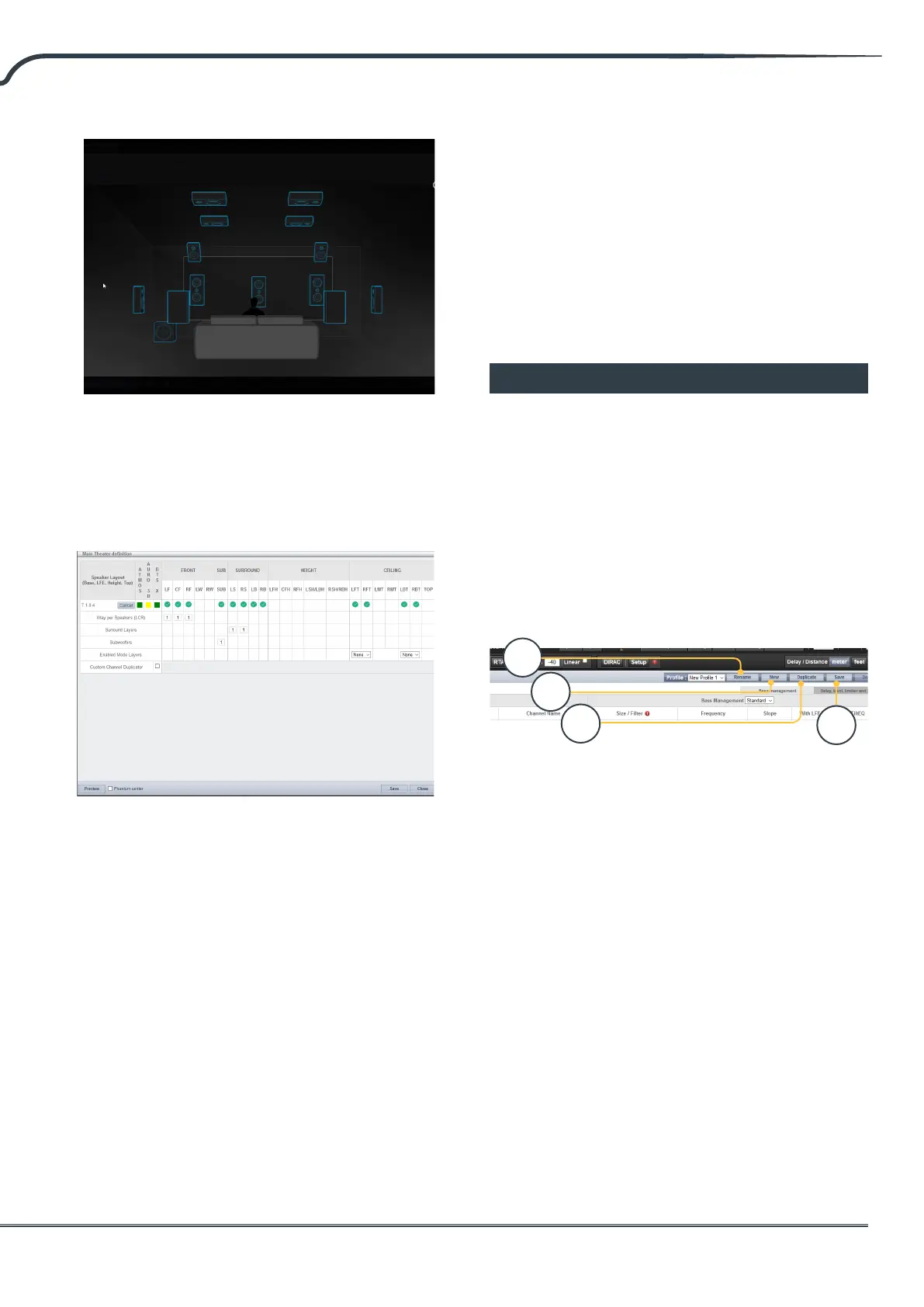
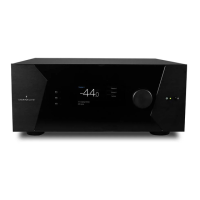
3. Rene Theater Denition
Once you select your desired speaker layout,
you have the option to rene certain settings.
• Ways per Speaker (LCR): For the front le, center,
and right speakers, you can dene multi-way active
loudspeakers up to 3 ways per speaker.
• Surround Layers: Optionally duplicate surround
channels to increase coverage in large rooms to
match seating row count.
• Subwoofers: Though there is only 1 LFE channel,
you can specify the number of channels which will
drive discrete subwoofers. Unlike daisy chaining
subwoofers, each channel can have its own settings
and EQ. For installation without Subwoofer, put “0”.
• Enabled Mode Layers: When using customized
Dolby Atmos up-ring loudspeakers in place of
ceiling mounted top layer speakers, choose whether
these speakers are mounted on top of the Front,
Side or Back loudspeakers.
• Custom Channel Duplicator: Check this box and
enter the number of duplicates for any channel in
the theater.
• Phantom Center: If no discrete center channel
speaker is present, checking this box will remove the
center channel from the theater denition.
Any changes made here can be visualized by
clicking the PREVIEW button. Once your theater is
dened properly, click SAVE to proceed. You will
then be directed towards a page where you can
make speaker based adjustments.
Profiles
For each Theater, Sub-Theater, and zone, you
can save multiple proles for dierent listening
preferences. Proles can be recalled as part of
presets “Presets” on page 29. A prole includes
the following information: Speaker denition
(multi-way, levels, delays), bass management,
manual EQ, and Dirac lter design if applied.
Some clients have dierent EQ proles based on
the type of content they listen to e.g. movies vs.
music.
1. Rename
By default, one prole is created called New
Prole 1. You can rename this to something
more descriptive.
2. New
Click New to build a new prole from defaults.
3. Duplicate
Build a variation on a saved prole. This is
especially useful if you have a prole designed
with Dirac Live. Since you cannot edit Dirac
reference proles directly, you can build a
duplicate and edit that duplicate.
4. Save
Aer any changes to a prole or creation of a
new one, you must SAVE your changes.
Sub
Base
Height
Top
1
2
3
4



 To Next Page