12
Input Settings
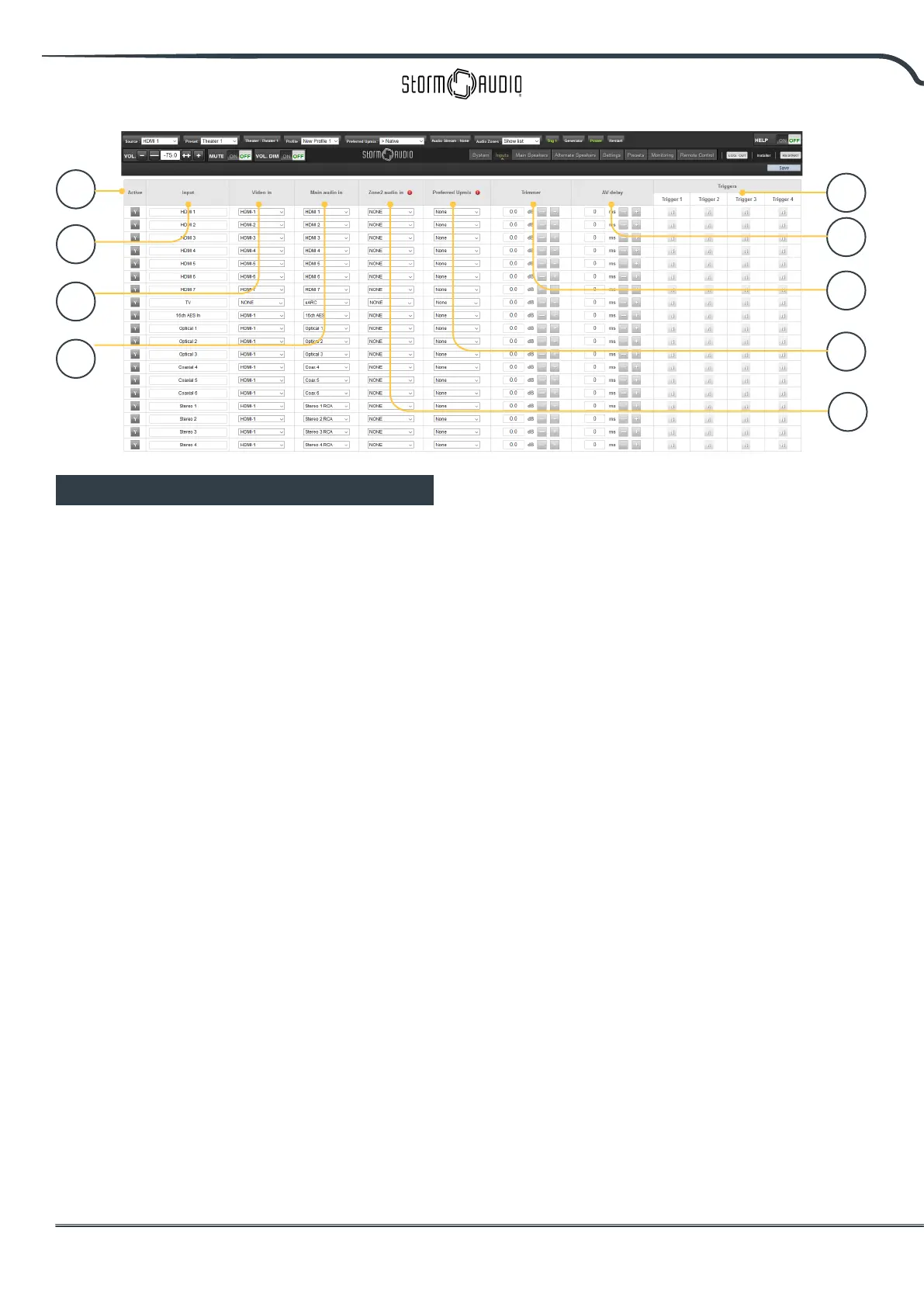
The ISP permits the installer to create access to
sources in a very intuitive way for the end user. The
installer is advised to title inputs thoughtfully and
without ambiguity. No longer must an end user
remember which physical input is attached to a
particular source component. Further, only inputs
specically congured as ACTIVE will be available
from the remote control. Finally, multiple inputs
can be created from a single source component
for the purposes of loading separate settings. For
example, you may have an input titled ‘CD Music’
that accesses a Blu-Ray player attached to HDMI 7
that by default downmixes everything to stereo and
another input titled ‘Blu-Ray Movie’ that accesses
the same source component but upmixes all audio
to Dolby Surround.
1. Active
Any input with a grayed Y is accessible from
remote controls. To disable access to an input,
click the Y and it will change to an N and gray
out the entire row thereby disabling access to
this input. You are advised to disable any input
with no source component attached.
2. Input
This is the name of the input that will appear
in remote control applications. By default, the
name is the same as the default audio input.
You may type in this box and change the
name to something more intuitive. Supports a
maximum of 10 characters.
3. Video In
For any given input, you can map separate
video and audio inputs except that when the
audio input is an HDMI input, the video input
must be the same HDMI input. None may also
be chosen when no video is desired.
4. Main Audio In
For any given input, you can map separate
video and audio inputs for the Main Theater
audio path, except that when the audio input
is an HDMI input, video must be the same HDMI
input. None may also be chosen when no video
is desired. Note that the analog input matrix
may be selected as a particular stereo pair or
as a 7.1 input.
5. Zone2 Audio In
The ISP oers a dual source selection so that
you can have one source playing in the Main
Theater dened in point 4 above and another
source playing in the other dened Audio Zones
(see “Building a Theater - Dening Channels” in
p14 for the Theater and Audio Zones creation).
The Zone2 Audio input cannot include HDMI
selection. For device with HDMI connection,
It is recommended to connect and dene an
Input with two physical connection to the ISP
such as HDMI for Main Audio In and SPDIF/RCA
for the Zone2 Audio In. Doing so, selecting this
Input will take the correct physical connection
1
2
3
4
5
6
7
8
9



 To Next Page