ISP Immersive Sound Processor
23
1
Child Theater / Sub Theater
You may optionally create alternate speaker
denitions in your theater with some restrictions.
For example, if you wish to have music playing
before the movie plays before everyone is seated
and quiet, you might only want that music playing
from the overhead speakers so as not to interfere
with conversation. In this case, you can dene a
child theater so that stereo le/right audio is played
only through the top speakers (as in the example
above).
Child theaters behave just like zones or main
theaters in that they can be selected as outputs,
programmed into presets and can have multiple
proles.
Note that though multiple Child theaters can be
designed per main theater, signal assignment is
common to all.
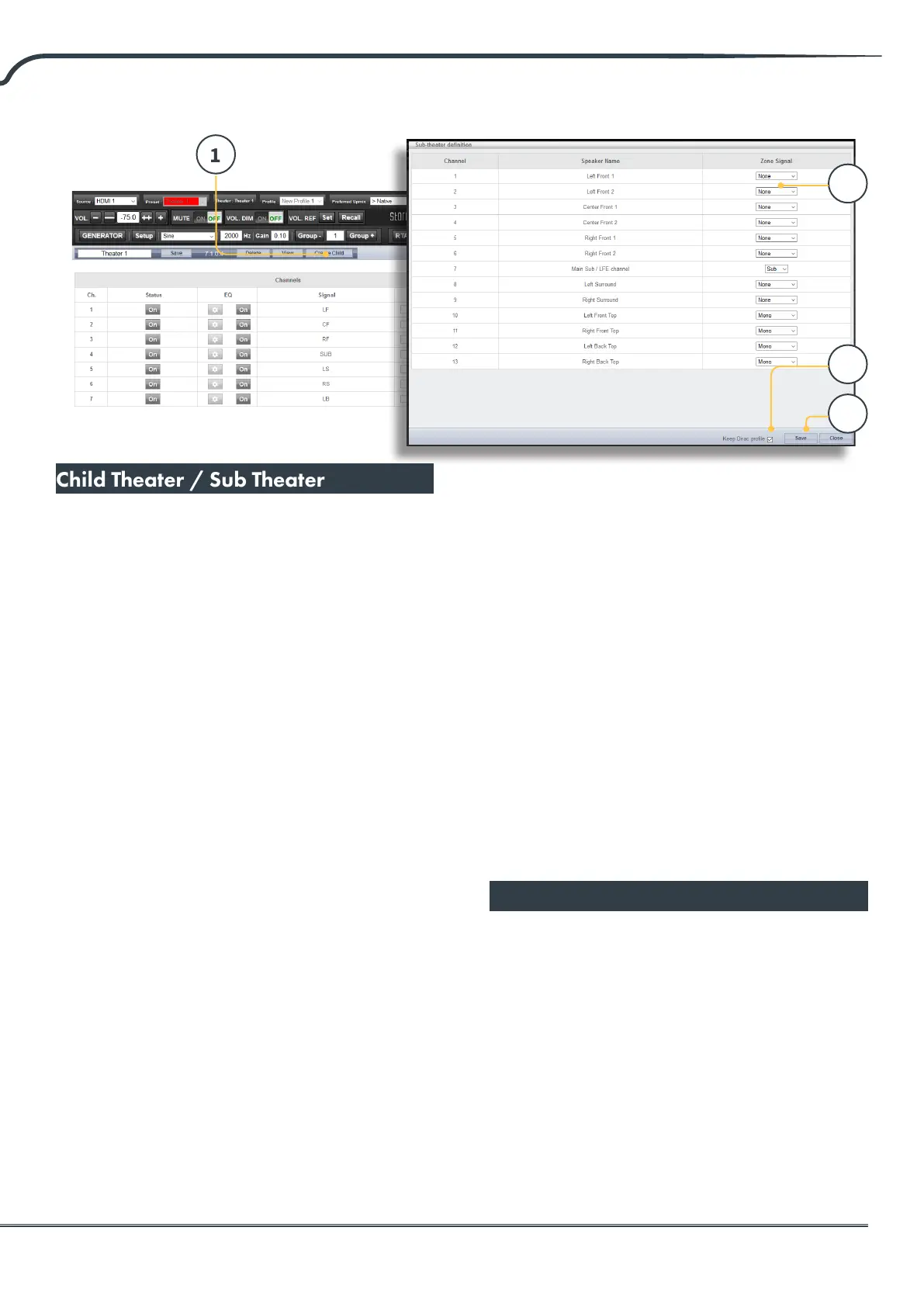
1. Create Child
From the Main Speakers page, Edit your theater.
Click Create Child. A window will appear with a
list of loudspeaker names and their channel ID.
2. Zone Signal
For each loudspeaker, select the signal to be
played. You may choose Stereo Le, Stereo
Right, Mono, or None. Subwoofer channels can
play Subwoofer signal or None.
3. Keep Dirac Prole
If you have created a Dirac prole for the parent
theater, you have the option to retain that
calibration for the child theater.
4. Save/Close
Save when done, or Close to cancel.
5. Bass Management / Delay Level
Phase
Child theaters have comparably limited
options compared to full theaters. If a child
theater includes a subwoofer channel, the full
range channels are forced to small. In this case,
you can adjust the crossover frequency, slope
and subwoofer subsonic lter. If no subwoofer
channel is enabled for the child theater, the
main channels are forced to large. No Expert
Bass Management is available for Child
Theaters.
Zones
Zones are mono or stereo, and with or without
video output or can be dedicated to headphone
playback when used with an external headphone
amplier. Stereo Audio/Video and Headphone
Zones include provisions for adjusting lip sync.
Audio only zones do not. Zones occupy unused
channels and can play concurrently with a theater
or without one. Note that system wide, you can
select one input for the main theater (Main Source)
and one Zone 2 input used by all the audio zones
(Secondary source). You can choose the Zone to
play either the Zone2 source or follow the Main
Theater source. Zones have all the same features
2
3
4



 To Next Page