16
Test Tone Generator
The ISP includes a highly congurable test tone
generator which can be used to help manually
calibrate channels.
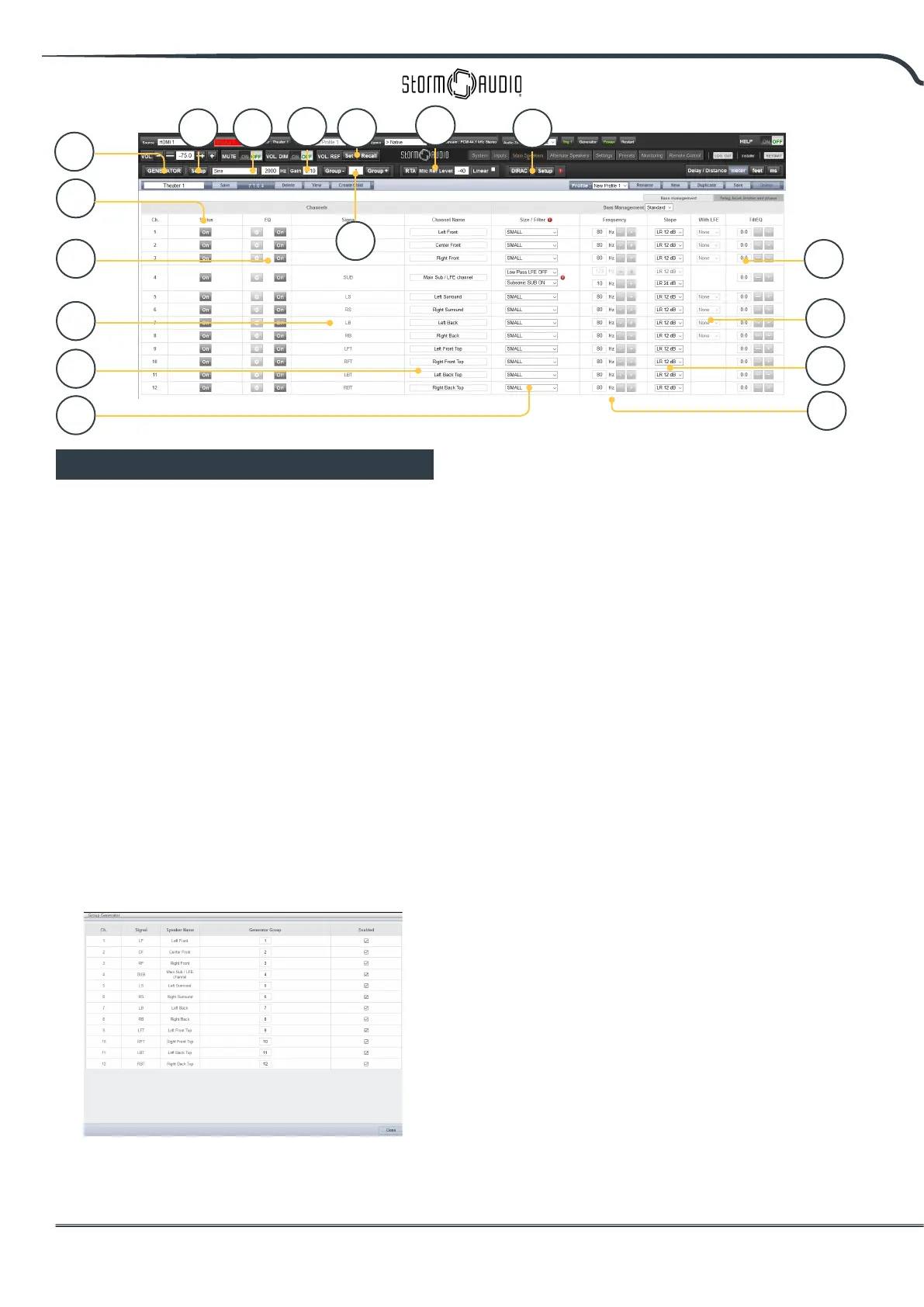
1. Generator
Click this button to turn on the tone generator.
It will automatically start with Group 1. The
channels outputting sound will be highlighted
in green.
2. Setup
Unlike traditional generators, the ISP will not
strictly play tones one channel at a time. Click
Setup to assign channels to groups. Each
group may contain one or more channels. For
example, if you have 2-way active loudspeakers,
you may wish to group the high frequency and
low frequency component of each into one
group.
3. Noise Selection
Choose the type of noise or tone created by the
generator.
• Sine: Generates a sine wave at the frequency
specied.
• Pink Noise: Generates full bandwidth pink noise.
• Pink Noise 400-4kHz: Generates pink noise band
limited to one decade. This is particularly useful
when setting relative levels between channels
with dramatically dierent useful bandwidths.
Remember SPL meters measure not only sound
pressure but also bandwidth.
• External: it is possible to use an external noise
generator connected to one of the ISP dened input.
This is usually required when using an external room
calibration tool providing its own stimuli (Room EQ
Wizard is one of them, see “REW integration”, p22).
4. Gain
The gain gure can be set so that the noise
generator operates at a level at or below that
of a normal source playing at 0dBFS. Default is
0.1 (-20dBFS).
5. Group
When the noise generator is active, use this
function to play the noise through dierent
groups dened in “2. Setup”.
6. RTA
When a USB microphone (such as the optional
Theater Acoustic Diagnostic Kit) is connected
to the ISP, you can use the Real Time Analyzer
to visualize the response of loudspeaker
groups in the room. Note that the built in RTA
is not accurate enough to use for calibration,
but is useful for getting a good idea of the
1
2 3
4
5
6
7
10
9
11
12
15
16
13
14
8
17



 To Next Page