ISP Immersive Sound Processor
19
audio that exceeds -3dBFS will be reproduced
at -3dBFS. By their nature, limiters are not ideal
acoustic solutions, but this feature can prevent
subjectively worse sounding distortion, or in
extreme cases, damage to loudspeakers or
ampliers. If you nd that you are aggressively
using the limiter function, you are encouraged
to upgrade loudspeakers and/or amplication.
22. Phase Invert
Check the box for any channel in which you
wish to invert signal polarity.
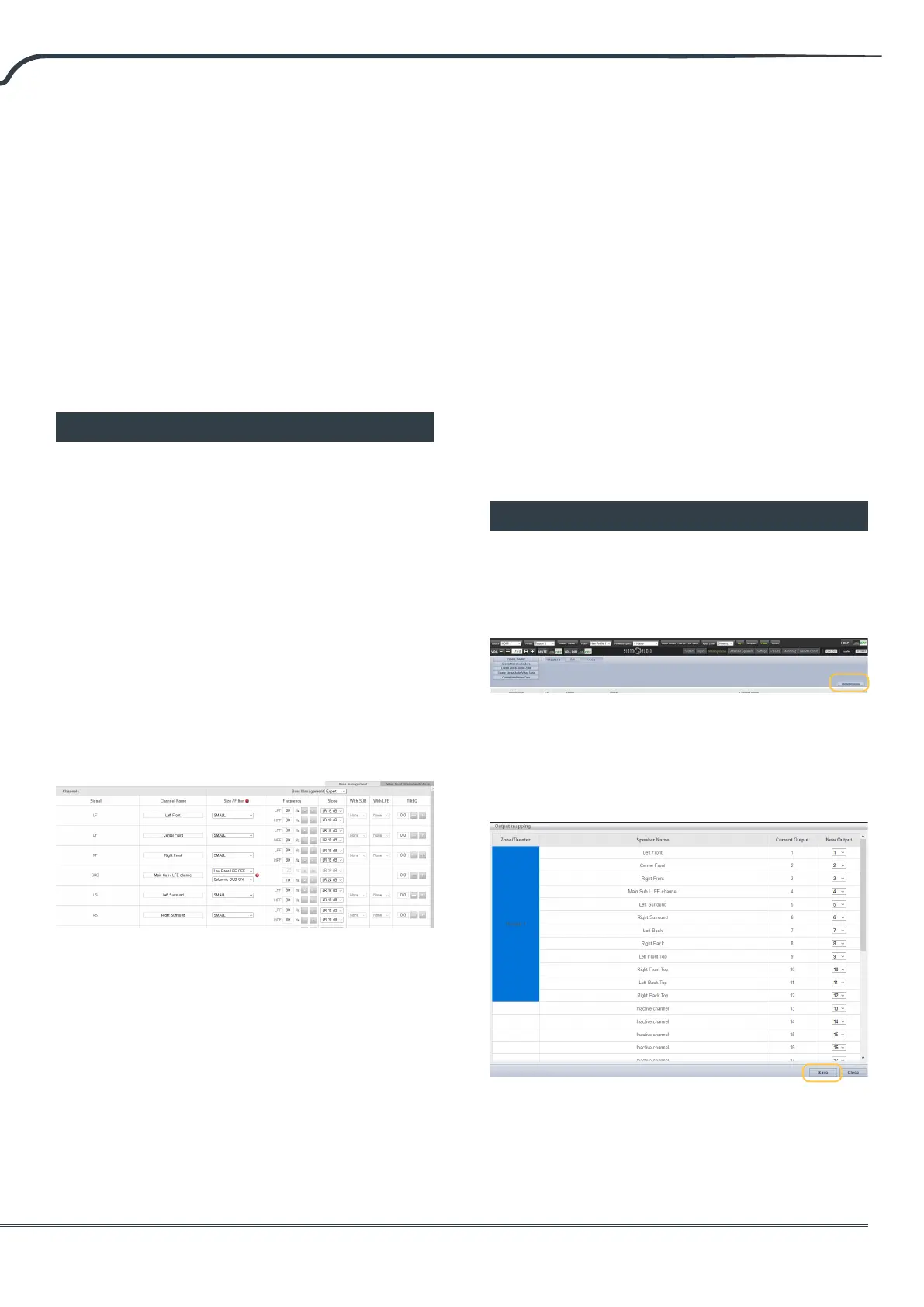
Expert Bass Management
When it is desirable to ne tune subwoofer
integration beyond what is possible in Standard
Bass Management Mode, you may select Expert.
The exibility within can achieve greater subwoofer
integration, but should only be used by calibrators
with suicient skill otherwise comparably poor
results may be inevitable. Compared to Standard
mode, Expert includes the following features:
• Additional Size/Filter options
• Ability to separate HPF and LPF frequency and slope
per channel
• Ability to mix SUB bass (not just LFE bass) back into
channels set to Large, Large and Sub and Large with
Sub.
1. Size/Filter
Speakers may be set to one of the following 4
options:
• Small: Channel is high pass ltered according
to the HPF frequency and slope. Bass is routed to
subwoofer channels according to frequency and
slope dened by LPF frequency and slope. Small
speakers cannot have subwoofer or LFE bass mixed
in.
• Large: Channel is not band limited. Channel can
have subwoofer and/or LFE bass mixed in.
• Large and Sub: Channel is not band limited, but a
copy of bass for this channel is routed to subwoofer
channels as well. Set the frequency below which
bass should be sent to the subwoofer and the slope
at which the crossover occurs.
• Large with Sub: This special case enables you
to eectively split a full range loudspeaker into a
“small speaker” plus “virtual subwoofer”. The HPF
frequency and slope dene the characteristic of the
“small speaker” portion. LPF frequency and slope
dene the virtual subwoofer characteristic.
Note that aer making any changes,
you must press the SAVE button near
the top right of the screen or you will
loose your changes.
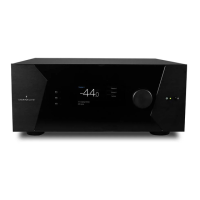
Output Mapping
Should you wish to map a physical analog output
channel to a loudspeaker other than the default
assignment, you may do so from the Main Speakers
page. Click Output Mapping.
Using the New Output column on the right of the
pop-up menu, select a new output channel. If you
choose a currently occupied new output channel,
that channel will be automatically reassigned.
Save.



 To Next Page