18
* Items 14 and 15 pertain to Standard Bass
Management Mode in which the crossover point
and slope dened apply to both the high pass and
low pass sides of the lter equally. For Expert Bass
Management, see “Expert Bass Management” on
page 19.
14. Frequency
When the channel is set to Small or Large and
Sub, the Frequency denes the point below
which bass in this channel is routed to the
subwoofer(s). Note that the frequency is the
-3dB point along the slope dened in the next
column and is not an absolute cuto point.
15. Slope
The rate at which bass is ‘crossed over’ into the
subwoofer when the channel is set to Small or
Large and Sub. LR 12dB and LR 24dB are 2nd
order and 4th order Linkwitz Riley alignments
respectively.
16. With LFE
When a channel is set to Large or Large and
Sub, this channel can optionally reproduce
LFE bass which would normally be the sole
responsibility of the subwoofer channels.
When set to None, no LFE will be mixed into
this channel. When set to a gure between 0dB
and -20dB, LFE bass attenuated by that gure
will be mixed into this channel. This feature is
useful when the main channels have suicient
bandwidth AND dynamic range to support the
subwoofers in creating an appropriate amount
of bass sound pressure in the room.
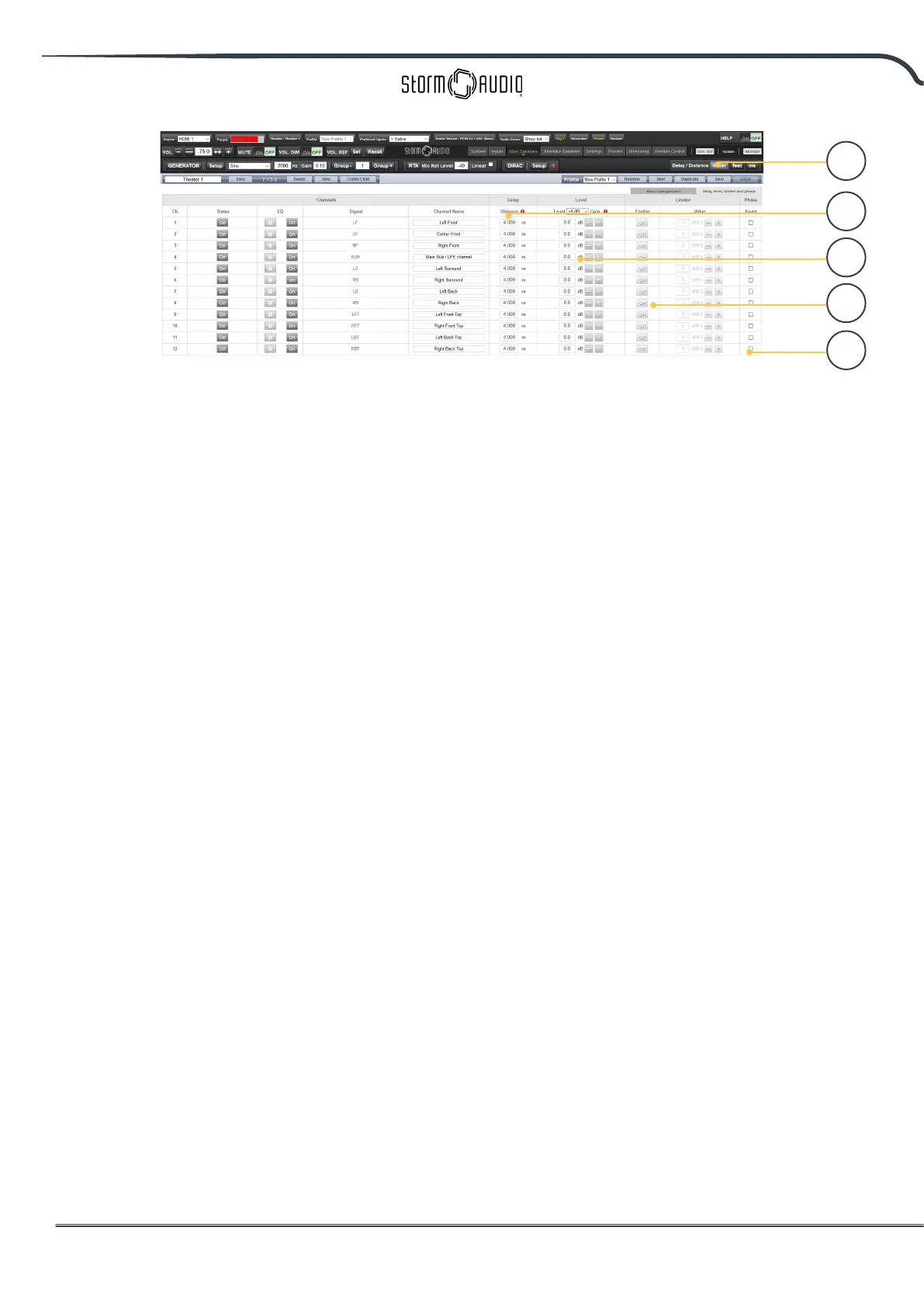
* Items 19-22 apply to settings found in the ‘Delay,
Level, Limiter, and Phase’ section.
17. TiltEQ
For speakers behind a motorized screen for
example, you might need to change their
“audio brightness” depending on the screen
position up or down. TiltEQ allows the sound
to be darker of brighter.
18. Delay units
Choose whether to measure channel delays in
meters (default), feet, or milliseconds.
19. Delay per Channel
Each channel should have distance/delay set
beteween that loudspeaker and the sweetspot.
You can dene this in meters (default), feet, or
ms depending on your setting in 16.
20. Level
Set the level of each channel in between
-100dB and +12dB in 1dB increments. Best
practice is to set other channels to a negative
gure relative to the loudest channel to avoid
clipping when possible. Global gain makeup
can be applied to the theater when the relative
level of the theater is too low (usually a result of
a high degree of correction due to Dirac Live’s
mixed phase lters). Use global gain makeup
judiciously to avoid clipping.
21. Limiter
To prevent distortion due to loudspeaker
overdriving or amplier clipping, you may wish
to engage a limiter on a channel. When enabled,
a compressor will attenuate audio above the
threshold set by the Limiter Value for that
channel back down to that value. For instance,
if the limiter is enabled and set to -3dBFS, any
21
22
20
19
18



 To Next Page