ISP Immersive Sound Processor
5
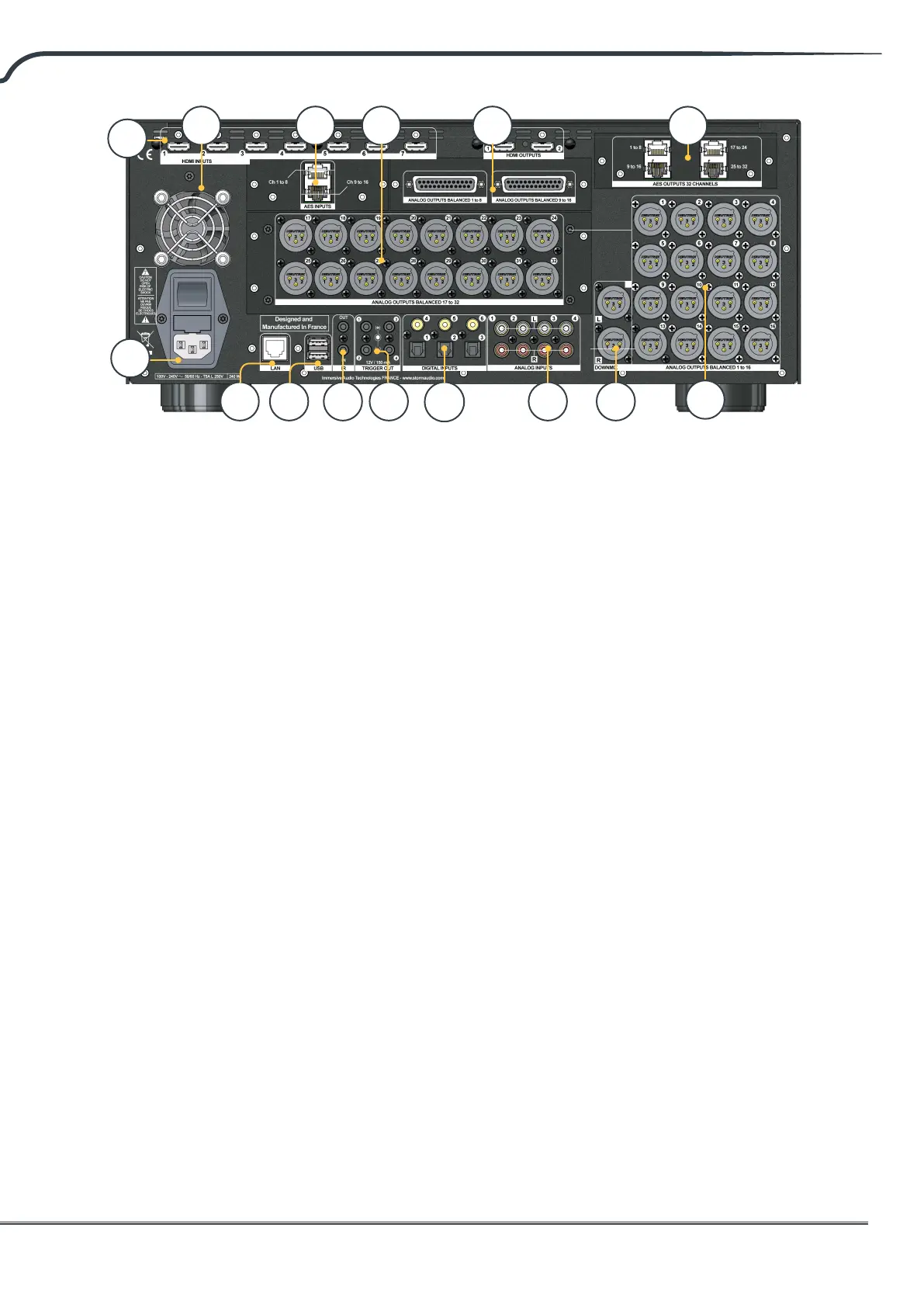
11. IR
IR input and output are provided via 3.5mm
jacks for optional control via IR remote.
12. Trigger Out
Four separate trigger outputs are provided to
control power of certain connected devices.
See “Triggers” on page 27 for conguration
information.
13. Digital Inputs
Three digital coax and 3 TOSLINK optical digital
inputs are provided for connection of legacy
digital sources.
14. Analog Input
Eight RCA inputs are provided and can
be used as 4x stereo pairs or 1x 7.1 input.
When connected as a 7.1 input, the channel
assignment is as follows clockwise from top
le: LF, CF, LS, LB, RB, RS, SUB, RF.
15. Downmix Output
A stereo pair of XLR outputs is provided as a
dedicated 2 channel downmix output. These
outputs produce a stereo downmix of whatever
audio is playing in the selected theater. To
congure, see “Parameters” on page 28.
Downmix may be enabled for select presets.
See “Presets” on page 29.
16. Analog Output
Sixteen XLR analog audio outputs are provided
by default which are fully assignable to
theaters or zones. See instructions starting
with “Building a Theater - Dening Channels”
on page 14. Outputs may also be remapped.
See “Output Mapping” on page 19. Pin 2 hot.
17. Optional Analog/Digital Output
Three optional modules are available for this
slot to provide either 4ch XLR analog outputs
or the 32ch as digital outputs with one module
supporting the AES/EBU format over 4x RJ45
connector and one module supporting the
Audio Video Bridging (AVB) Audio over IP
transmission.
18. Optional Alternate Analog Output
Two optional modules are available to provide
16ch additional outputs that can be used
either as Alternate (Balanced DB25 outputs) or
Alternate/Duplicate Theater creation.
19. Option Analog Output
One optional module is available to allow for
up to 16ch additional analog audio outputs,
oering total 32ch XLR outputs to the ISP.
20. Optional Digital Input
One optional module is available to allow for
up to 16ch of AES/EBU audio streams to be
provided through 2x RJ45 connectors. See
“Settings” on p28.
21. Rear Panel Fan
From time to time, the ISP may automatically
turn on the fan to draw cool air through the ISP
and out the back. Do not obstruct the fan or
any airow vents on the chassis.
9 10 12
13
18
21
14 15
16
11
7
8
17
20 19



 To Next Page