Replacing and Adding DIMMs
Installing and Replacing System Components
5-29
To replace a faulty DIMM
If you must replace DIMMs in different enclosures, work on one enclosure at a time to
keep the system operating.
Be sure that the system is duplexed before removing either enclosure.
1. Remove the bezel.
2. Remove the CPU-I⁄O enclosure.
3. Remove the CPU-I/O enclosure cover.
4. Remove the plenum.
5. Perform the procedure “Removing DIMMs” on page 5-27
6. Perform the procedure “Installing DIMMs” on page 5-28.
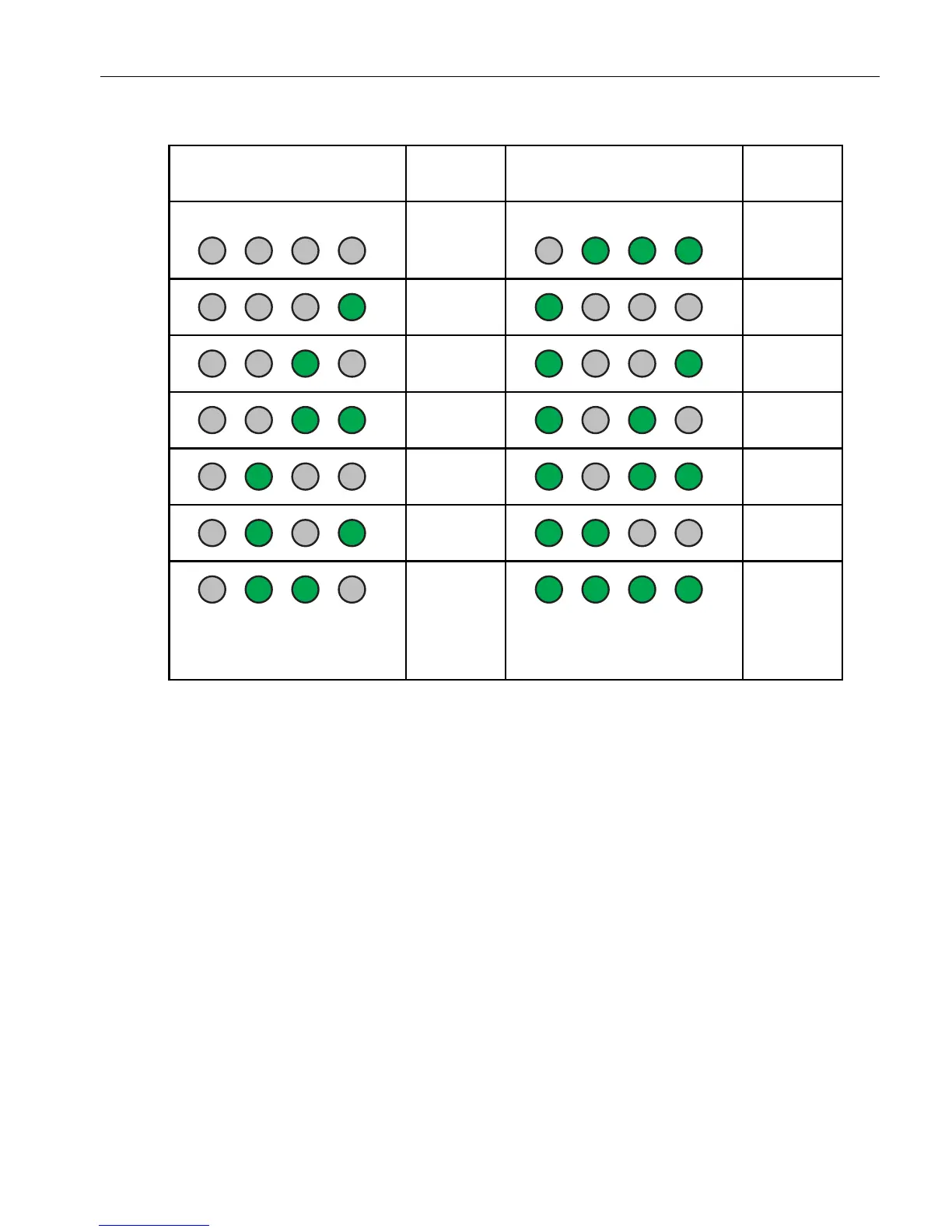
Table 5-1. Memory Fault LEDs
Memory Fault LEDs DIMM
Number
Memory Fault LEDs DIMM
Number
0–No
defective
DIMM
7
18
29
310
411
512
615–Fault
cannot be
isolated to
a specific
DIMM.



 To Next Page