TimeLine - User Manual
®
pg 2
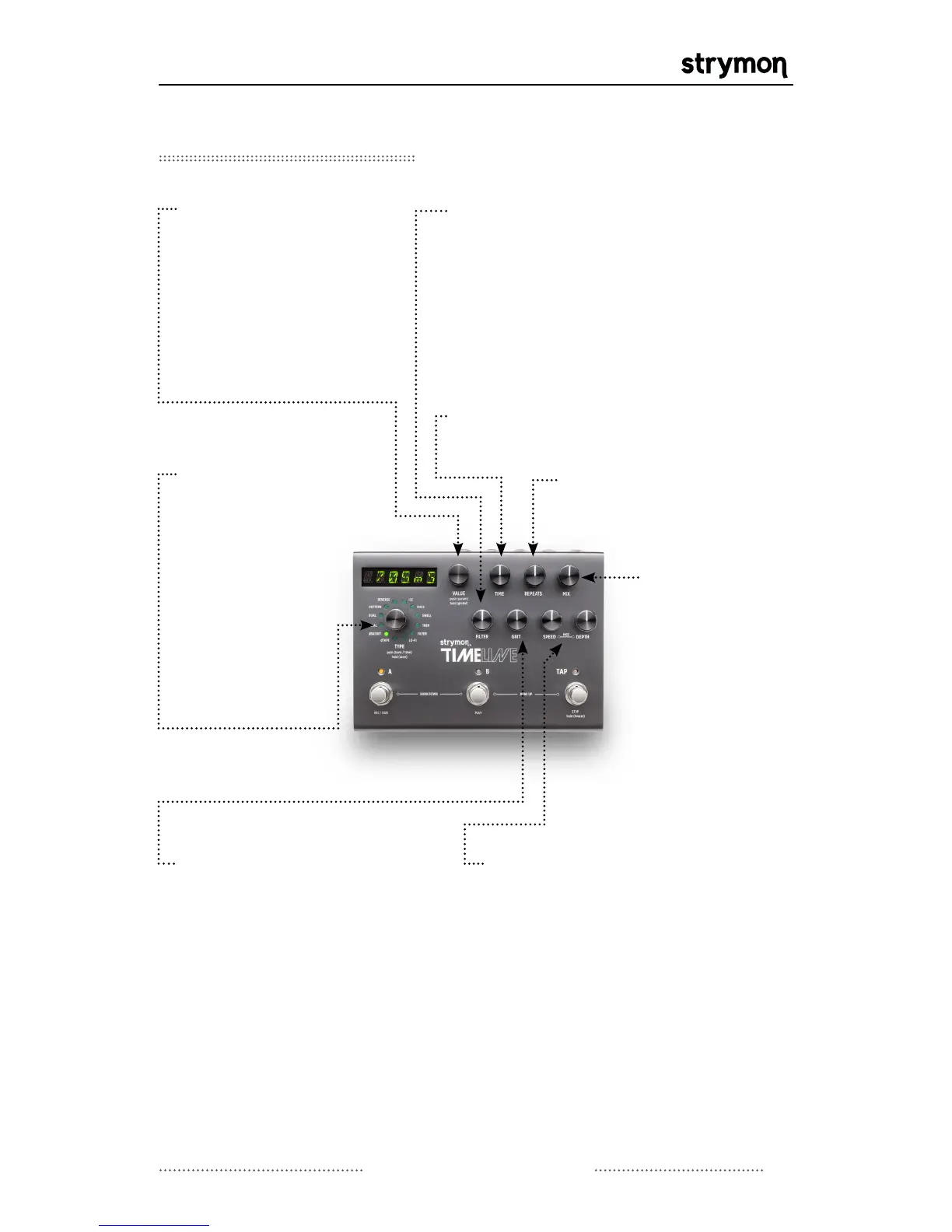
Front Panel Controls
VALUE: Provides fine
adjustment of delay
time. Push to access the
parameter menu for the
current delay machine.
Hold to access the
global menu.
FILTER: Controls the shape of the
repeats filter.
dTape: controls tape age
dBucket: controls the special dBucket
filter. See dBucket section for full
details.
Filter: controls center frequency of
LFO filter.
REPEATS: Sets the delay
feedback level (number of
repeats).
MOD CONTROLS:
Speed controls
the speed of the delay modulation
LFO while Depth controls the
intensity of the delay modulation.
NOTE: In dTape mode Speed
controls Tape Crinkle and Depth
controls wow & flutter.
TYPE:
Turn to
select desired
Delay Machine.
Push to toggle
the display to
show delay time
or the current
bank. Hold to
save current
preset.
GRIT:
Progressively adds
distortion and artifacts.
dTape: controls tape
bias
dBucket: controls
bucket loss
Continued on Next Page
MIX: Adjusts the
mix of analog
dry signal to wet
delay signal.
The Mix occurs
in analog. Set
around 3 o’clock
for a 50/50 mix.
TIME:
Provides coarse adjustment of
delay time.



 To Next Page