EasyManua.ls Logo

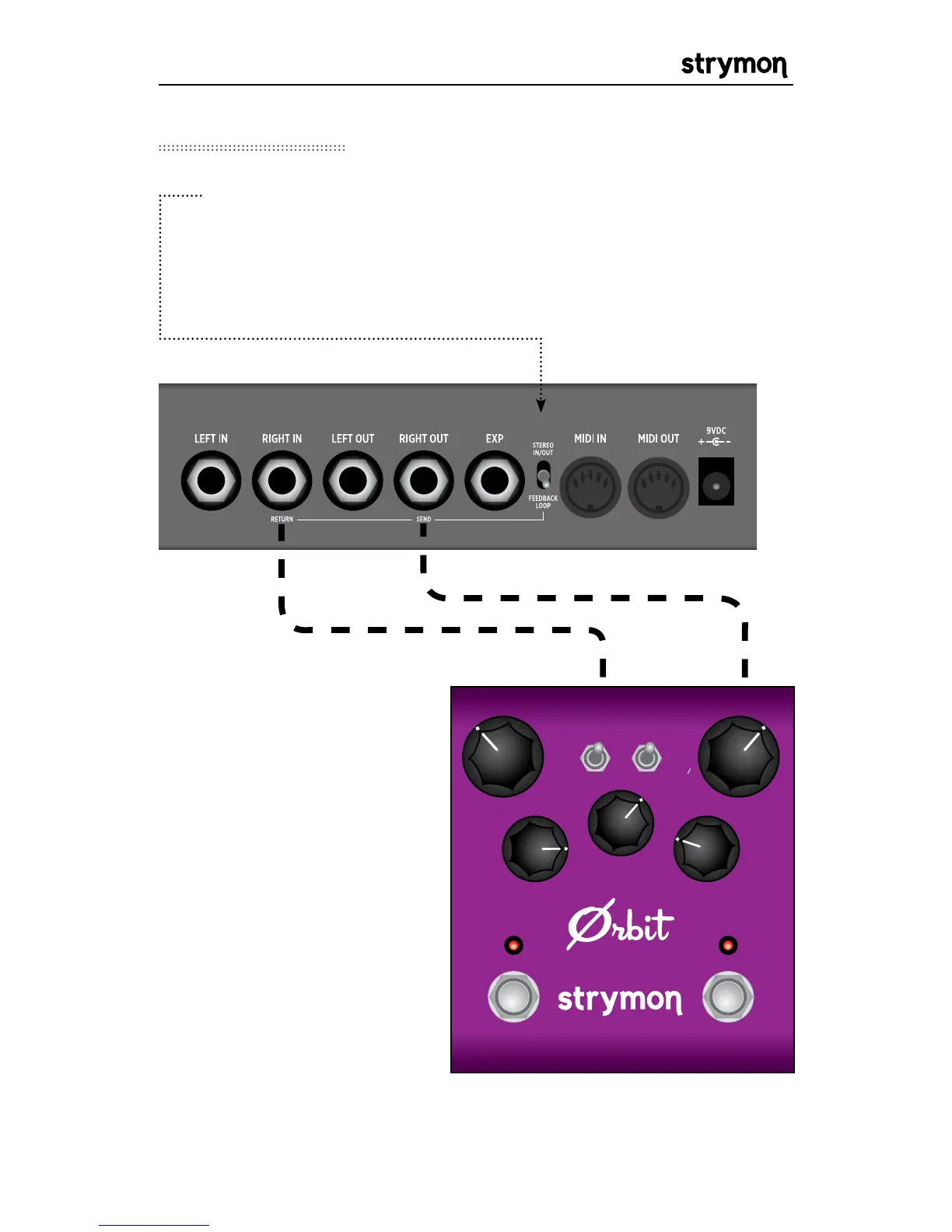
Strymon TimeLine - Feedback Loop for External Effects; External Effect Integration

Strymon TimeLine
42 pages
Print Icon
To Next Page IconTo Next Page
To Previous Page IconTo Previous Page
Loading...
TimeLine - User Manual
®
pg 37
WIDTHSPEED
REGEN
pos
+/-
neg
BYPASSFAVORITE
dBucket Flanger
®
MANUALMIX
FEEDBACK LFO
log
lin
thru
0
Connect an external
effect to the feedback
loop. Any external effect
can be used. Feel free
to experiment with the
different sounds that
can be achieved. All of
the delay repeats will be
processed through the
external effect.
Set the FEEDBACK LOOP switch to the down position to insert an
external effect into the delay feedback path.
NOTE: If not using an external effect in the feedback loop, set switch
to stereo.
Feedback Loop
OUTPUT INPUT

Other manuals for Strymon TimeLine

Related product manuals