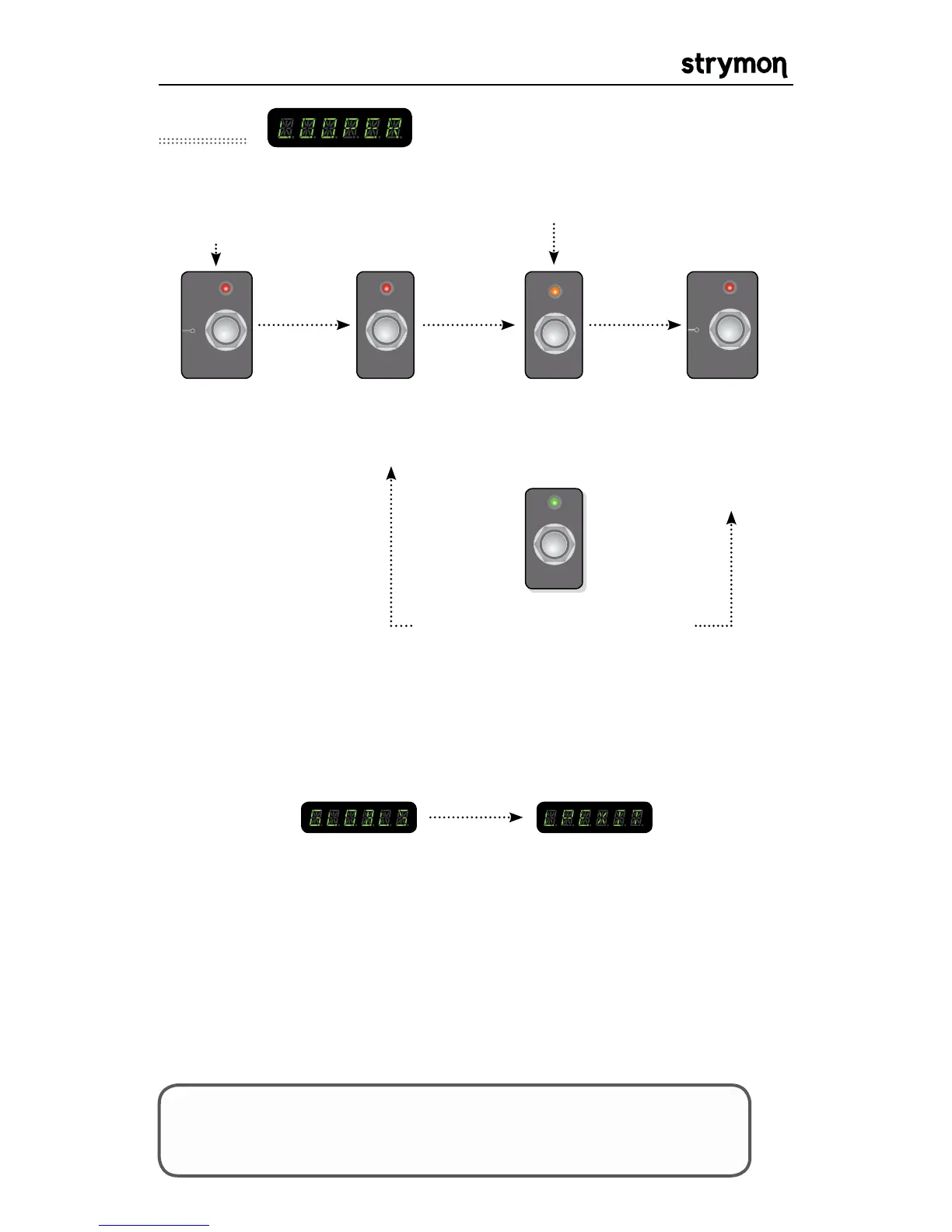
TAP LED will turn red to indicate
looper controls are active and
blink green to show delay time.
OR
push the A
footswitch again
to overdub
The A LED will turn amber to
indicate looper is overdubbing
push the B footswitch to play the
loop. Any time the B footswitch is
pressed it will re-trigger the loop.
Looper
NOTE: The loop can be played in the background if desired. Normally
the loop will stop when exiting the looper. To keep playing the loop
when exiting looper set the Looper Exit global to PLAY. The looper can
also be controlled via MIDI at all times.
LOOPER GLOBALS: There are controls to vary the loop level, looper exit
behavior and looper pre or post configuration in the GLOBALS menu.
Please consult the globals section of the manual for more information.
LOOPER MIDI CONTROL: Controlling the looper via MIDI is
accomplished by sending MIDI note numbers with a velocity greater
than zero OR MIDI CCs. Record, Play, Stop, Reverse, Half Speed, Undo
(to initial recorded loo) and Redo can all be controlled via MIDI. See the
MIDI specification for the note numbers and CCs.
TIPS & TRICKS: Connect an external MIDI control to access
additional looper features like Reverse, Half Speed, Undo (to
initial recorded loop) and Redo.



 To Next Page