Component Access/Removal
Integrated
(700-
3
BASE)
Series
7-6
#3758424 - Revision B - December, 2005
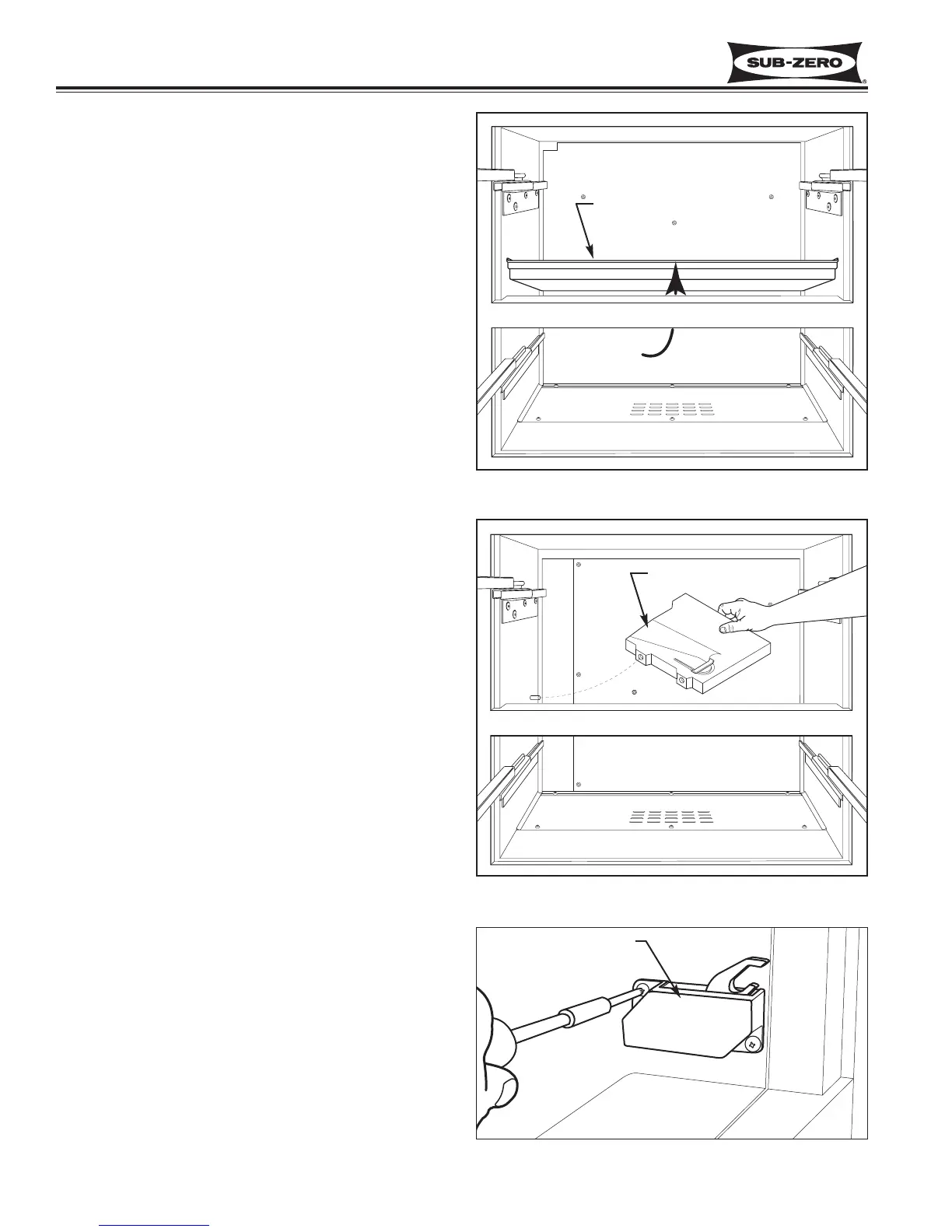
Mullion Divider Removal (700BC/I-3 Only)
The mullion divider assembly is set between the two
drawer areas.
To remove a mullion divider (See Figure 7-9):
1. Remove display wire harness from wire clip.
2. Reach into lower drawer compartment and push
divider upwards.
Wire Tray Removal (700BR-3, 700BF/I-3 Only)
The wire tray is rests on pegs at the left and at the back
right corner of the duct cover. It is set between the two
drawer areas.
To remove a wire tray (See Figure 7-10):
1. Remove display wire harness from wire clip.
2. Lift right side of wire tray up, then pull it to the right
and out of the compartment.
NOTE: On the model 700BF-3, the screw under the
tray that supports the back right corner may need to be
loosened prior to step 2 above.
Drawer Closer Assembly Removal (All Base Units)
Drawer closer assemblies are located on the right side
wall. Two screws secure each assembly to the wall.
To remove a drawer closer assembly, extract screws
that secure drawer closer to wall and pull drawer closer
assembly from wall. (See Figure 7-11)
Figure 7-9. Mullion Divider Removal (700BCI-3)
Push divider
upwards
Figure 7-11. Drawer Closer Assembly Removal
Drawer Closer Assy
Mullion Divider
Figure 7-10. Wire Tray Removal (700BFI-3 Shown)
Wire Tray


 To Next Page