134
June 2013
Electrical Systems Operation & Diagnosis Module (602)
DEALER DIAG MENU SCREEN
The Dealer Diagnostic Menu will now activate.
Next press {Vehicle Signal Info.}
NOTE: Diagnostic information is
currently only available in Vehicle
Signal Info. And Connection info.
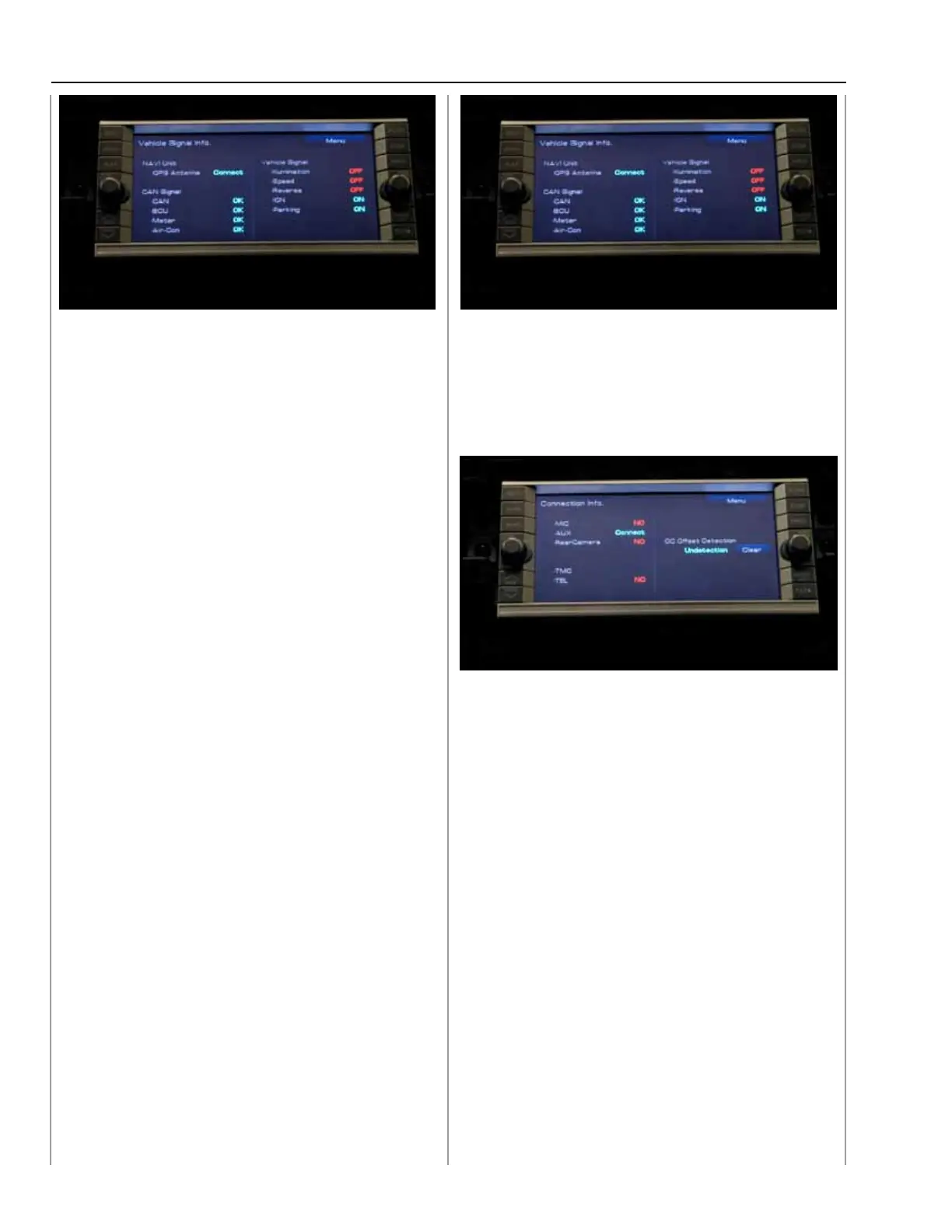
Vehicle Signal Info. Provides the status of the
connections between the Navi/Audio Unit and:
Controller Area Network Signals
CAN
BCU - (BIU)
METER - (Combination Meter)
AIR-Con - (Air Conditioning)
Vehicle Signals:
Illumination Control
Speed Signal
Reverse
Ignition
Parking (Brake)
VEHICLE SIGNAL INFO. SCREEN
Pressing Menu will take you back to the Dealer
Diagnostic Menu.
Press {Connection Info.}
CONNECTION INFO. SCREEN
The only current connection is the Aux Input.
Press {Menu} to go back to the Dealer Diagnostic
Menu.
Press {Exit} to return to normal operation.
037
038
039



 To Next Page