137
June 2013
Electrical Systems Operation & Diagnosis Module (602)
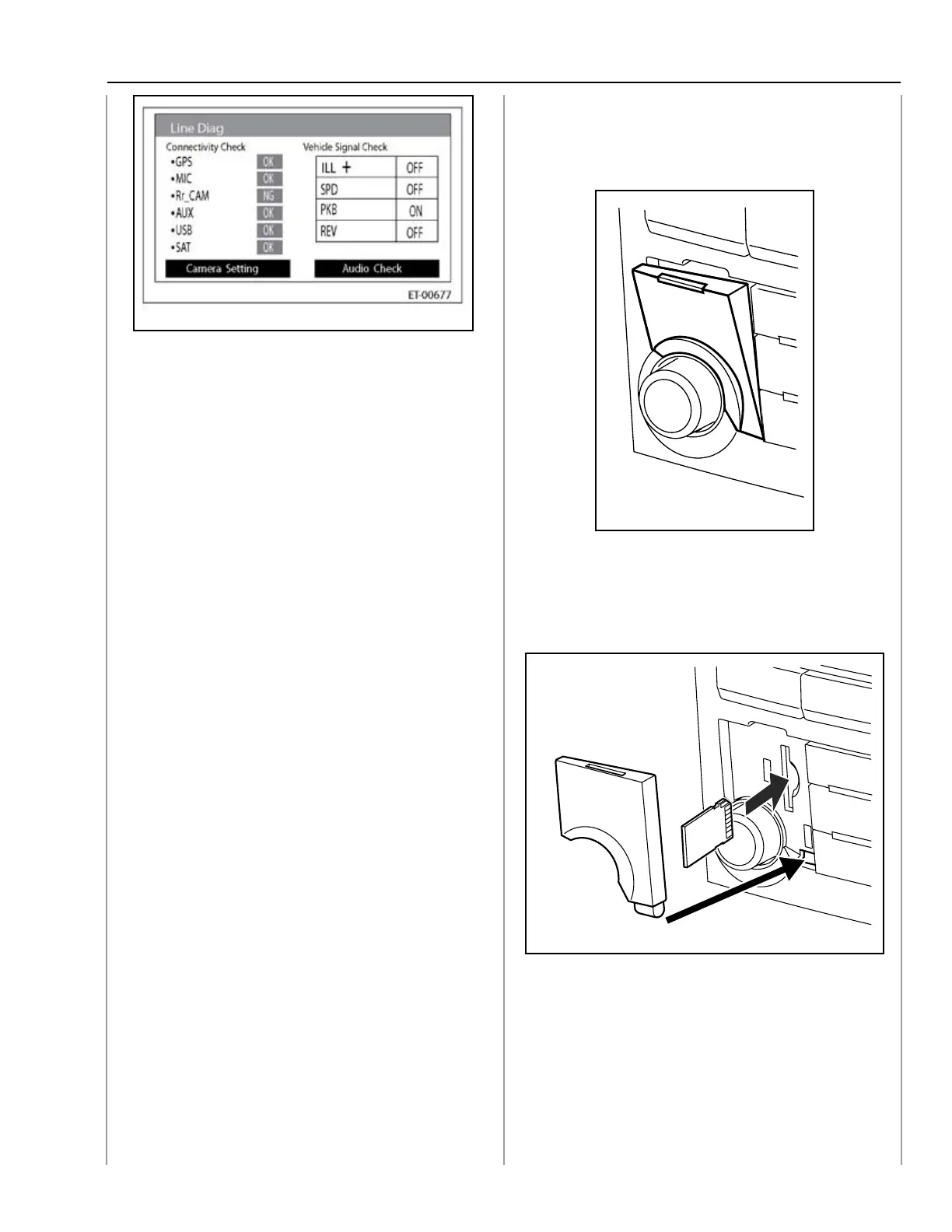
DIAGNOSTIC SCREEN
With the ignition ON and audio OFF, press and
hold button (c) for 3 seconds or more while
pressing the buttons (a) and (b).
Note: Diagnostic mode
can be cancelled by
pressing the button (a)
for 3 seconds or more,
or turning the ignition
OFF.
Note: Ejecting the SD Card
without following
proper procedures
may corrupt SD Card.
NOTE: Diagnostic mode
activation for all audio
systems can be found
in the “Entertainment
ET” section of the
Subaru Service
Manual.
2013 Legacy/Outback
SD card location on applicable 2013 Legacy/
Outback models.
SD Card Location
Note: See Subaru Owners Manual for
details.
SD Car Slot and Door
Note: Follow the directions on the
navigation display to correctly
remove the SD card.
047
048
049




 To Next Page