Black plate (319,1)
一般Model "A2510GE-B" EDITED: 2015/ 6/ 25
How to make a call list Page
By call history 5-87
By contacts list 5-89
By dialpad
*1
5-91
By off hook switch 5-92
By voice command system
5-102
*1
: The operation cannot be performed while
driving.
! By call history
! Incoming Calls
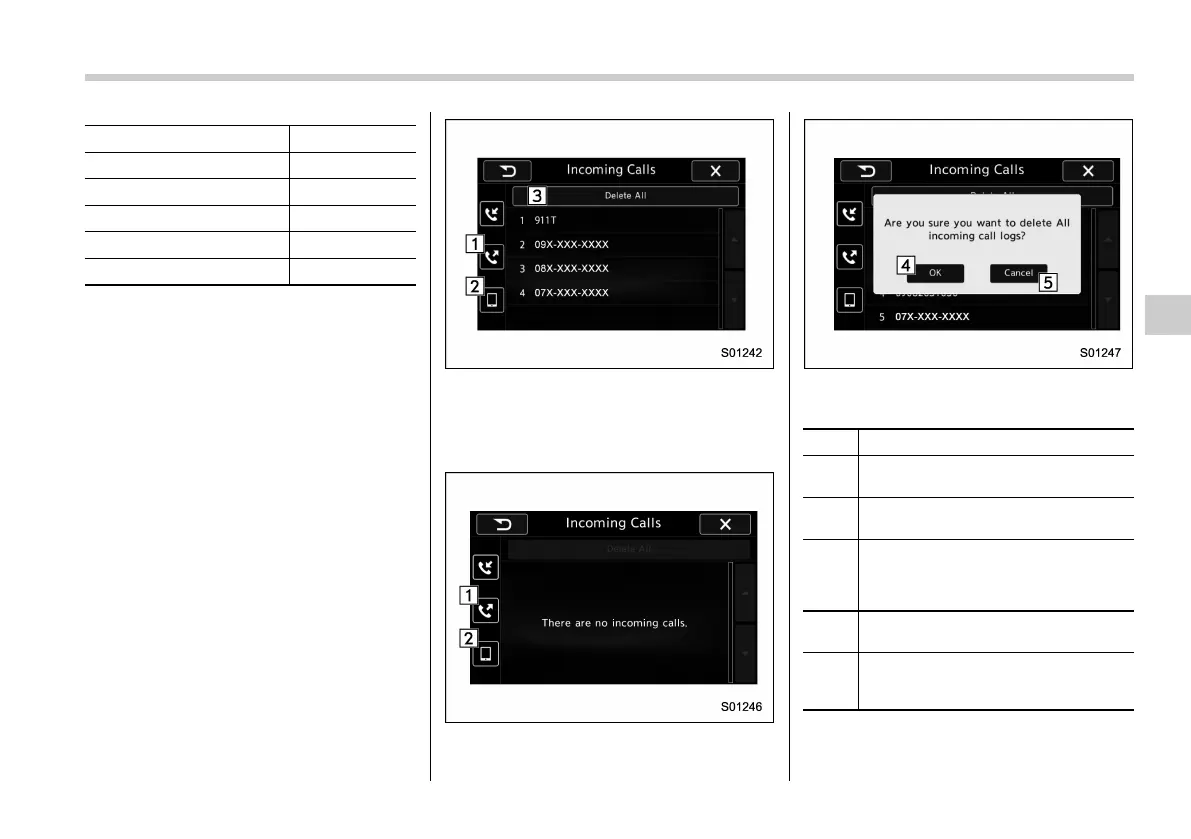
. On the PHONE screen, select “Incom-
ing Calls” to open the Incoming Calls
screen.
. Up to ten items in the incoming call
history are listed. Scroll the screen to see
items that are not on the screen.
. You can make a call by selecting an
item in the incoming call history list.
Incoming Calls screen
. If there is no incoming call history, a
message appears to indicate that there is
no incoming call history data.
Incoming Calls screen (No incoming call
history)
Incoming Calls screen (Confirmation to
delete incoming call history)
No. Function
&
1
“Outgoing Calls” key: Opens the Out-
going Calls screen.
&
2
“Contacts” key: Opens the Contacts
screen.
&
3
“Delete All” key: Deletes all incoming
call history data. The “Delete All” key
is disabled when there is no incoming
call history.
&
4
“OK” key: Deletes incoming call his-
tory.
&
5
“Cancel” key: Cancels the deletion of
incoming call history. The screen
returns to the Incoming Calls screen.
Audio/Phone operation (Hands–free system for cellular phones)
5-87
– CONTINUED –
5















 To Next Page